deploy-rs
deploy-rs
Goal: Deploy a flake-defined NixOS host to a remote machine with deploy-rs, understand activation profiles, and succeed at least once end-to-end over SSH. Target config: NixOS 26.05.
nixos-rebuild --target-host works; fleets still standardize on deploy tools for profiles, magic rollback, and multi-node later. deploy-rs is a common choice for small-to-medium flakes before (or beside) Colmena.
Why it matters
Pushing a closure and activating it without sitting on the machine is the core of fleet ops. This chapter installs the boring muscle memory: SSH auth, profile activation, proof file, second delta, and a safe failure story.
Theory 1 — Deploy pipeline
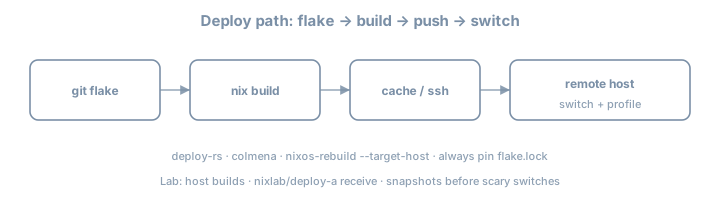
local eval (flake) → build (local/remote) → copy closure → activate → health check → keep/rollback| Step | Failure mode |
|---|---|
| Eval | Module errors |
| Build | Compile / missing cache |
| Copy | SSH/disk |
| Activate | Boot/switch scripts fail |
| Confirm | Custom checks fail → auto rollback (when configured) |
Understanding where it failed is half the job—read the stage in the log before rewriting modules blindly.
deploy-rs
  builds profile path P (NixOS system)
  copies closure of P to target
  activates P (switch-to-configuration)
  optional confirm / magic rollback window
Theory 2 — Flake skeleton with deploy-rs
{
  description = "deploy-rs lab";

  inputs = {
    nixpkgs.url = "github:NixOS/nixpkgs/nixos-26.05";
    deploy-rs.url = "github:serokell/deploy-rs";
    deploy-rs.inputs.nixpkgs.follows = "nixpkgs";
  };

  outputs = { self, nixpkgs, deploy-rs, ... }:
    let
      system = "x86_64-linux";
    in {
      nixosConfigurations.lab-vm = nixpkgs.lib.nixosSystem {
        inherit system;
        modules = [ ./hosts/lab-vm/configuration.nix ];
      };

      deploy.nodes.lab-vm = {
        hostname = "lab-vm.example.internal"; # or IP
        profiles.system = {
          user = "root";
          path = deploy-rs.lib.${system}.activate.nixos
            self.nixosConfigurations.lab-vm;
        };
      };

      checks = builtins.mapAttrs
        (system: deployLib: deployLib.deployChecks self.deploy)
        deploy-rs.lib;
    };
}
nix shell github:serokell/deploy-rs -c deploy .#lab-vm
# or after packaging deploy-rs in a shell:
deploy .#lab-vmPin via flake input so CI and laptop match. Exact CLI entrypoints: prefer current serokell docs for your pin.
Theory 3 — SSH prerequisites
ssh root@lab-vm.example.internal nix --version
# or deploy user with passwordless sudo / root activation per your policy| Requirement | Notes |
|---|---|
| Nix on target | NixOS has it; confirm version band |
| Flakes enabled | On target as needed for activation |
| Disk space | Closures are large first time |
| Network to substituters | Or pre-pushed cache |
| Non-interactive auth | Keys, not passwords |
| Same arch (or builder) | Arch mismatch fails painfully |
# target snippets
services.openssh.enable = true;
users.users.root.openssh.authorizedKeys.keys = [
  "ssh-ed25519 AAAA… deploy"
];
# Prefer dedicated deploy key; hardening still applies
system.stateVersion = "26.05";
Theory 4 — Magic rollback / confirmation
deploy-rs can require confirmation that the new system is healthy; if SSH dies, it rolls back. Read current serokell docs for confirmTimeout / magic-rollback options for your version—enable something before testing firewall changes remotely.
deploy.nodes.lab-vm = {
  hostname = "192.0.2.50";
  # sshOpts = [ "-p" "22" ];
  profiles.system = {
    user = "root";
    path = deploy-rs.lib.x86_64-linux.activate.nixos
      self.nixosConfigurations.lab-vm;
    # magicRollback / confirmTimeout per current docs
  };
};
Always keep a console/VNC path on the first remote firewall experiment. Magic rollback is not a substitute for out-of-band access.
| If this fails… | Look at |
|---|---|
| Eval on laptop | modules, flake inputs |
| Build | caches, builders, arch |
| Copy | SSH, disk, bandwidth |
| Activate | systemd, scripts, secrets paths |
| Confirm timeout | network cut by your own firewall |
Theory 5 — Build locality
| Mode | Idea |
|---|---|
| Build local, copy | Laptop/CI builds; target only activates |
| Build on target | Sometimes via remote builder / deploy options |
| Build on remote builder + cache | Packaging machinery |
For lab: local build + copy is fine if architectures match. Cross-arch without a builder is pain—fix remote builders first if needed.
Cache interaction
Deploy once with cold cache (or after GC on target), once with warm substitutes. Record wall times. Deploy without cache is a social incident for fleets.
Theory 6 — Profiles beyond system
deploy-rs supports multiple profiles per node (system is the common first). Later you might activate user/home profiles; master one system profile end-to-end first.
| Profile idea | Role |
|---|---|
system |
NixOS activation |
| Future custom | App-only activations (advanced) |
Do not invent multi-profile complexity until single profile is boring.
Theory 7 — vs nixos-rebuild --target-host
nixos-rebuild switch --flake .#lab-vm --target-host root@lab-vm| Concern | rebuild –target-host | deploy-rs |
|---|---|---|
| Built-in | Yes | Flake input |
| Magic rollback ergonomics | Limited | Stronger story |
| Multi-node | Manual | deploy.nodes |
| Checks | Manual | deployChecks |
| Learning cost | Low | Medium |
Write five lines on when you prefer each after you have used both once.
Worked example — trivial visible change
# hosts/lab-vm/configuration.nix
{ pkgs, ... }:
{
  networking.hostName = "lab-vm";
  environment.systemPackages = [ pkgs.hello pkgs.git ];
  environment.etc."deploy-proof".text = "deployed-by-deploy-rs\n";
  services.openssh.enable = true;
  system.stateVersion = "26.05";
}
deploy .#lab-vm
ssh lab-vm cat /etc/deploy-proofSecond deploy: change the text; redeploy; confirm update. Two successful deploys beat one lucky shot.
Generation awareness
ssh lab-vm -- sudo nix-env -p /nix/var/nix/profiles/system --list-generations | tailNote generation number before/after deploy. You cannot rollback what you never listed.
Worked example — RUNBOOK seed
# Deploy lab-vm
1. VPN/SSH path reachable
2. nix flake lock status known
3. deploy .#lab-vm
4. health: cat /etc/deploy-proof && systemctl is-system-running
5. if fail: console access; list generations; rollback
Lab — multi-step
Suggested notes: ~/lab/nixos/ops/deploy
Step 1 — Target ready
Disposable NixOS VM with SSH key auth. Snapshot the VM before first deploy.
Step 2 — Add deploy-rs input
follows nixpkgs; lock; commit.
Step 3 — Wire deploy.nodes
Match nixosConfigurations name; set hostname/IP. Prefer IP in lab DNS chaos.
Step 4 — First deploy
nix flake check   # includes deployChecks if wired
deploy .#lab-vm
# -s / skip-checks flags: know them; don’t live on skip forever
Capture full terminal output in notes.
Step 5 — Prove activation
ssh lab-vm cat /etc/deploy-proof
ssh lab-vm nixos-version
ssh lab-vm readlink /run/current-system
Step 6 — Second deploy delta
Change environment.etc text; redeploy; confirm update. Note wall time vs first deploy (cache effects).
Step 7 — Failure drill (safe)
Deploy a config that adds a harmless broken oneshot or bad package, observe failure handling; restore from snapshot if needed. Do not lock yourself out on purpose without console.
Step 8 — Compare one-liner
Once, run classic nixos-rebuild --target-host. Write comparison notes.
Step 9 — Document RUNBOOK seed
As above.
Step 10 — Generation awareness after deploy
List generations; record numbers.
Step 11 — Cache interaction
Cold vs warm deploy times.
Step 12 — Multi-node sketch (optional)
Add a second node attr in deploy.nodes even if only one is real—prove eval shape.
Exercises
- Draw the pipeline and mark where magic rollback acts.
- Design a deploy key policy (who has it, rotation).
- Estimate first-deploy closure size for your lab host (
nix path-info -Sh).
- Write a “deploy failed at copy” runbook paragraph.
- Compare deploy-rs vs Colmena for a 2-node vs 20-node mental model (preview).
Common gotchas
| Symptom / mistake | What to do |
|---|---|
| Arch mismatch | Build on same system or use remote builder |
| Permission denied | root keys / sudo deploy user |
| Out of disk on target | GC; grow disk |
| Hang on activation | Console; magic rollback timeouts |
deploy not found |
nix shell the tool |
| Hostname DNS | Use IP for lab |
| Checks fail locally | Fix deployChecks or understand impure needs |
follows forgotten |
Mixed nixpkgs between deploy-rs and host |
| Firewall lockout | Console first; enable magic rollback |
| Secrets missing on target | sops keys / paths must exist before service start |
Checkpoint
- deploy-rs in flake
- Successful remote activation
- Visible file/package change verified over SSH
- Second delta deploy succeeded
- Comparison note vs
nixos-rebuild --target-host
- RUNBOOK seed written
- Generation numbers recorded
- Magic rollback / confirm awareness
Commit
git add .
git commit -m "ops: deploy-rs end-to-end"
Write three personal gotchas before Colmena.