Static Routing Labs
Static Routing Labs
Static routes are the control plane you can see with your eyeballs. Master them in Containerlab with FRR or Linux before OSPF/BGP hide the decisions inside protocols.
Learning goals
By the end of this chapter you can:
- Build a multi-router static topology as code
- Install and verify routes in Linux and FRR
- Implement floating static failover with metrics
- Break and restore return paths deliberately
- Write verify scripts that catch one-way routing
Topology: triangle with hosts
h1--r1-------r2--h2
     \       /
      \     /
r3| Link | Subnet |
|---|---|
| r1–r2 | 10.0.12.0/24 |
| r2–r3 | 10.0.23.0/24 |
| r3–r1 | 10.0.13.0/24 |
| h1 LAN | 192.168.1.0/24 (r1 gateway) |
| h2 LAN | 192.168.2.0/24 (r2 gateway) |
| r3 LAN optional | 192.168.3.0/24 |
Loopbacks: r1 1.1.1.1/32, r2 2.2.2.2/32, r3 3.3.3.3/32.
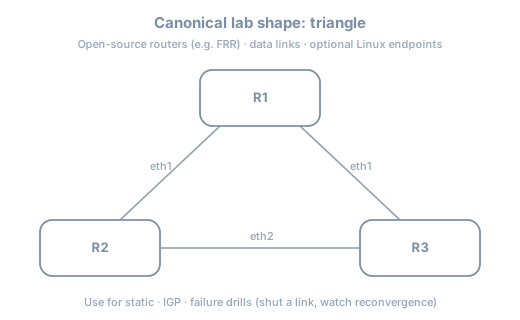
Containerlab topology
name: static-tri

topology:
  nodes:
    r1:
      kind: linux
      image: quay.io/frrouting/frr:10.2.1
      binds:
        - ./config/r1:/etc/frr
    r2:
      kind: linux
      image: quay.io/frrouting/frr:10.2.1
      binds:
        - ./config/r2:/etc/frr
    r3:
      kind: linux
      image: quay.io/frrouting/frr:10.2.1
      binds:
        - ./config/r3:/etc/frr
    h1:
      kind: linux
      image: alpine:3.20
      exec:
        - apk add --no-cache iproute2 iputils
        - ip addr add 192.168.1.10/24 dev eth1
        - ip link set eth1 up
        - ip route add default via 192.168.1.1
    h2:
      kind: linux
      image: alpine:3.20
      exec:
        - apk add --no-cache iproute2 iputils
        - ip addr add 192.168.2.10/24 dev eth1
        - ip link set eth1 up
        - ip route add default via 192.168.2.1

  links:
    - endpoints: ["h1:eth1", "r1:eth3"]
    - endpoints: ["h2:eth1", "r2:eth3"]
    - endpoints: ["r1:eth1", "r2:eth1"]
    - endpoints: ["r2:eth2", "r3:eth1"]
    - endpoints: ["r3:eth2", "r1:eth2"]
FRR config sketches
Enable zebra in daemons. Example frr.conf for r1:
frr version 10.2.1
frr defaults traditional
hostname r1
!
interface lo
 ip address 1.1.1.1/32
!
interface eth1
 ip address 10.0.12.1/24
!
interface eth2
 ip address 10.0.13.1/24
!
interface eth3
 ip address 192.168.1.1/24
!
ip route 192.168.2.0/24 10.0.12.2
ip route 2.2.2.2/32 10.0.12.2
ip route 3.3.3.3/32 10.0.13.2
!
line vty
r2 mirrors with LAN 192.168.2.1/24, route to 192.168.1.0/24 via 10.0.12.1, etc.
r3 needs routes to both LANs if used as alternate path:
ip route 192.168.1.0/24 10.0.13.1
ip route 192.168.2.0/24 10.0.23.1
Adjust interface IPs for r3 on 10.0.13.2 and 10.0.23.2.
Exact FRR container startup (vtysh config load) depends on image—follow image docs for
/etc/frrlayout (frr.conf,daemons, permissions).
Linux-only alternative
If FRR image friction appears, pure Alpine routers work:
sysctl -w net.ipv4.ip_forward=1
ip addr add ...
ip route add 192.168.2.0/24 via 10.0.12.2
Deploy and baseline
sudo containerlab deploy -t static-tri.clab.yml
docker exec clab-static-tri-r1 vtysh -c 'show ip route'
docker exec clab-static-tri-h1 ping -c 3 192.168.2.10
docker exec clab-static-tri-h1 traceroute -n 192.168.2.10
Predict
- Path h1→h2 is h1–r1–r2–h2 (direct static)
- Loopback 2.2.2.2 reachable from r1
Observe
docker exec clab-static-tri-r1 ip route get 192.168.2.10
docker exec clab-static-tri-r2 ip route get 192.168.1.10
Floating statics
On r1, prefer r2 path, backup via r3:
ip route 192.168.2.0/24 10.0.12.2
ip route 192.168.2.0/24 10.0.13.2 200
In Linux:
ip route add 192.168.2.0/24 via 10.0.12.2 metric 10
ip route add 192.168.2.0/24 via 10.0.13.2 metric 200
Caveat: Floating statics failover when the route is withdrawn—often when the interface or next hop tracking says down. A silent next hop that stays “up” but blackholes may not fail over without tracking/BFD (advanced). In labs, shut the interface to force failover.
Failover drill
docker exec clab-static-tri-h1 ping -c 100 192.168.2.10 &
docker exec clab-static-tri-r1 ip link set eth1 down
# observe loss then recovery via r3 if floating installed end-to-end
docker exec clab-static-tri-r1 ip route get 192.168.2.10
docker exec clab-static-tri-r1 ip link set eth1 up
Ensure r3 and r2 have consistent return paths for the backup trajectory.
Return path drill (mandatory)
Inject on r2:
# remove route to h1 LAN
vtysh -c 'configure terminal' -c 'no ip route 192.168.1.0/24 10.0.12.1' -c 'end'
# or linux: ip route del 192.168.1.0/24
Predict: One-way behavior; h1→h2 may fail depending on path; debugging must check reverse.
Restore from config files + reload, not memory folklore.
Blackhole and reject
ip route add blackhole 10.66.0.0/16
# or
ip route add unreachable 10.66.0.0/16
Useful when summarizing: explicit sink for unallocated space you advertise.
verify.sh
#!/usr/bin/env bash
set -euo pipefail
fail() { echo "FAIL: $*" >&2; exit 1; }

docker exec clab-static-tri-h1 ping -c 2 -W 1 192.168.2.10 || fail "h1->h2"
docker exec clab-static-tri-h2 ping -c 2 -W 1 192.168.1.10 || fail "h2->h1"
docker exec clab-static-tri-r1 vtysh -c 'show ip route' | grep -q 192.168.2.0 || fail "r1 route"

echo OK
Addressing.md excerpt
| Node | Iface | IP |
|------|-------|-----|
| r1 | eth1 | 10.0.12.1/24 |
| r2 | eth1 | 10.0.12.2/24 |
| r1 | eth2 | 10.0.13.1/24 |
| r3 | eth2 | 10.0.13.2/24 |
| r2 | eth2 | 10.0.23.1/24 |
| r3 | eth1 | 10.0.23.2/24 |
| r1 | eth3 | 192.168.1.1/24 |
| r2 | eth3 | 192.168.2.1/24 |
| h1 | eth1 | 192.168.1.10/24 |
| h2 | eth1 | 192.168.2.10/24 |
Default routes at edge
Simulating “internet”:
# on r1
ip route 0.0.0.0/0 10.0.12.2
Only if r2 has a path onward. Avoid default loops (r1 defaults to r2, r2 defaults to r1).
IPv6 statics (optional parallel)
ipv6 route 2001:db8:2::/64 2001:db8:12::2ip -6 route add 2001:db8:2::/64 via 2001:db8:12::2Dual-stack the triangle when comfortable.
Common mistakes
| Mistake | Symptom |
|---|---|
| Missing return route | One-way ping |
| Wrong next hop IP | Route present, unresolved neigh |
| Floating without interface down | No failover on silent blackhole |
| Overlapping LAN IPs | Chaos |
| Forgetting ip_forward | Router becomes host |
Summary
- Static labs teach bidirectional design and verification
- Triangle + floating statics build failover intuition
- Interface shutdown is the honest failover inject
- FRR and Linux both work; keep configs in git
- verify.sh must test both directions
Next: ICMP and path MTU—when small pings lie and large packets die.