Link Layer and Ethernet
Link Layer and Ethernet
The link layer moves frames between neighbors on a shared medium or point-to-point link. In almost every lab in this book, that means Ethernet (physical or virtual).
Learning goals
- Describe Ethernet frame fields used in daily troubleshooting
- Explain unicast, multicast, broadcast at L2
- Contrast hubs (obsolete), switches, and bridges
- Preview MAC learning (full drills in Layer 2 part)
Why link layer matters
IP cannot deliver alone: on multi-access Ethernet, the next hop is identified by MAC. Wrong VLAN, wrong MAC, or broken L2 path makes “routing” look broken when the problem is local.
Ethernet frame (simplified)
| Field | Role |
|---|---|
| Dest MAC | Who should accept the frame |
| Src MAC | Who sent it (learning key on switches) |
| Ethertype / length | Payload type (e.g. 0x0800 IPv4, 0x86DD IPv6, 0x0806 ARP) |
| Payload | IP packet, ARP, etc. |
| FCS | Error detection |
802.1Q VLAN tags insert TPID + TCI (including VLAN ID) between SA and Ethertype on trunks—details in VLANs chapter.
MAC addresses
- 48-bit; written
aa:bb:cc:dd:ee:ff
- Universally administered vs locally administered
- Broadcast
ff:ff:ff:ff:ff:ff
- Multicast: group bit set
ip -br link
ip link show eth1
Broadcast domain vs collision domain
- Collision domain: historically shared half-duplex media; switched full-duplex Ethernet largely eliminates classic collisions
- Broadcast domain: extent of L2 broadcast/unknown flood—usually one VLAN
Routers stop L2 broadcasts; switches do not.
Switch vs router (again)
| Device | Forwarding key | Changes MAC? | Changes IP? |
|---|---|---|---|
| L2 switch | Dest MAC + FDB | No (transparent) | No |
| Router | Dest IP + FIB | Yes (new Ethernet hop) | No (until NAT) |
MAC learning (preview)
- Learn src MAC → port on ingress
- If dest MAC known, forward to that port
- If unknown unicast, flood in the VLAN
- Broadcast/multicast: flood per rules
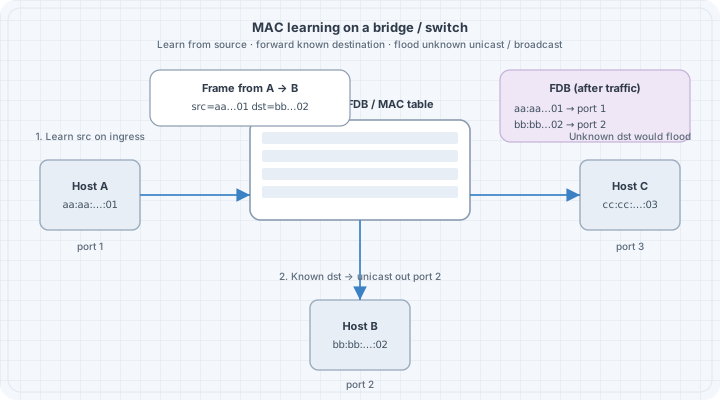
Deep labs: Ethernet & MAC Learning.
Virtual Ethernet in labs
Containerlab connects nodes with veth pairs and bridges—same Ethernet model, software implementation:
ip link
bridge link   # if bridge-utils / iproute2 bridge
Common L2 failures (foundations list)
| Symptom | Typical cause |
|---|---|
| Incomplete ARP | Wrong subnet, wrong VLAN, silent host |
| Flapping MAC | Loops or dual-homing without design |
| No frame at all | Down interface, wrong cable/veth, admin down |
Checkpoint
Explain what a switch does when it receives a frame with an unknown destination MAC, and what it does with the source MAC.