TIME-WAIT on Linux: What the Timers Really Do
TIME-WAIT on Linux: What the Timers Really Do
Learning goals
- Say which end of a connection holds
TIME-WAIT, and why - Read the
timer:(timewait,…)field inss -oand tellTIME-WAITfrom an orphanedFIN-WAIT-2 - Explain why
net.ipv4.tcp_fin_timeoutdoes not shortenTIME-WAITon Linux - Recognise source-port exhaustion (
EADDRNOTAVAIL) and fix it in the right order: pooling first, thentcp_tw_reuse, nevertcp_max_tw_buckets
Thesis
TIME-WAIT is the price the active closer pays so that old segments of a connection die before the same four-tuple is used again. RFC 9293 asks for 2×MSL. Linux pays a fixed 60 seconds: TCP_TIMEWAIT_LEN (60*HZ) in include/net/tcp.h. No sysctl changes it. The sysctl most people reach for, tcp_fin_timeout, times a different state. If short connections run you out of ports, the fix is fewer connections (pooling, keep-alive), not a shorter wait.
Mental model
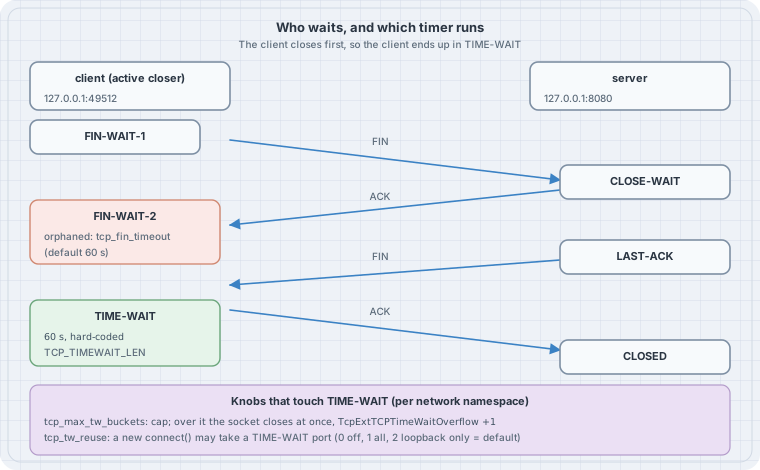
Three facts carry the whole chapter:
- Whoever sends the first FIN waits. It is a role, not “the client” or “the server”. An HTTP server that closes idle keep-alive connections collects
TIME-WAITitself. TIME-WAITcosts a four-tuple, not much memory. Linux swaps the full socket for a smalltcp_timewait_sock. The scarce thing is the local port toward one destination(dst IP, dst port).- Two timers, two states.
TIME-WAITis always 60 s. An orphanedFIN-WAIT-2(the app calledclose(), the peer never sent its FIN) is limited bytcp_fin_timeout.
Why the wait exists (RFC 9293, §3.6)
- Late duplicates. A segment delayed in the network must not be accepted by a new connection that reuses the same four-tuple and happens to have an overlapping sequence space.
- The last ACK can be lost. If the final ACK is lost, the peer resends its FIN. The side in
TIME-WAITstill has state and re-ACKs it. Without that state it would answer with RST, and the peer would log an error for a connection that actually closed cleanly.
RFC 9293 sets the wait at 2×MSL, with MSL “arbitrarily defined to be 2 minutes” (4 minutes in total). Linux chose 60 s long ago and wrote it as a compile-time constant.
What the kernel source says
From Linux 6.12 (include/net/tcp.h):
#define TCP_TIMEWAIT_LEN (60*HZ) /* how long to wait to destroy TIME-WAIT
                  * state, about 60 seconds */
#define TCP_FIN_TIMEOUT TCP_TIMEWAIT_LEN
In tcp_time_wait() (net/ipv4/tcp_minisocks.c), a real TIME-WAIT socket always gets the constant:
        if (state == TCP_TIME_WAIT)
            timeo = TCP_TIMEWAIT_LEN;
tcp_close() (net/ipv4/tcp.c) is where tcp_fin_timeout comes in. When an application closes a socket that is in FIN-WAIT-2, the kernel parks it as a time-wait mini-socket in substate FIN-WAIT-2, with the tcp_fin_timeout value as its timer:
            const int tmo = tcp_fin_time(sk);

            if (tmo > TCP_TIMEWAIT_LEN) {
                inet_csk_reset_keepalive_timer(sk,
                        tmo - TCP_TIMEWAIT_LEN);
            } else {
                tcp_time_wait(sk, TCP_FIN_WAIT2, tmo);
That explains the odd ss line you will see in Lab 1: state fin-wait-2 with a timewait timer.
The ip-sysctl documentation says the same thing in prose: tcp_fin_timeout is “the length of time an orphaned (no longer referenced by any application) connection will remain in the FIN_WAIT_2 state before it is aborted at the local end.”
The knobs, and what each one really does
| Sysctl (per network namespace) | Default | Effect on TIME-WAIT |
|---|---|---|
net.ipv4.tcp_fin_timeout |
60 | None. Limits orphaned FIN-WAIT-2 only |
net.ipv4.tcp_max_tw_buckets |
depends on memory (65536 in the lab below) | A cap. Over it, a closing socket skips TIME-WAIT and is destroyed at once (TcpExtTCPTimeWaitOverflow). The docs: “you must not lower the limit artificially” |
net.ipv4.tcp_tw_reuse |
2 | A new outgoing connect() may take over a TIME-WAIT four-tuple if both ends used TCP timestamps and the newest timestamp is from an earlier second. 0 = off, 1 = all, 2 = loopback only |
net.ipv4.tcp_tw_recycle |
removed | Removed in Linux 4.12. It broke clients behind NAT. Old tuning guides that set it now just fail |
net.ipv4.ip_local_port_range |
32768 60999 | How many source ports a client has per destination |
Lab 1: watch the timers (run, no sudo)
Everything below runs inside unshare -rn: a private network namespace in which you are root, so its TCP sysctls are yours to change and the host is not affected. You need Python 3 and ss/nstat from iproute2. These are genuine outputs from Linux 6.12.
tw.py opens N connections on loopback and always closes the client side first:
"""Make TCP connections on loopback and close them from the client side.

usage: python3 tw.py PORT N {both-close|server-holds} SECONDS
  both-close    the client closes first, the server closes on EOF  -> client in TIME-WAIT
  server-holds  the client closes, the server never does           -> client in FIN-WAIT-2
The server sockets stay alive for SECONDS so ss can look at them.
"""
import socket, sys, time

port, n, mode, hold = int(sys.argv[1]), int(sys.argv[2]), sys.argv[3], float(sys.argv[4])
srv = socket.socket(); srv.bind(("127.0.0.1", port)); srv.listen(64)
kept = []
for _ in range(n):
    c = socket.create_connection(("127.0.0.1", port))
    s, _ = srv.accept()
    c.close()                      # the client sends FIN first: the active closer
    if mode == "both-close":
        s.recv(1)                  # read the EOF
        s.close()                  # the server's FIN completes the close
    else:
        kept.append(s)             # never close: the client waits in FIN-WAIT-2
time.sleep(hold)
lab.sh drives it and reads the timers back with ss -o:
#!/bin/sh
# Run as: unshare -rn sh lab.sh   (a private network namespace; its TCP sysctls are its own)
ip link set lo up
P=/proc/sys/net/ipv4
show() { ss -tano state "$1" "( dport = :$2 )" | sed 1d | sed "s/^/$1  /"; }

echo "== 1. defaults in a fresh namespace"
for k in tcp_fin_timeout tcp_max_tw_buckets tcp_tw_reuse; do echo "$k = $(cat $P/$k)"; done

echo "== 2. client closes first: who holds TIME-WAIT, for how long?"
python3 tw.py 8001 3 both-close 0; show time-wait 8001
ss -tanH "( sport = :8001 )" | wc -l | sed 's/^/server-side sockets left: /'

echo "== 3. tcp_fin_timeout=5 does not shorten TIME-WAIT"
echo 5 > $P/tcp_fin_timeout
python3 tw.py 8002 2 both-close 0; show time-wait 8002

echo "== 4. ...it times FIN-WAIT-2 for sockets the app already closed"
python3 tw.py 8003 2 server-holds 7 & sleep 0.5; show fin-wait-2 8003
sleep 5; echo "after 5.5 s:"; ss -tanH "( dport = :8003 )" | wc -l | sed 's/^/client sockets left: /'; wait

echo "== 5. tcp_max_tw_buckets=2: the third socket skips TIME-WAIT"
echo 60 > $P/tcp_fin_timeout
sleep 75                                    # let every earlier TIME-WAIT socket be reaped
echo "TIME-WAIT sockets before: $(ss -tanH state time-wait | wc -l)"
echo 2 > $P/tcp_max_tw_buckets
before=$(nstat -az TcpExtTCPTimeWaitOverflow | awk '/Overflow/{print $2}')
python3 tw.py 8005 5 both-close 0; show time-wait 8005
after=$(nstat -az TcpExtTCPTimeWaitOverflow | awk '/Overflow/{print $2}')
echo "TcpExtTCPTimeWaitOverflow: $before -> $after"
$ unshare -rn sh lab.sh
== 1. defaults in a fresh namespace
tcp_fin_timeout = 60
tcp_max_tw_buckets = 65536
tcp_tw_reuse = 2
== 2. client closes first: who holds TIME-WAIT, for how long?
time-wait 0 0 127.0.0.1:37370 127.0.0.1:8001 timer:(timewait,59sec,0)
time-wait 0 0 127.0.0.1:37366 127.0.0.1:8001 timer:(timewait,59sec,0)
time-wait 0 0 127.0.0.1:37386 127.0.0.1:8001 timer:(timewait,59sec,0)
server-side sockets left: 0
== 3. tcp_fin_timeout=5 does not shorten TIME-WAIT
time-wait 0 0 127.0.0.1:47914 127.0.0.1:8002 timer:(timewait,59sec,0)
time-wait 0 0 127.0.0.1:47930 127.0.0.1:8002 timer:(timewait,59sec,0)
== 4. ...it times FIN-WAIT-2 for sockets the app already closed
fin-wait-2 0 0 127.0.0.1:38132 127.0.0.1:8003 timer:(timewait,4.516sec,0)
fin-wait-2 0 0 127.0.0.1:38116 127.0.0.1:8003 timer:(timewait,4.516sec,0)
after 5.5 s:
client sockets left: 0
== 5. tcp_max_tw_buckets=2: the third socket skips TIME-WAIT
TIME-WAIT sockets before: 0
time-wait 0 0 127.0.0.1:56858 127.0.0.1:8005 timer:(timewait,59sec,0)
time-wait 0 0 127.0.0.1:56848 127.0.0.1:8005 timer:(timewait,59sec,0)
TcpExtTCPTimeWaitOverflow: 0 -> 3Reading it:
- Step 2. Only the client’s sockets (destination port 8001) are in
TIME-WAIT, each withtimewait,59sec. The server, the passive closer, kept nothing. - Step 3. With
tcp_fin_timeoutat 5, newTIME-WAITsockets still start at 59 s. The constant wins. - Step 4. The server never closes, so the client (already closed by the app) sits in
FIN-WAIT-2. This timer is ~4.5 s, the 5 stcp_fin_timeout, and 5.5 s later the client side is gone. The kernel stores it as a time-wait mini-socket, which is whyssprintstimewaitas the timer name for afin-wait-2row. - Step 5. With the cap at 2, two sockets enter
TIME-WAITand three are destroyed on the spot, counted byTcpExtTCPTimeWaitOverflow. That is the lost-ACK protection gone for those three. The only trace is that counter (6.12 prints no log line), so this setting is a DoS brake, not a tuning knob.
A detail you will hit in your own experiments: a TIME-WAIT socket can linger a few seconds past 60 s, shown as timer:(timewait,,0). That’s because long kernel timers are batched on a coarse timer wheel. Wait about 70 s between runs, or use a new port each time as the scripts above do.
Lab 2: port exhaustion and the fixes (run, no sudo)
Each TIME-WAIT socket holds one local port toward one (dst IP, dst port). A client that opens a new connection per request to the same backend uses up ip_local_port_range within the 60 s. exhaust.py makes it quick by shrinking the range to four ports:
"""Open-and-close short connections until connect() runs out of source ports.

usage: python3 exhaust.py ATTEMPTS [PAUSE]
Each round: connect, server closes on EOF after the client closes (client keeps TIME-WAIT).
"""
import errno, socket, sys, time

attempts = int(sys.argv[1]); pause = float(sys.argv[2]) if len(sys.argv) > 2 else 0
srv = socket.socket(); srv.bind(("127.0.0.1", 8080)); srv.listen(64)
for i in range(1, attempts + 1):
    try:
        c = socket.create_connection(("127.0.0.1", 8080))
    except OSError as e:
        print(f"connect {i}: {errno.errorcode[e.errno]} ({e.strerror})")
        continue
    port = c.getsockname()[1]
    s, _ = srv.accept(); c.close(); s.recv(1); s.close()
    print(f"connect {i}: ok, source port {port}")
    time.sleep(pause)
pool.py sends 1000 small requests, either with a new connection each or over one kept-open connection:
"""The same 1000 requests, once with a new connection each, once over one kept connection."""
import socket, subprocess, sys

def tw():
    out = subprocess.run(["ss", "-tanH", "state", "time-wait", f"( dport = :{port} )"], capture_output=True, text=True).stdout
    return len(out.splitlines())

mode, port = sys.argv[1], int(sys.argv[2])
srv = socket.socket(); srv.bind(("127.0.0.1", port)); srv.listen(64)
if mode == "new-per-request":
    for _ in range(1000):
        c = socket.create_connection(("127.0.0.1", port)); s, _ = srv.accept()
        c.sendall(b"GET\n"); s.recv(4); s.sendall(b"OK\n"); c.recv(3)
        c.close(); s.recv(1); s.close()
else:  # pooled
    c = socket.create_connection(("127.0.0.1", port)); s, _ = srv.accept()
    for _ in range(1000):
        c.sendall(b"GET\n"); s.recv(4); s.sendall(b"OK\n"); c.recv(3)
    c.close(); s.recv(1); s.close()
print(f"{mode:16} 1000 requests -> {tw()} sockets in TIME-WAIT")
#!/bin/sh
# Run as: unshare -rn sh lab2.sh
ip link set lo up
P=/proc/sys/net/ipv4
echo 40000 40003 > $P/ip_local_port_range # four source ports, to make exhaustion quick
echo "== 6. tcp_tw_reuse=0: four ports, six connections"
echo 0 > $P/tcp_tw_reuse
python3 exhaust.py 6
sleep 75
echo "== 7. tcp_tw_reuse=2 (loopback): same six, 1.1 s apart"
echo 2 > $P/tcp_tw_reuse
python3 exhaust.py 6 1.1
echo "== 8. one connection per request vs one pooled connection"
echo "32768 60999" > $P/ip_local_port_range
python3 pool.py new-per-request 9001
python3 pool.py pooled 9002$ unshare -rn sh lab2.sh
== 6. tcp_tw_reuse=0: four ports, six connections
connect 1: ok, source port 40002
connect 2: ok, source port 40000
connect 3: ok, source port 40001
connect 4: ok, source port 40003
connect 5: EADDRNOTAVAIL (Cannot assign requested address)
connect 6: EADDRNOTAVAIL (Cannot assign requested address)
== 7. tcp_tw_reuse=2 (loopback): same six, 1.1 s apart
connect 1: ok, source port 40000
connect 2: ok, source port 40002
connect 3: ok, source port 40002
connect 4: ok, source port 40002
connect 5: ok, source port 40002
connect 6: ok, source port 40000
== 8. one connection per request vs one pooled connection
new-per-request 1000 requests -> 1000 sockets in TIME-WAIT
pooled 1000 requests -> 1 sockets in TIME-WAIT- Step 6. With reuse off, four connections fit and the fifth
connect()fails withEADDRNOTAVAIL. That error, not “too many open files”, is what port exhaustion looks like to the application. - Step 7. With
tcp_tw_reuse=2and loopback, all six work: the kernel takes over aTIME-WAITport (40002 is used four times). It does this only because Linux sends TCP timestamps by default, which lets PAWS (RFC 7323) reject old duplicates. The source (tcp_twsk_unique()innet/ipv4/tcp_ipv4.c) also requires the last timestamp to be from an earlier second; that is why the script pauses 1.1 s. - Step 8. The real fix. The same 1000 requests leave 1000
TIME-WAITsockets, or 1 when they share a connection.
The default 2 explains a common surprise: reuse “works” in a laptop benchmark against localhost and does nothing against a remote backend. For non-loopback traffic you have to set 1 yourself.
Case: the proxy that ran out of ports
A reverse proxy forwards to a single backend 10.0.0.5:8080 and opens a new upstream connection per request, closing it after the response. At 600 requests/s it holds about 600 × 60 = 36,000 TIME-WAIT sockets toward one destination. That is more than the 28,232 ports in the default range, so upstream connect() calls begin to fail with EADDRNOTAVAIL.
The fixes, in order:
- Keep upstream connections alive and pool them. For nginx, use
keepalivein theupstreamblock withproxy_http_version 1.1and an emptyConnectionheader. For an HTTP client library, reuse the client object. This removes the problem instead of hiding it. - Let the side that can afford it close. If the backend closes, its
TIME-WAITis keyed on its listening port with many client ports, which never exhausts anything. - Spread the four-tuple. More backend IPs or ports, or more proxy source IPs (
proxy_bind), each give a fresh 28k ports. - Then, maybe,
tcp_tw_reuse=1on the client host, knowing it relies on timestamps on both ends. - Widen
ip_local_port_rangeif you must, but avoid ports that local services listen on.
Never: lower tcp_max_tw_buckets, set the removed tcp_tw_recycle, or “fix” it with SO_LINGER timeout 0. That last one sends RST instead of FIN and throws away unsent data.
Trap
Counting TIME-WAIT sockets and panicking. Thousands of them on a busy web server are normal and cheap. Measure the symptom instead: EADDRNOTAVAIL in client logs, or TIME-WAIT grouped by destination nearing your port range:
ss -tanH state time-wait | awk '{print $4}' | sort | uniq -c | sort -rn | headBoring rule
Leave the TIME-WAIT sysctls alone. Pool connections to the same destination, and only if a measured shortage remains, turn on tcp_tw_reuse=1 on the side that connects.
Try this
- In Lab 1, make the server close first (call
s.close()beforec.close()) and check which port now shows up inTIME-WAIT. - Set
tcp_fin_timeoutto 90 and repeat step 4.tcp_close()now uses a keepalive timer for the first 30 s, so afin-wait-2row should show a different timer name. Check it withss -o. - Turn timestamps off (
echo 0 > /proc/sys/net/ipv4/tcp_timestampsinside the namespace) and rerun step 7. Predict the result first. - Change
pool.pyso that the server closes each connection first, then countTIME-WAITby local port instead of by destination port.
Verification
- Both labs were run on Linux 6.12 with iproute2
ss/nstatand Python 3, insideunshare -rnas an unprivileged user. The outputs above are genuine and unedited. - The kernel excerpts are from the v6.12 tag.
tcp_tw_reuse_delay(a later addition for tuning the one-second rule) is not present on 6.12 and is not covered here.
Sources
- RFC 9293, Transmission Control Protocol, §3.3.2 (state diagram) and §3.6 (closing a connection): https://www.rfc-editor.org/rfc/rfc9293
- RFC 7323, TCP Extensions for High Performance (timestamps, PAWS): https://www.rfc-editor.org/rfc/rfc7323
- Linux ip-sysctl documentation (
tcp_fin_timeout,tcp_max_tw_buckets,tcp_tw_reuse): https://docs.kernel.org/networking/ip-sysctl.html - Linux v6.12 source:
include/net/tcp.h,net/ipv4/tcp.c(tcp_close),net/ipv4/tcp_minisocks.c(tcp_time_wait),net/ipv4/tcp_ipv4.c(tcp_twsk_unique): https://github.com/torvalds/linux/tree/v6.12/net/ipv4 - Removal of
tcp_tw_recycle(Linux 4.12): https://git.kernel.org/pub/scm/linux/kernel/git/torvalds/linux.git/commit/?id=4396e46187ca5070219b81773c4e65088dac50cc - nginx
upstream keepalive: https://nginx.org/en/docs/http/ngx_http_upstream_module.html#keepalive - ss(8): https://man7.org/linux/man-pages/man8/ss.8.html