Nix without /nix: chroot stores, –store, and why paths bake in /nix/store
Nix without /nix: chroot stores, --store, and why paths bake in /nix/store
Sooner or later you meet a Linux machine where you cannot create /nix: a shared HPC login node, a locked-down CI runner, a container without root, a colleague’s laptop. The tempting fix is “put the store somewhere else”, and Nix lets you say exactly that in two very different ways. One keeps every store path identical to the rest of the world and only moves the bytes (a chroot store). The other changes the store’s name and quietly throws away the binary cache. This chapter runs both on a host with no /nix, no root and no daemon, measures the difference, and shows the traps that appear when the host itself tries to use paths that only exist inside a namespace.
Everything below ran on this book’s lab box: Debian 13, Linux 6.12, user uid=1000, no /nix directory, and the statically linked Nix 2.35.3 binary on PATH as nix. nixpkgs is pinned to the nixos-26.05 tip of 2026-10-18 (8ce73368d1ef…). Versions for this book: Nix 2.35.3 (upstream tag; the nix.dev “latest” manual is 2.35.2), NixOS 26.05.
Learning goals
- Explain the difference between the logical store directory (
/nix/store, inside every path and binary) and the physical location of the bytes - Create and use a chroot store with
--store DIR(local?root=DIR): build, substitute, run, copy and garbage-collect without root - Run programs from a chroot store on the host with
nix shell --storeorbwrap, and know why./resultand profiles dangle - Predict what changing the logical store directory (
local?store=/opt/nix/store) costs, and whynix copybetween such stores is wrong - Check whether a host can run chroot stores at all (unprivileged user and mount namespaces)
Thesis
Move the bytes, never the name. A chroot store keeps
/nix/storeas the logical path and puts the files anywhere you own; a user namespace makes them appear at/nix/storewhenever something runs. Change the name instead and every hash changes, the binary cache is gone, and you are bootstrapping a compiler from a hex seed.
Mental model
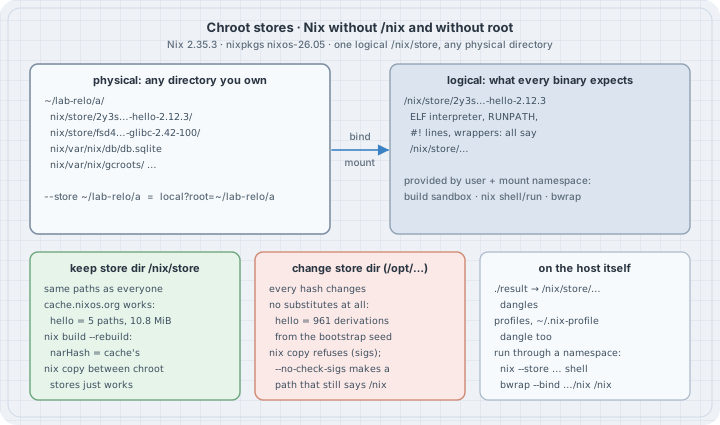
  logical path (in hashes, ELF headers, scripts)      physical bytes
  ──────────────────────────────────────────────      ─────────────────────────────────
  /nix/store/2y3s…-hello-2.12.3          ◄── bind ──  ~/lab-relo/a/nix/store/2y3s…-hello-2.12.3
                                          mount in    ~/lab-relo/a/nix/var/nix/db/db.sqlite
                                          a user +
                                          mount ns
  chroot store :  --store ~/lab-relo/a   =  local?root=~/lab-relo/a       (store dir stays /nix/store)
  relabelled   :  local?store=/opt/nix/store&real=…&state=…&log=…        (store dir changes: new hashes)
Three facts carry the chapter:
- The store directory is part of every store path’s hash (see How Nix computes a store path). It is also written into the binaries themselves: the ELF interpreter,
RUNPATH,#!lines and wrapper scripts all contain/nix/store/…. Moving files does not move those strings. - A chroot store changes only where the bytes live. The store directory stays
/nix/store, so paths, hashes and signatures are the onescache.nixos.orgserves. To use the files, something must make them appear at/nix/store: Nix’s own build sandbox,nix shell/nix runwith--store, or any tool that can bind-mount in a user namespace. - “Auto” already does this. With the default
store = auto, Nix uses/nix/storeif/nix/var/nixis writable, else the daemon socket if it exists, else (Linux only) the chroot store~/.local/share/nix/root. A rootless Nix that “just works” on a machine with no/nixis a chroot store.
Case 1 — Can this host do it?
Chroot stores need unprivileged user and mount namespaces. Check before anything else.
nix --version
ls -d /nix
nix config show store
cat /proc/sys/user/max_user_namespaces
unshare --user --mount true && echo "unprivileged user+mount namespaces: ok"
nix (Nix) 2.35.3
ls: cannot access '/nix': No such file or directory
auto
63991
unprivileged user+mount namespaces: okNo /nix, the store setting is auto, and an unprivileged process may create user and mount namespaces. Places where this fails, all checked from documentation rather than run here: user.max_user_namespaces = 0; Debian/Ubuntu kernels with kernel.unprivileged_userns_clone = 0; Ubuntu 23.10 and later, where kernel.apparmor_restrict_unprivileged_userns = 1 lets only AppArmor-profiled programs create user namespaces with full capabilities; and container runtimes whose seccomp profile blocks unshare/clone with CLONE_NEWUSER. On those hosts a chroot store cannot build or run anything; ask for a real /nix (or a bind mount at /nix) instead of relabelling the store (Case 5).
Case 2 — A chroot store: physical layout, logical paths
P=github:NixOS/nixpkgs/8ce73368d1efd4d657e9064d29b144a52046b4e8
H=/nix/store/2y3s86m1yj9xnypd44vivfz3mwybzlki-hello-2.12.3
nix --store ~/lab-relo/a build --no-link --print-out-paths "$P#hello"
ls ~/lab-relo/a ~/lab-relo/a/nix ~/lab-relo/a/nix/var/nix
nix --store ~/lab-relo/a path-info -r "$H"
readelf -l ~/lab-relo/a$H/bin/hello | grep -o 'interpreter: [^]]*'
~/lab-relo/a$H/bin/hello; echo "exit=$?"
/nix/store/2y3s86m1yj9xnypd44vivfz3mwybzlki-hello-2.12.3
/home/box/lab-relo/a:
nix
/home/box/lab-relo/a/nix:
store
var
/home/box/lab-relo/a/nix/var/nix:
db
gc.lock
gcroots
profiles
temproots
/nix/store/l1n6wi2lyzglvgzbwzw9n9w2pzkcj41i-xgcc-15.3.0-libgcc
/nix/store/g6mvl9ns7k52zfv9pcfw3dbh65z3j7id-libunistring-1.4.2
/nix/store/l5y42bimjvvn8h3v5y40w13vv7y2p3k5-libidn2-2.3.8
/nix/store/fsd4vbp9zjd9iaicq2fb9lpc1h5j973y-glibc-2.42-100
/nix/store/2y3s86m1yj9xnypd44vivfz3mwybzlki-hello-2.12.3
interpreter: /nix/store/fsd4vbp9zjd9iaicq2fb9lpc1h5j973y-glibc-2.42-100/lib/ld-linux-x86-64.so.2
/tmp/relo2/runall.sh: line 19: /home/box/lab-relo/a/nix/store/2y3s86m1yj9xnypd44vivfz3mwybzlki-hello-2.12.3/bin/hello: cannot execute: required file not found
exit=127--store ~/lab-relo/a is shorthand for local?root=/home/box/lab-relo/a: an ordinary local store whose every directory (store, state, log) is prefixed with that root. The printed path is the logical one, /nix/store/2y3s…, byte for byte what a NixOS machine prints. The bytes are at ~/lab-relo/a/nix/store/2y3s…, with the SQLite database and GC roots under ~/lab-relo/a/nix/var/nix.
The last two lines are the whole problem in one error (the runall.sh prefix is bash naming the lab script that ran the command). The binary exists, but its ELF interpreter is /nix/store/…-glibc-2.42-100/lib/ld-linux-x86-64.so.2, which does not exist on this host. The kernel cannot start it (“required file not found” is ENOENT for the interpreter, not for hello).
Case 3 — Running programs from a chroot store
Two ways to make the logical path real, both unprivileged:
nix --store ~/lab-relo/a shell "$H" --command sh -c \
  'hello; command -v hello; grep " /nix/store " /proc/self/mountinfo | cut -d" " -f4,5; id -u'
bwrap --bind ~/lab-relo/a/nix /nix "$H/bin/hello" --greeting="hello via bwrap"
Hello, world!
/nix/store/2y3s86m1yj9xnypd44vivfz3mwybzlki-hello-2.12.3/bin/hello
/home/box/lab-relo/a/nix/store /nix/store
1000
hello via bwrapnix shell --store … creates a user and mount namespace, bind-mounts ~/lab-relo/a/nix/store at /nix/store (the mountinfo line shows source root and mount point) and runs the command there as the same uid. nix run --store … uses the same mechanism (not run here). Outside Nix, bwrap (bubblewrap) does it with one bind mount; because bubblewrap starts from an empty root, hello’s closure is all the program sees, which is exactly what a Nix closure promises it needs. nix-user-chroot and nix-portable are community tools built on the same idea (nix-portable falls back to proot, which uses ptrace and is much slower, when user namespaces are unavailable); neither was run here.
Case 4 — Builds in a chroot store are the same builds
The build sandbox already runs every builder in its own namespaces with inputs bind-mounted at /nix/store/…. A chroot store only changes the source of those bind mounts. To prove it, rebuild hello from source in the chroot store and compare with the binary cache:
nix --store ~/lab-relo/a build --rebuild --no-link "$P#hello" 2>&1 | grep -v '^copying path'
echo "exit=${PIPESTATUS[0]}"
for s in ~/lab-relo/a https://cache.nixos.org; do
  printf '%-28s %s\n' "$s" "$(nix path-info --store "$s" --json --json-format 1 "$H" | jq -r '.[].narHash')"
done
checking outputs of '/nix/store/v4c5h94di88ccdd9isyzhivdw84k81nh-hello-2.12.3.drv'...
exit=0
/home/box/lab-relo/a sha256-OuTV3GyEZLx2+V1V4xaqEYxdvzrsMuymxdvL4WWaWyE=
https://cache.nixos.org sha256-OuTV3GyEZLx2+V1V4xaqEYxdvzrsMuymxdvL4WWaWyE=--rebuild substituted the build inputs (43 paths, filtered out above), compiled GNU hello again under ~/lab-relo/a, and compared the result with the copy already in the store. Exit 0 and no “may not be deterministic” error: bit-identical. The NAR hash matches what cache.nixos.org serves for the same path. A user on a cluster with no /nix produces the same bits as Hydra.
The sandbox hides the physical location from paths, not from a builder that goes looking. This deliberately nosy derivation records its mounts:
# where.nix — a derivation that records where it thinks it is being built
let
  sh = "${builtins.storePath /nix/store/fl6zyj3yfpa973icc6ca3zbm55izmm9r-busybox-1.37.0}/bin/sh";
in
derivation {
  name = "where-am-i";
  system = "x86_64-linux";
  builder = sh;
  args = [ "-c" ''
    echo "out   = $out" > $out
    echo "shell = ${sh}" >> $out
    while read -r id parent dev root mnt rest; do
      case $mnt in /nix/store/*) echo "mount = $root -> $mnt" >> $out ;; esac
    done < /proc/self/mountinfo
  '' ];
}BB=/nix/store/fl6zyj3yfpa973icc6ca3zbm55izmm9r-busybox-1.37.0
nix --store ~/lab-relo/a build --no-link "$P#busybox-sandbox-shell"
mkdir -p ~/lab-relo/elsewhere
nix copy --from ~/lab-relo/a --to ~/lab-relo/elsewhere/b "$BB"
for s in ~/lab-relo/a ~/lab-relo/elsewhere/b; do
o=$(nix --store "$s" build -f where.nix --no-link --print-out-paths)
echo "== $s"; cat "$s$o"
nix --store "$s" path-info --json --json-format 1 "$o" | jq -r '.[].narHash'
done== /home/box/lab-relo/a
out = /nix/store/95p76pxpqgy0n1pkyrghvcrnq0zwy6kq-where-am-i
shell = /nix/store/fl6zyj3yfpa973icc6ca3zbm55izmm9r-busybox-1.37.0/bin/sh
mount = /home/box/lab-relo/a/nix/store/fl6zyj3yfpa973icc6ca3zbm55izmm9r-busybox-1.37.0 -> /nix/store/fl6zyj3yfpa973icc6ca3zbm55izmm9r-busybox-1.37.0
sha256-kAo3I6hwz5QYxc8ij4medwDO2Rr8H99Xg2Ez23/kaa0=
== /home/box/lab-relo/elsewhere/b
out = /nix/store/95p76pxpqgy0n1pkyrghvcrnq0zwy6kq-where-am-i
shell = /nix/store/fl6zyj3yfpa973icc6ca3zbm55izmm9r-busybox-1.37.0/bin/sh
mount = /home/box/lab-relo/elsewhere/b/nix/store/fl6zyj3yfpa973icc6ca3zbm55izmm9r-busybox-1.37.0 -> /nix/store/fl6zyj3yfpa973icc6ca3zbm55izmm9r-busybox-1.37.0
sha256-82ArCXEVkU/AH39Xy7f5tNRYN0ObKzSP9vj2FAPoek8=Same derivation, same output path (input-addressed: the path depends on the recipe, not on the result), two different NAR hashes. /proc/self/mountinfo inside the sandbox names the real source of each bind mount, and this builder wrote it into $out. Nothing in Nix flags this: each store built and registered its own bytes. Real packages do not read mountinfo, which is why hello matched above; but it is the reason “same path” never proves “same bytes”. Use nix build --rebuild (or --check) and compare NAR hashes when it matters.
Case 5 — Relabelling the store: the expensive mistake
Now the other way: keep the files in a home directory and also call the store /opt/nix/store.
S='local?store=/opt/nix/store&state=/home/box/lab-relo/c/state&log=/home/box/lab-relo/c/log&real=/home/box/lab-relo/c/store'
nix --store "$S" eval --no-eval-cache --raw "$P#hello.outPath"; echo
nix --store "$S" build --no-eval-cache --dry-run "$P#hello" 2>&1 | grep 'will be'
nix --store ~/lab-relo/d build --no-eval-cache --dry-run "$P#hello" 2>&1 | grep 'will be'
/opt/nix/store/qj1hpmrfji1r7lfv1pby3lizgbx856mx-hello-2.12.3
these 961 derivations will be built:
these 5 paths will be fetched (10.8 MiB download, 36.2 MiB unpacked):Same nixpkgs commit, same hello, new hash (qj1h… instead of 2y3s…), because the store directory is inside the fingerprint. Nothing under /opt/nix/store exists in any public cache, so the relabelled store must build 961 derivations, starting from nixpkgs 26.05’s minimal bootstrap (a hex0 seed, then stage0-posix, the Mes C library and up to GCC). The chroot store d, with the store directory left alone, needs 5 downloads, 10.8 MiB. --no-eval-cache matters here: the flake evaluation cache is keyed by the flake, not by the store directory, and without it the second store can get a cached /nix/store answer.
And you cannot convert between the two by copying:
nix copy --from ~/lab-relo/a --to "$S" "$H" 2>&1 | grep '^error:'
nix copy --no-check-sigs --from ~/lab-relo/a --to "$S" "$H" && echo "copy with --no-check-sigs: exit 0"
ls ~/lab-relo/c/store | grep 'hello-2.12.3$'
readelf -l ~/lab-relo/c/store/${H#/nix/store/}/bin/hello | grep -o 'interpreter: [^]]*'
error: cannot add path '/opt/nix/store/g6mvl9ns7k52zfv9pcfw3dbh65z3j7id-libunistring-1.4.2' because it lacks a signature by a trusted key
copy with --no-check-sigs: exit 0
2y3s86m1yj9xnypd44vivfz3mwybzlki-hello-2.12.3
interpreter: /nix/store/fsd4vbp9zjd9iaicq2fb9lpc1h5j973y-glibc-2.42-100/lib/ld-linux-x86-64.so.2The first copy is refused: the signatures from cache.nixos.org are for /nix/store/… names. Forcing it with --no-check-sigs “works”, and produces /opt/nix/store/2y3s…-hello-2.12.3: a path whose hash belongs to a different store directory and whose binary still asks for an interpreter in /nix/store. The manual is explicit that paths can only be copied between stores with the same store setting; the tool does not stop you once you disable the check.
Case 6 — The host’s view: results, profiles and GC roots
Anything Nix leaves on the host side (./result, profile links, ~/.nix-profile) is a symlink to a logical path.
nix --store ~/lab-relo/a profile add --profile ~/lab-relo/prof-new "$H" 2>&1 | tail -1
nix-env --store ~/lab-relo/a -p ~/lab-relo/prof -i "$H" 2>&1
find ~/lab-relo -maxdepth 1 -name 'prof*' -printf '%f -> %l\n' | sort
test -x ~/lab-relo/prof/bin/hello && echo "prof/bin/hello runs on the host" || echo "prof/bin/hello: dangling on the host"
bwrap --bind ~/lab-relo/a/nix /nix --ro-bind ~/lab-relo ~/lab-relo ~/lab-relo/prof/bin/hello
nix-store --store ~/lab-relo/a --gc --print-roots 2>/dev/null
nix --store ~/lab-relo/a store gc 2>&1 | tail -1
nix --store ~/lab-relo/a path-info "$H" && echo "hello survived: the profile is a GC root"
error: cannot read directory "/nix/store/2y3s86m1yj9xnypd44vivfz3mwybzlki-hello-2.12.3": No such file or directory
installing 'hello-2.12.3'
building '/nix/store/a9m9hffbk96vi1inwnrvx9c3l247r408-user-environment.drv'...
prof -> prof-1-link
prof-1-link -> /nix/store/cxa0nmp5aa22rnxjpn0gibqm7q10yn6a-user-environment
prof/bin/hello: dangling on the host
Hello, world!
"/home/box/lab-relo/prof-1-link" -> /nix/store/cxa0nmp5aa22rnxjpn0gibqm7q10yn6a-user-environment
116 store paths deleted, 358.7 MiB freed
/nix/store/2y3s86m1yj9xnypd44vivfz3mwybzlki-hello-2.12.3
hello survived: the profile is a GC rootWhat happened:
nix profile addfailed with Nix 2.35.3 and a chroot store: it assembles the profile by reading package directories at their logical path on the host, which does not exist. Observed here; treat it as a current limitation, not a rule.nix-env -iworked, because classicnix-envbuilds the profile as a derivation (user-environment, using the built-inbuildenvbuilder) inside the sandbox, where/nix/storeexists.- The profile link points at
/nix/store/…-user-environment, so~/lab-relo/prof/bin/hellodangles on the host. Putting it onPATHdoes nothing. It runs once the store is mounted (bwrap), and the profile directory is bind-mounted read-only so the link can be followed. - The profile is registered as an indirect GC root in the chroot store’s
gcroots/auto, sonix store gc(which removed 116 paths, mostly the build inputs from Case 4) kepthello.
The trap
Trap: “set store = /opt/nix/store and keep using the cache.” The store directory is in every hash. A relabelled store gets no substitutes and rebuilds the world from the bootstrap seed (Case 5). If /nix cannot exist, use a chroot store; if /nix can exist but the disk is elsewhere, bind-mount or mount that storage at /nix.
Trap: “./result works, so I can put the chroot store’s bins on PATH.” Every link Nix creates points at the logical /nix/store/…. On a host without /nix they dangle (Cases 2 and 6). Run things through nix shell --store …, nix run --store … or a bind-mounting wrapper, or wrap your shell session in one.
Trap: “same store path means same bytes.” Input-addressed paths are a promise about the recipe. A builder that reads /proc/self/mountinfo, the host name or the time produces different bytes at the same path in different stores, and nothing complains (Case 4). Check with --rebuild and NAR hashes.
Trap: “rm -rf the lab when done.” Store paths are read-only (0555 directories), so a plain rm -rf ~/lab-relo fails with “Permission denied” on every file (it did, on the first run of this lab). Use nix store gc on the store, or chmod -R u+w the directory first.
Trap: “it worked on my laptop, so it works on the cluster.” Chroot stores live or die by unprivileged user namespaces. Check unshare --user --mount true on the target before promising anyone a rootless Nix (Case 1).
The boring rule
- Never change the logical store directory. Keep
/nix/store. - Without root and without
/nix, use a chroot store:--store ~/some/dir(or letstore = autopick~/.local/share/nix/root), and run programs throughnix shell/nix run --storeorbwrap. - With root once, prefer a real
/nix(a dedicated filesystem or bind mount at/nix) and the daemon; the chroot store is the fallback, not the goal. - Treat everything Nix writes on the host side of a chroot store (results, profiles) as meaningful only inside the namespace.
Try this
- Run
nix --store ~/lab-relo/a run "$P#cowsay" -- mooand find, in~/lab-relo/a/nix/var/nix/gcroots, whether anything now keepscowsayalive. - Point
--storeat a directory on an NFS or Lustre home on a cluster you use. Does SQLite locking undernix/var/nix/dbbehave? (The manual’sread-onlystore setting exists for read-only database filesystems.) - Make a binary cache from the chroot store with
nix copy --to file:///tmp/cache "$H", readnix-cache-info, and substitute from it into a fresh chroot store with--substituters file:///tmp/cache --no-require-sigs. - Change
where.nixto stop readingmountinfo, rebuild it in both stores and compare NAR hashes again. - On a test VM where you are root, set
kernel.apparmor_restrict_unprivileged_userns=1(Ubuntu) oruser.max_user_namespaces=0, and watch Case 3 fail. Revert afterwards.
Next
- Store, profiles, and GC on Linux for the normal, daemon-backed store.
- How Nix computes a store path for why the store directory is inside every hash.
Verification
- Run here, unprivileged: Debian 13, Linux 6.12.94+,
uid=1000, no/nix, no daemon, no root.nixis the statically linked Nix 2.35.3 binary already on the box (nothing installed).bwrap0.12.0 andjqwere already present. nixpkgs pinned tonixos-26.05at8ce73368d1efd4d657e9064d29b144a52046b4e8(branch tip 2026-10-18, GitHub API). - One script recreated the lab from an empty
~/lab-reloand captured every output block above; only the 43copying pathlines of Case 4 and the stderr ofnix-store --print-roots(stale temp-root notices) are filtered, as the listed commands show. The first run also produced therm -rf“Permission denied” flood described in the trap; the script now doeschmod -R u+wfirst. - Versions checked 2026-10-19: Nix upstream tag 2.35.3; nix.dev “latest” manual 2.35.2; NixOS 26.05 current stable.
store = autosemantics quoted fromnix help-stores(Nix 2.35.3). Thelocalstore settings (root,store,real,state,log,read-only) and the “samestoresetting” rule for copying come from the Local Store page of the manual.- Not run: hosts where user namespaces are disabled or restricted (sysctls need root; written from kernel and Ubuntu documentation),
nix-user-chrootandnix-portable(not installed), and Try-this item 2 (no NFS/Lustre here).
Sources
- Nix manual — Local Store (chroot stores,
root,store,real,state,log,read-only; “you can only copy store paths between stores if they have the samestoresetting”),storesetting and theautostore,nix store gc,nix build --rebuild,nix copy, Store path specification - Linux —
user_namespaces(7),mount_namespaces(7),/proc/sys/user/max_user_namespaces - Ubuntu — Restricted unprivileged user namespaces (
kernel.apparmor_restrict_unprivileged_userns) - bubblewrap — https://github.com/containers/bubblewrap
- nixpkgs minimal bootstrap —
pkgs/os-specific/linux/minimal-bootstrapin https://github.com/NixOS/nixpkgs/tree/nixos-26.05 - Community tools (not run): nix-user-chroot, nix-portable
Inspiration
X post by @bereknyei (2026-08-07): https://x.com/bereknyei/status/2085834505126879588 — topic signal only (a pointer to the Nix Vegas / DEF CON talk on relocatable Nix stores). The chapter cites only the primary docs above.