Self-contained scripts with #! nix-shell / #! nix
Self-contained scripts with #! nix-shell / #! nix
A script that starts curl | xml2json | jq works on your laptop and fails on a colleague’s, on CI, and on the server that has only curl. The usual fixes are “install the deps”, a container, or a Go/Rust rewrite. Nix shebang scripts keep the script as a script and declare the interpreter and every tool it needs in the file itself. Anyone with Nix can run it; without Nix they cannot, which is the honesty the shebang encodes. This chapter covers both forms still in use: classic nix-shell -i … -p … and the modern nix shell … --command shebang, how the kernel and env actually start them, how to pin so tomorrow’s run is the same as today’s, and the traps that make a shebang silently wrong.
Nix is not installed on this box. Every shebang script below is written from the Nix 2.35 and nix.dev manuals and is marked not run here. What was run is the kernel/env behaviour that decides whether Nix ever gets a chance: how a multi-line shebang is handed off, what env does with spaces, and how BINPRM_BUF_SIZE truncates a long first line. Versions for this book: Nix 2.35.3 (upstream tags), NixOS 26.05 (stable “Yarara”).
Learning goals
- Write a classic
#!/usr/bin/env nix-shellscript with-i,-p/--packages,--pureand a pinned-I nixpkgs=… - Write the modern
#!/usr/bin/env nixform withnix shelland--command - Explain why options must live on extra
#! nix-shell/#! nixlines, and whenenv -Sis an alternative - Pin a revision (tarball, flake lock, or
--override-input) so the script is reproducible - Say when a shebang script is the right tool versus a
devShell, a flake app (nix run) or a packaged derivation
Thesis
A shebang script is a tiny, portable derivation of one run. Pin the inputs, declare the packages, and the script carries its own toolchain. Leave the pin floating and you have reinvented “works on my machine” with extra steps.
Mental model
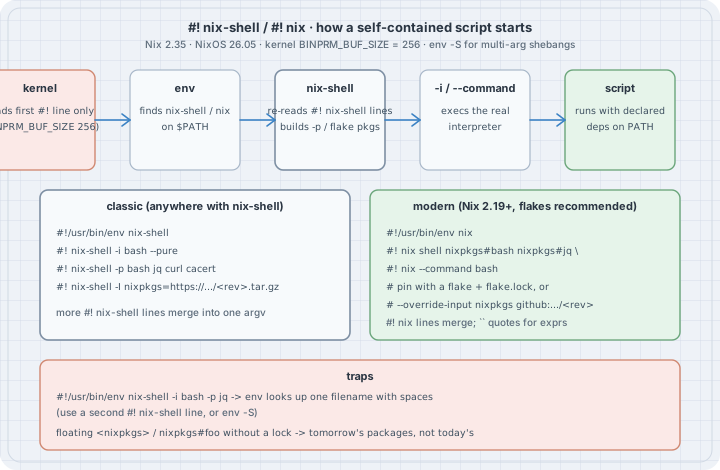
  script file
  ┌──────────────────────────────────────────────────────────┐
  │  #!/usr/bin/env nix-shell     ← only this line is a      │
  │  #! nix-shell -i bash --pure     kernel shebang          │
  │  #! nix-shell -p bash jq …    ← Nix re-reads these       │
  │  #! nix-shell -I nixpkgs=…/<rev>.tar.gz                  │
  │  … body …                                                │
  └──────────────────────────────────────────────────────────┘
           │
           ▼  kernel: execve("/usr/bin/env", ["nix-shell", script, args…])
           ▼  env:     find "nix-shell" on $PATH
           ▼  nix-shell: parse #! nix-shell lines, realise packages, exec -i
Two facts matter before any Nix option:
- The kernel sees only the first
#!line, and at mostBINPRM_BUF_SIZE(256) bytes of it. Everything after the first space on that line is one argument to the interpreter (unless you useenv -S). Extra#! nix-shell/#! nixlines are ordinary text to the kernel; Nix opens the file and parses them itself. /usr/bin/envlooks up a name.#!/usr/bin/env nix-shell -i bashmakesenvsearch for a file literally callednix-shell -i bash. That is why the options go on subsequent lines, or why you write#!/usr/bin/env -S nix-shell -i bash …(env -Ssplits).
Case 1 — What the kernel and env actually pass (run here)
A stand-in nix-shell that only prints its argv shows the hand-off. Nothing below needs Nix.
# fakebin/nix-shell — a STAND-IN, not Nix: print exactly what env hands over
#!/bin/sh
printf '$0 = %s\n' "$0"
i=1
for a in "$@"; do printf '$%d = %s\n' "$i" "$a"; i=$((i + 1)); done
# report.sh — what a real script looks like to the stand-in
#!/usr/bin/env nix-shell
#! nix-shell -i bash --pure
#! nix-shell -p bash jq
echo "this line is for bash, not for the stand-in"chmod +x fakebin/nix-shell report.sh
PATH="$PWD/fakebin:$PATH" ./report.sh --since 2026-10-01 "two words"$0 = /workspace/lab-1018am-shebang/fakebin/nix-shell
$1 = ./report.sh
$2 = --since
$3 = 2026-10-01
$4 = two wordsenv found nix-shell on PATH and gave it the script path and then the user arguments. The #! nix-shell … lines never appear in argv: a real nix-shell reopens $1 and reads them. That is also why you must not put options on the first line:
# wrong.sh — options on the first line
#!/usr/bin/env nix-shell -i bash -p jq
echo unreachablePATH="$PWD/fakebin:$PATH" ./wrong.sh; echo exit:$?env: ‘nix-shell -i bash -p jq’: No such file or directory
env: use -[v]S to pass options in shebang lines
exit:127GNU env even tells you the fix. With env -S the first line can carry options, and the stand-in then sees them as separate argv entries before the script path:
# split.sh
#!/usr/bin/env -S nix-shell -i bash -p jq
echo unreachable with the stand-inPATH="$PWD/fakebin:$PATH" ./split.sh$0 = /workspace/lab-1018am-shebang/fakebin/nix-shell
$1 = -i
$2 = bash
$3 = -p
$4 = jq
$5 = ./split.shPrefer the multi-line #! nix-shell form: it is what the Nix manuals show, it works on env without -S, and it keeps the first line short.
The first line also has a hard length limit. On Linux the kernel copies at most BINPRM_BUF_SIZE (256) bytes of the shebang, including the #!:
# long.py — how much of a long #! line survives?
python3 - <<'PY'
import os, subprocess
for n in (200, 240, 300):
    path = f"/tmp/long-shebang-{n}.sh"
    with open(path, "w") as f:
        f.write("#!/usr/bin/env -S printf %s\\n " + "x" * n + "\necho never\n")
    os.chmod(path, 0o755)
    r = subprocess.run([path], capture_output=True, text=True)
    got = len(r.stdout.splitlines()[0]) if r.stdout else 0
    print(f"argument of {n:3} x's -> printf received {got:3} x's"
          f"  (shebang line {len('#!/usr/bin/env -S printf %s\\n ') + n} bytes)")
    os.unlink(path)
PY
argument of 200 x's -> printf received 200 x's (shebang line 230 bytes)
argument of 240 x's -> printf received 225 x's (shebang line 270 bytes)
argument of 300 x's -> printf received 225 x's (shebang line 330 bytes)Past 256 bytes the argument is silently truncated. A long -I nixpkgs=https://…/<64-char-sha>.tar.gz on the first line is how people hit this; put pins on later #! lines, which Nix reads from the file and which are not limited by BINPRM_BUF_SIZE.
Case 2 — Classic form: nix-shell -i / -p / --pure / -I (not run here)
This is the form in the Nix 2.35 nix-shell manual and the nix.dev tutorial Reproducible interpreted scripts. It works with any Nix that provides nix-shell, including non-flake installs.
# nixpkgs-releases.sh — declare bash, curl, jq, xml2json; pin nixpkgs
#!/usr/bin/env nix-shell
#! nix-shell -i bash --pure
#! nix-shell -p bash cacert curl jq python3Packages.xmljson
#! nix-shell -I nixpkgs=https://github.com/NixOS/nixpkgs/archive/26f4107e47e3ad0ffd0db220469ba83b6f6d96e8.tar.gz
curl -fsSL https://github.com/NixOS/nixpkgs/releases.atom | xml2json | jq .
# not run here — Nix is not installed on this box
# chmod +x nixpkgs-releases.sh && ./nixpkgs-releases.shWhat each line does:
| Piece | Meaning |
|---|---|
#!/usr/bin/env nix-shell |
Kernel shebang. env finds nix-shell on PATH (so Nix must be on PATH for the user who runs it). |
-i bash |
After the environment is ready, exec bash as the real interpreter; the script path is passed as $1 to it. |
--pure |
Clear almost all of the ambient environment before starting. Retains a few variables (HOME, USER, DISPLAY, …). Forces the script to use only the packages you listed. |
-p / --packages |
Attribute paths in nixpkgs that should be on PATH (and in buildInputs for the temporary derivation). Multiple -p lines merge. |
-I nixpkgs=https://…/<rev>.tar.gz |
Pin. Without this, nix-shell uses whatever <nixpkgs> resolves to in NIX_PATH / the flake registry today. |
cacert |
Needed under --pure so TLS trusts work (curl https). |
A language other than bash is the same pattern: -i python3 with python3 and the libraries on -p, -i runghc with a GHC-with-packages expression, and so on. For languages where # is not a comment (JavaScript, Ruby, PHP, Erlang), wrap the #! nix-shell lines in a block comment; Nix still finds them, the real interpreter ignores them.
Relative paths in the shebang (Nix 2.24+). A #! nix-shell --expr 'import ./shell.nix' or #! nix-shell ./deps.nix -i python3 resolves ./ relative to the script’s directory, not the caller’s cwd. That is what makes ~/bin/say-hi that imports ~/bin/shell.nix work when you run it from $HOME. Opt out with nix-shell-shebang-arguments-relative-to-script = false in nix.conf if you must keep the old behaviour; that option is scheduled to go away.
Case 3 — Modern form: #!/usr/bin/env nix + nix shell (not run here)
Nix 2.19 made the nix CLI itself a shebang interpreter. Subsequent #! nix … lines are concatenated into one nix invocation. The usual shape puts nix shell installables on those lines and ends with --command real-interpreter:
# hello-cowsay.sh — flake installables, no -I tarball
#!/usr/bin/env nix
#! nix shell nixpkgs#bash nixpkgs#hello nixpkgs#cowsay --command bash
hello | cowsay
# pinned-with-override.sh — pin the nixpkgs input without a local flake
#!/usr/bin/env nix
#! nix shell --override-input nixpkgs github:NixOS/nixpkgs/26f4107e47e3ad0ffd0db220469ba83b6f6d96e8
#! nix nixpkgs#bash nixpkgs#jq --command bash
jq --version# not run here — Nix is not installed on this box
# chmod +x hello-cowsay.sh pinned-with-override.sh
# ./hello-cowsay.sh
# ./pinned-with-override.shNotes that bite in practice:
- Double backticks (a pair of backtick characters, as in the Nix manual’s shebang section) quote a multi-line or special Nix expression inside a
#! nixline. Single or double quotes are what the classicnix-shellshebang uses for-pexpressions; do not mix the two styles up. --command bashreplaces-i bash. There is no-iin the new CLI.nixpkgs#foowithout a pin follows the flake registry. On a machine whose registry tracksnixpkgs-unstable, tomorrow’sjqmay not be today’s. Prefer a project flake that the script references (#! nix shell path:.#jq --command bashnext to aflake.lock), or--override-input/ a lockedgithub:NixOS/nixpkgs/<rev>as above.- The new form needs a Nix with the
nix-command(and for flakes,flakes) experimental feature, which Fedora 44’s packaged Nix and current Determinate installs enable by default. Classicnix-shellremains the lowest-common-denominator for mixed fleets.
Case 4 — Pinning so “reproducible” means something
| Pin style | Example | Pros | Cons |
|---|---|---|---|
| Floating channel / registry | -p jq or nixpkgs#jq alone |
Short | Changes under you |
| nixpkgs tarball URL | -I nixpkgs=https://github.com/NixOS/nixpkgs/archive/<rev>.tar.gz |
One line, works with classic nix-shell |
URL length; first hit downloads the tree |
Flake + flake.lock next to the script |
#! nix shell path:.#tools --command bash |
Best UX, updates via nix flake update |
Needs flakes; the lock must be committed |
--override-input nixpkgs github:…/<rev> |
See Case 3 | No local flake required | Verbose; easy to leave floating by mistake |
fetchTarball inside a deps.nix |
#! nix-shell deps.nix -i python3 with a fixed sha256 |
Classic, auditable | Two files to ship |
The commit used in the examples above, 26f4107e47e3ad0ffd0db220469ba83b6f6d96e8, was the tip of nixos-26.05 on 2026-10-15. For a script you ship, pick a revision on purpose and record why (a release, a CVE fix, a known-good CI pin). Do not paste “whatever nix flake metadata said this morning” into a shebang and call it pinned.
Case 5 — When not to use a shebang
| Need | Prefer |
|---|---|
| An interactive project toolchain (compilers, linters, formatters) | A flake devShell + nix develop / direnv (the previous chapter) |
A command other people run as nix run github:org/repo#cmd |
A flake apps / packages output |
| Something installed on a system or in a profile | A real derivation (writeShellApplication, stdenv.mkDerivation) so GC and signatures apply |
| A dependency graph shared by many scripts | One flake, many apps; not twenty shebangs each pinning nixpkgs |
| Running on hosts without Nix | A container image or a static binary; a shebang cannot help |
A shebang shines for glue: a one-file report, a webhook receiver, a bootstrap that must not assume the host’s jq. Once the file grows a test suite or a second entry point, promote it to a flake app.
Promoting a script to a Flake app (pkgs.writers.writePython3Bin)
On non-NixOS Linux distributions (Fedora, Ubuntu, Debian), scripts that rely on pip or ambient package managers frequently break: 1. Distro Python updates break virtualenv symlinks or pipx environments. 2. Scripts requiring external system utilities (e.g. aplay from alsa-utils, ffmpeg, or sox for media scripts) fail whenever the host lacks those system binaries—a failure mode Python package managers cannot address.
While a #! nix-shell -i python3 shebang solves this for a single local file, promoting the script to a Flake app using pkgs.writers.writePython3Bin packages it into a hermetic, multi-architecture command that anyone with Nix can execute via nix run:
# flake.nix (co-located with readarticle.py)
{
  inputs.nixpkgs.url = "github:NixOS/nixpkgs/nixos-26.05";

  outputs = { self, nixpkgs, ... }:
    let
      forAllSystems = f: nixpkgs.lib.genAttrs [ "x86_64-linux" "aarch64-linux" ] (system:
        f nixpkgs.legacyPackages.${system}
      );
    in {
      packages = forAllSystems (pkgs: {
        default = pkgs.writers.writePython3Bin "readarticle" {
          # System tools placed on PATH
          makeWrapperArgs = [
            "--prefix" "PATH" ":" (pkgs.lib.makeBinPath [ pkgs.alsa-utils ])
          ];
          # Python modules placed on PYTHONPATH
          libraries = with pkgs.python3Packages; [
            requests
            trafilatura
          ];
        } (builtins.readFile ./readarticle.py);
      });
    };
}
# Run locally or from git on any Linux machine with Nix
nix run . -- https://example.com/articleInside readarticle.py, the Python code invokes subprocess.run(["aplay", ...]) without caring where aplay is installed. Nix wraps the interpreter, injects dependencies onto PATH and PYTHONPATH, and even runs a build-time lint check (pyflakes) that catches syntax errors before runtime.
The trap
Trap: “options on the first line.” Case 1. env looks up one filename. Use a second #! line, or env -S.
Trap: “floating <nixpkgs> is fine for a demo.” It is fine for a demo you throw away. It is how last quarter’s “reproducible” script started needing a different Python. Pin.
Trap: “--pure and then call git/ssh/docker.” They are gone from PATH. Either add them to -p, or drop --pure and accept host tooling (and document that). --keep VAR retains named ambient variables under --pure when you need a token or a socket.
Trap: “the shebang is a sandbox.” It is an environment. Network, home directory, and (without a user namespace) the rest of the machine are still there. --pure only cleans the environment block.
Trap: “writeShellApplication in nixpkgs already does this.” For packages, yes: it rewrites the shebang to a store bash and puts deps on PATH. That is the right end state for something you install. A #! nix-shell script is the right form for something you copy as a file to a machine that has Nix but not your package set.
Trap: “long -I on the first line.” Case 1: silent truncation at 256 bytes. Put pins on later lines.
The boring rule
Put #!/usr/bin/env nix-shell (or nix) on line one, every option on the following #! lines, and a pinned nixpkgs (tarball revision, flake lock, or --override-input). Use --pure unless you have a named reason not to. When the script grows up, promote it to a flake app.
Try this
- On a machine with Nix 2.35+, save Case 2’s script,
chmod +xit, and run it. Then change the pinned revision to anothernixos-26.05commit and confirmjq --version(add ajq --versionline) is unchanged or moves, depending on what that commit changed. - Convert Case 2 to Case 3 with
nixpkgs#…installables and--override-input. Which form’s first run downloaded more? - Drop
--pureand see whether a hostcurlthat is not the nixpkgs one still runs. Then put--pureback and addcacert. - Write a Python script that imports
requestswith#! nix-shell -i python3 -p python3Packages.requestsand a pin. Run it from a different directory than the one you wrote it in. - On Nix ≥ 2.24, put
deps.nixnext to a script that does#! nix-shell ./deps.nix -i bashand run the script from$HOME. Confirm it still finds./deps.nix.
Next
Verification
- Run here (no Nix): Case 1. Debian 13, Linux 6.12.94+, GNU coreutils env 9.7,
BINPRM_BUF_SIZE256 from/usr/include/linux/binfmts.h. The stand-innix-shell, theenverror with spaces,env -Ssplitting, and the truncation probe were all executed; outputs above are pasted from those runs. - Not run here: Cases 2–3 and every real
nix-shell/nix shellinvocation./nixdoes not exist on this box, and installing Nix is out of bounds for this run. Those listings follow the Nix 2.35nix-shellmanual, thenixshebang documentation, the 2.19 / 2.24 release notes, and the nix.dev Reproducible interpreted scripts tutorial. - Versions checked 2026-10-18: Nix 2.35.3 (upstream tag), NixOS 26.05 current on nixos.org,
nixos-26.05tip26f4107e47e…dated 2026-10-15. - No packages installed, no root, no
sudo, no AI/coding CLIs.
Sources
- Nix 2.35 manual —
nix-shell(including Use as a#!-interpreter) - Nix 2.35 manual —
nixshebang interpreter andnix shell - Nix release notes — 2.19 (shebang via
nix), 2.24 (nix-shellshebang paths relative to the script) - nix.dev tutorial — Reproducible interpreted scripts
- Linux
BINPRM_BUF_SIZE—include/uapi/linux/binfmts.h(256); GNU coreutilsenv --help(-S/--split-str) - nixos.org download page (Nix 2.35.x, NixOS 26.05) and the
nixos-26.05branch tip used as the example pin
Inspiration
X post by @wereness (2026-06-20): https://x.com/wereness/status/2068459592216920440 — topic signal only (“force throwaway scripts onto #! nix-shell so they never crash on missing tools”). The chapter cites only the primary docs above.