Bootloader Selection: GRUB and systemd-boot
Firmware has selected an EFI executable. Which operating-system entry does that executable select, and where does its configuration come from? Firmware boot options and bootloader menu entries are separate layers. Changing one does not automatically change the other.
This chapter identifies the loader used by the Ubuntu bl02 installation, explains the configuration ownership of GRUB and systemd-boot, and changes a GRUB menu timeout on a disposable clone. You need the previous chapter’s firmware and ESP observations, VM console access and the verified recovery baseline. The lab assumes the single-disk UEFI bl02 setup without shared writable disks, a backing chain or TPM state. If yours differs, do not use the clone recipe until its storage and firmware state have their own safe copy procedure.
Two decisions before Linux runs
UEFI selects an EFI executable through a firmware boot option or another firmware boot path. That executable can be a bootloader, an intermediary such as shim, or another EFI application. A bootloader can then present its own menu and choose a kernel, initial RAM filesystem and command line. The first decision is made by firmware; the second is made by the selected boot software.
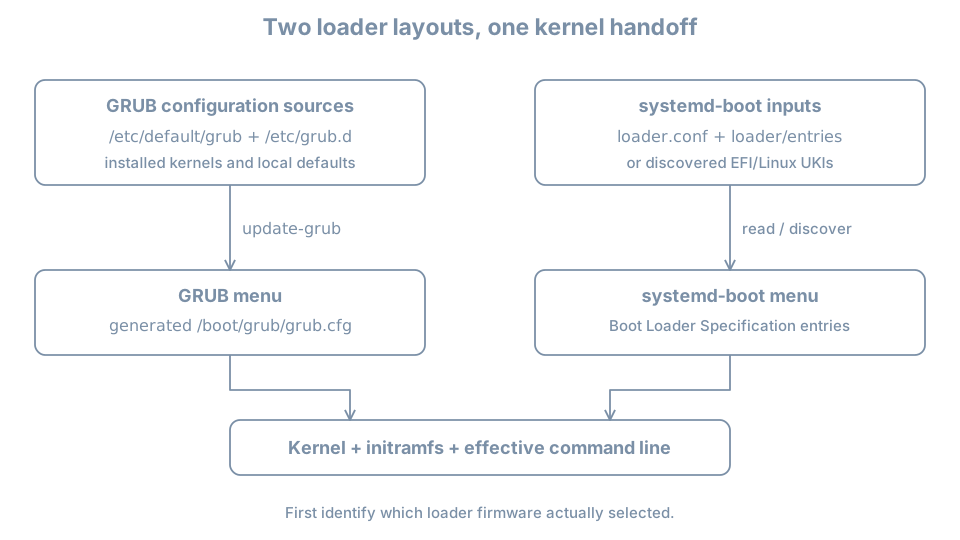
On a typical Ubuntu UEFI installation, firmware may load shimx64.efi, which participates in loading GRUB. The actual path depends on installation, architecture and security configuration. On other systems firmware may load systemd-boot directly. The presence of files for both loaders is not enough to establish which one was selected.
Inspect the previously recorded BootCurrent and its path with sudo efibootmgr -v if the tool and EFI variable interface are available. On systems supporting the relevant interface, bootctl status can report additional loader information:
sudo efibootmgr -v
bootctl status
A missing command, unavailable variable or incomplete bootctl report is an observation limit. In particular, bootctl provides more detailed selected-loader information when the loader implements its interface; a GRUB system need not report everything a systemd-boot system would. See the bootctl documentation. Compare the firmware entry, mounted ESP and actual console boot behavior; do not install a different loader to make the report match an example.
Prepare a disposable GRUB test guest
The exercise changes local configuration and reboots. Use a full powered-off clone, not the original. In bl02, shut down cleanly. On the host:
sudo virsh --connect qemu:///system domstate bl02
sudo virsh --connect qemu:///system domblklist bl02 --details
Require shut off and reconcile the single system disk with the earlier record. Ensure there is enough host space for a full copy. The destination VM name and disk path in the following command must not already exist:
sudo virt-clone --connect qemu:///system \
  --original bl02 --name bl03-loader-lab \
  --file /var/lib/libvirt/images/bl03-loader-lab.qcow2
This follows the powered-off clone method established in Part 01. Inspect the original and clone with domblklist --details and dumpxml, using the same qemu:///system connection. Confirm distinct disk paths and distinct UEFI NVRAM files. If the definition has extra disks, shared state, a backing chain or TPM state, stop; those require a different copy and recovery plan. Keep bl02 shut off throughout the test because the clone also contains the original guest’s hostname, machine ID and credentials. In the manager, attach the clone’s NIC to the isolated blpractice network while it is shut down. The graphical console supplies access and no package download is needed.
Start only bl03-loader-lab. The login hostname can still say bl02; use the console window’s VM identity and the host-side disk record to distinguish the clone. Verify administrative access, root mount and the GRUB paths. If this is not a GRUB installation with /etc/default/grub and /boot/grub/grub.cfg, stop this GRUB-specific exercise. Do not install GRUB over the existing boot path merely to continue.
What changes for systemd-boot?
systemd-boot is a UEFI boot manager that discovers entries from the ESP and, where configured, the Extended Boot Loader partition (XBOOTLDR). It can read Boot Loader Specification Type #1 entry files and discover Type #2 unified kernel images. Its documentation describes the locations and features. This is a comparison, not a recommendation to replace Ubuntu’s existing loader.
On a system already using systemd-boot, first identify the actual ESP and optional XBOOTLDR mount. Then inspect, where present, loader/loader.conf, loader/entries/ and EFI/Linux/ on those filesystems. bootctl status reports available status; bootctl list lists entries it knows how to discover. A list can include discoverable entries even when another loader was used to boot. Absence of a particular directory is not proof of failure if another supported entry mechanism is in use.
Unlike the Ubuntu GRUB workflow, update-grub does not generate systemd-boot entries. Configuration and entry ownership may belong to a distribution package, kernel-install, an image builder or an administrator. Find that owner before editing. Runtime EFI variables can affect selection too; a file alone may not describe the effective next boot. Use the installed version’s manual and distribution procedure for any change and provide a console and rollback before applying it.
Diagnose the correct selection layer
| Symptom | First distinction | Evidence |
|---|---|---|
| Firmware reports no boot option | Firmware selection versus loader menu | BootOrder, selected device and ESP path from the prior chapter |
| GRUB appears but expected kernel is absent | Loader configuration versus installed artifacts | Generated menu, inputs and /boot inventory |
| GRUB source changed but behavior did not | Input versus generated output versus selected loader | Overrides, generation result, console and active boot path |
| systemd-boot list differs from current boot | Discoverable entries versus selected loader | bootctl status, firmware selection and relevant mounts |
| A menu entry appears but fails after selection | Menu existence versus working kernel/root | Preserve console error and identify the next failed stage |
For the original host, preserve a known working boot choice and console access before any persistent change. Do not use a one-time firmware choice, a loader’s one-time selection and a permanent default as interchangeable operations. Recovery of a deliberately broken boot entry is developed after the remaining boot stages are understood.
Practice and recall
Record the selected firmware path, loader evidence, configuration owner, generated or discovered entries, and the clone’s before/change/rollback observations. Explain which settings can persist after reboot and which observation applies only to the current boot.
- Firmware selects an EFI application; a loader selects its own boot entry.
- GRUB’s source configuration and generated menu have different owners and lifecycles.
- systemd-boot discovers entries from its supported boot partitions and formats.
- A valid menu file and an existing menu entry do not prove a successful boot.
- Test persistent configuration changes on a recoverable clone and verify rollback.