Targets, Activation, Readiness and Boot Timing
A dashboard says the system reached multi-user.target in twelve seconds, yet a client request fails for another ten seconds. The two observations can both be correct. A target is a synchronization point in the manager’s unit graph; application readiness is a claim that must be checked at the application’s boundary.
Use the running bl02 console and the boot record from the preceding chapter. The commands below inspect state and timing. They do not change the default target or disable any service.
What a target tells you
A target is a systemd unit that groups or orders other units. On a conventional system, default.target commonly resolves to multi-user.target for a non-graphical host or graphical.target for a graphical one. The actual alias and dependencies are configuration, not a universal promise. The systemd special-unit reference documents common targets.
Inspect the default and current target state:
systemctl get-default
systemctl list-units --type=target --all --no-pager
systemctl status multi-user.target --no-pager
systemctl --failed --no-pager
get-default reports the configured default for normal boot. Active targets describe current manager state. A target can be active while a wanted service has failed, while an application is still warming up, or while a service that will be started on demand has not yet been invoked. A graphical target can also include the multi-user target; the two labels do not represent mutually exclusive running modes.
network.target and network-online.target are especially easy to overread. A reached target is not a guarantee that DNS, a particular remote endpoint or the Internet is reachable. Whether a wait service is configured and what it considers online depend on the network manager and local configuration. Inspect the actual units, then test the dependency your application needs.
Activation and readiness are separate
Some services start during boot. Others are activated by a socket, path, timer, device or an explicit request. A listening socket can exist before the service process, and a service can remain inactive until its first request. The system manager may consider a service started at different points according to its Type= and implementation.
For Type=simple, manager activation does not wait for a service-specific ready notification. A Type=notify service can send a readiness notification, but that signal’s usefulness depends on what the service actually checks. A Type=oneshot service may complete successfully and exit. The systemd service reference defines the service types and their lifecycle semantics.
| Observation | What it supports | What remains to test |
|---|---|---|
| Unit is active | Manager considers the unit active | The actual application operation |
| Socket is listening | A local socket is bound | Whether a request is served correctly |
| Target is reached | Its activation transaction reached that milestone | Independent or later work and external dependencies |
| Client check succeeds | The tested operation worked at that time | Other operations, clients and failure modes |
Design a readiness check around an expected operation: for example, a query returning a known record, or an HTTP response containing an expected value. Name the client location, credentials, timeout and success condition. A process existing is weaker evidence than the operation it is meant to provide.
Read timing without assigning blame too quickly
Run:
systemd-analyze time
systemd-analyze blame
systemd-analyze critical-chain
The reported phases and available timestamps depend on the firmware, loader and initramfs. blame reports unit activation durations, not the complete reason the machine was slow. A long duration can include waiting for a dependency; some unit types do not provide a meaningful activation duration. critical-chain is a view of a time-critical ordering chain, not a complete trace of all concurrent work or timed-out jobs. The Ubuntu systemd-analyze manual documents these limits.
If a unit appears slow, inspect its actual status and current-boot log, substituting its observed name:
systemctl status UNIT --no-pager
sudo journalctl -b -u UNIT --no-pager
systemctl show UNIT -p Type -p After -p Wants -p Requires
Replace UNIT with the full unit name; it is a placeholder, not a unit to create. Compare timestamps and ask what the unit was waiting for. A network wait service taking time can reflect a missing link or an intentional network policy. Disabling it may shorten a graph while breaking a service that relies on it.
Worked example
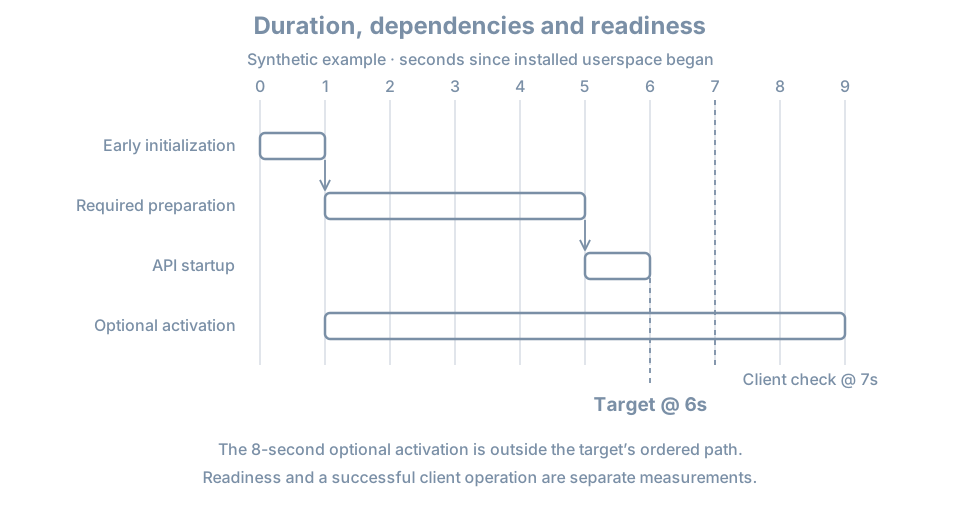
A synthetic timeline shows multi-user.target at six seconds and an optional activation finishing at nine. A client request at seven seconds succeeds. It would be wrong to add all unit durations together to claim a fifteen-second boot, or to say that the nine-second unit blocked that client without a dependency and request trace. The target time, optional activation and client test are separate evidence.
For a real incident, define a user-visible start and finish, collect several comparable boots, and control for cache, updates, workload and network conditions. Use a client probe that checks the actual expected response; record failures as well as the first success. More detailed performance methods come later.
Practice and recall
Record the default target, current active targets, system state, time, and one entry from critical-chain. For that unit, identify one plausible dependency and inspect its log. Explain which observation would prove a particular client operation works and why it is not supplied by the target name alone. Do not change a target or service as part of this inspection.
- A target is a manager milestone, not a complete application health test.
- Activation can be boot-driven or triggered later by another event.
- Service type affects when the manager considers startup complete.
- Timing output is evidence for a question, not a list of services to disable.