Timers, Cron and Anacron
Scheduled work is where small mistakes hide the longest. A backup job that has silently not run for three weeks looks exactly like one that runs every night, until the day you need it. An Ubuntu server can run three schedulers, often side by side: systemd timers, the classic cron daemon, and anacron for machines that are not always on. This chapter covers how each decides when to run, what happens to runs missed while the machine was off, how overlap and output are handled, and how to prove that a job ran.
A timer is a trigger unit for time
A .timer unit is the time-based sibling of the socket and path units in the previous chapter. It activates a unit, by default the .service with the same name, and the work lives in that service. The service is usually Type=oneshot with no [Install] section. You enable the timer, which by default is ordered before timers.target and is normally installed with WantedBy=timers.target.
Timers come in two clock families, documented in systemd.timer(5):
| Family | Settings | Counts from |
|---|---|---|
| Monotonic | OnBootSec=, OnStartupSec=, OnActiveSec=, OnUnitActiveSec=, OnUnitInactiveSec= |
an event: boot, manager start, timer activation, last start or last finish of the unit |
| Realtime | OnCalendar= |
the wall clock, as a calendar expression |
OnBootSec=15min plus OnUnitActiveSec=1h means “15 minutes after boot, then hourly after each start”. That pattern is immune to clock jumps and is a good fit for housekeeping. OnCalendar=Mon..Fri *-*-* 03:00 means “weekdays at 03:00 local time”. Calendar expressions accept shorthands (hourly, daily, weekly) and an optional time zone after the time (*-*-* 03:00 UTC). Check any expression before using it:
systemd-analyze calendar --iterations=4 'Mon..Fri *-*-* 03:00'
systemd-analyze calendar 'daily'
The first command prints the normalized form and the next four elapse times, which is the quickest way to catch an expression that means something other than what you intended.
When does it actually fire?
AccuracySec=defaults to 1 minute. The manager may run the timer anywhere in a one-minute window after the scheduled time, at a host-specific but stable offset, so that wake-ups are coalesced. Set it lower only when the job truly needs it.RandomizedDelaySec=adds a random delay up to the given value, chosen again before each run (unlessFixedRandomDelay=yes). It exists to stop a fleet of machines hitting the same mirror or API at 03:00:00.RandomizedOffsetSec=gives a stable per-host offset for calendar timers.- Calendar timers wait for the clock. Timers with
OnCalendar=are automatically ordered aftertime-set.targetandtime-sync.target, so a machine that boots with a bad clock does not fire a run based on the wrong time.
Missed runs: Persistent=
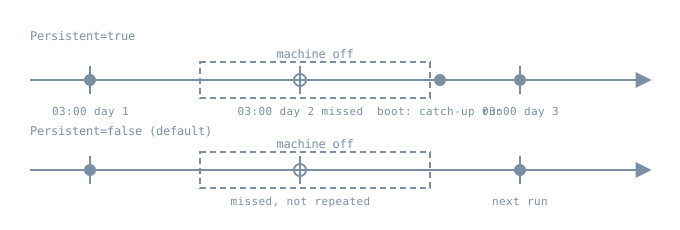
With Persistent=true, the manager stores the last trigger time on disk (under /var/lib/systemd/timers/). If at least one run would have happened while the timer was inactive, for example because the machine was powered off, the service is triggered once, soon after the timer starts again, subject to RandomizedDelaySec=. It has no effect on monotonic timers. systemctl clean --what=state NAME.timer removes the stamp. That is the systemd answer to the problem anacron was written for.
Overlap
A timer starts a unit; it does not start a second copy of a unit that is still running. If last night’s backup is still going at 03:00, the start request for an already-active oneshot service changes nothing. That gives you the “never overlap” behaviour that cron jobs have to build by hand with flock. It also means a hung job blocks every later run, so give the service a TimeoutStartSec= (for oneshot, this bounds the whole run) and alert on failures.
Inventory
systemctl list-timers --all
systemctl status apt-daily-upgrade.timer --no-pager
systemctl show logrotate.timer -p TimersCalendar -p LastTriggerUSec -p NextElapseUSecRealtime -p Persistent
journalctl -u logrotate.service -b --no-pager -n 20
list-timers shows, for each timer, the next and last elapse times and which unit it activates. An Ubuntu install already has several vendor timers, including apt-daily.timer, apt-daily-upgrade.timer, logrotate.timer, fstrim.timer and man-db.timer. Change them with drop-ins, as in chapter 5 of this part, not by editing /usr/lib.
Cron
Cron predates systemd by decades, and most third-party software and administrators still use it. On Ubuntu, the daemon is Debian’s cron, as described in cron(8) and crontab(5). Check whether it is installed and running on your image with systemctl status cron. It reads:
| Location | Format | Notes |
|---|---|---|
crontab -e (spool, per user) |
m h dom mon dow command |
runs as that user, edit only via crontab |
/etc/crontab |
adds a user field before the command | system-wide, owned by the cron package |
/etc/cron.d/* |
same as /etc/crontab, with a user field |
where packages and config management drop jobs |
/etc/cron.{hourly,daily,weekly,monthly}/ |
executable scripts | run by run-parts from /etc/crontab |
Cron behaviour that catches people out:
- A minimal environment. Jobs get
SHELLset tosh,HOMEandLOGNAMEfrom/etc/passwd, a short defaultPATH, and none of your login shell’s settings./etc/crontabsets its own longerPATHat the top, but user crontabs don’t. Use absolute paths, or setPATH=at the top of the crontab. %means newline in the command field unless escaped as\%, which breaksdate +%Fin crontabs.- Output is mailed, to the owner or to
MAILTO. On a server without a mail transfer agent, the output is usually just discarded. Redirect explicitly, or pipe tosystemd-cat -t jobnameso it goes to the journal. - Overlap is allowed. If a job runs longer than its interval, cron starts another one. Wrap it:
flock -n /run/lock/jobname.lock /usr/local/sbin/job. - Daylight saving. Debian cron special-cases clock changes of less than 3 hours. Fixed-time jobs in the skipped hour run soon after the change, and jobs in a repeated hour are not run twice. Jobs with wildcards in the hour or minute fields follow the new time immediately. Servers kept on UTC avoid the question.
- File names in the
run-partsdirectories. Debian’srun-parts, and cron for/etc/cron.d, accept only names made of letters, digits,_and-. A script calledbackup.shin/etc/cron.dailyis silently skipped.
That last point is easy to demonstrate without root, because run-parts is an ordinary program. This was run on a Debian box (run-parts 5.23.1) in a scratch directory:
$ ls -l | awk 'NR>1{print $1, $NF}'
-rwxr-xr-x 10-rotate
-rw-r--r-- 20-noexec
-rwxr-xr-x app.dpkg-old
-rwxr-xr-x backup.sh
-rwxr-xr-x logrotate_custom
-rwxr-xr-x zz-report~
$ run-parts --test .
./10-rotate
./logrotate_custom
$ run-parts --report .
./10-rotate:
10-rotate ran
./logrotate_custom:
logrotate_custom ranbackup.sh, the editor backup zz-report~ and the leftover app.dpkg-old all have the execute bit, and none of them run. 20-noexec is skipped because it is not executable. Run run-parts --test /etc/cron.daily on any server you inherit.
Anacron
Cron assumes the machine is on at the scheduled time. anacron(8) instead records in /var/spool/anacron/ when each job last ran. When it is invoked, it runs any job whose period (in days, or @monthly) has passed, after a configured delay. Its jobs live in /etc/anacrontab.
On Debian and Ubuntu, the stock /etc/crontab lines for daily, weekly and monthly jobs start with test -x /usr/sbin/anacron ||. When anacron is installed, cron leaves those directories to anacron, so the jobs run at a different time than /etc/crontab suggests. The hourly directory stays with cron. Whether anacron is installed varies by image and is common on desktops, so check before reasoning about when cron.daily actually runs:
grep -E 'cron\.(daily|weekly|monthly)' /etc/crontab
command -v anacron && systemctl list-timers anacron.timer --all
Choosing
For new jobs you own on Ubuntu, prefer a timer plus a oneshot service. You get the journal for output, Persistent= for catch-up, non-overlap by default, resource limits and sandboxing from the service, dependencies (After=network-online.target, RequiresMountsFor=/srv/backup), and systemctl list-timers as an inventory. Keep cron where software or a team expects it, or for a single user’s personal jobs, and use flock, explicit logging and run-parts-safe names. Don’t schedule the same job in both.
Lab: a persistent timer
Not run for this chapter. The authoring environment has no systemd, and the steps need root on the Ubuntu 26.04 bl06-service-lab clone used throughout Part 06. They were written from the manuals linked here. Only the run-parts demonstration above was actually run. Expected results are described in prose.
Create a oneshot job and a timer that fires every two minutes on the wall clock, with catch-up:
sudo tee /etc/systemd/system/bl06-tick.service >/dev/null <<'UNIT'
[Unit]
Description=Boring Linux lab scheduled job

[Service]
Type=oneshot
ExecStart=/bin/sh -c 'echo "tick at $(date -u +%%FT%%TZ)"'
TimeoutStartSec=60
DynamicUser=yes
UNIT

sudo tee /etc/systemd/system/bl06-tick.timer >/dev/null <<'UNIT'
[Unit]
Description=Boring Linux lab timer

[Timer]
OnCalendar=*:0/2
AccuracySec=1s
Persistent=true

[Install]
WantedBy=timers.target
UNIT

systemd-analyze calendar --iterations=3 '*:0/2'
sudo systemctl daemon-reload
sudo systemctl enable --now bl06-tick.timer
systemctl list-timers bl06-tick.timer --all
%% is how a literal % is written in a unit file, because % introduces specifiers. Wait a few minutes, then read the evidence from both ends:
journalctl -u bl06-tick.service --since '-10min' --no-pager
systemctl show bl06-tick.timer -p LastTriggerUSec -p NextElapseUSecRealtime
Expect a “tick at …” line every two minutes, each followed by the oneshot finishing. To see catch-up, stop the timer, wait past at least one scheduled time, then start it again. With Persistent=true one tick should appear right away, and only one however many were missed. AccuracySec=1s is a lab convenience so the ticks land on time; leave the default on real jobs.
A one-off run without writing files uses a transient timer:
sudo systemd-run --on-active=30s --unit=bl06-once /usr/bin/true
systemctl list-timers bl06-once.timer --all
Clean up:
sudo systemctl disable --now bl06-tick.timer
sudo systemctl clean --what=state bl06-tick.timer
sudo rm -f /etc/systemd/system/bl06-tick.timer /etc/systemd/system/bl06-tick.service
sudo systemctl daemon-reload
sudo systemctl reset-failed
systemctl list-timers --all 'bl06-*'
Diagnosis: “the job didn’t run”
- Is the scheduler looking at it? For a timer, check
systemctl list-timers --all. Look for an empty NEXT column, aninactivetimer, or a timer that was never enabled. For cron, check that the file is in the right place with the right format (user field or not), and that names inrun-partsdirectories passrun-parts --test. - Did it fire and fail?
journalctl -u NAME.servicefor timers. For cron,journalctl -u cronshows theCMDlines, and the job’s own output only if you redirected it. - Is it the environment? A job that works interactively and fails from cron is nearly always
PATH, the working directory,HOME, or a missing%escape. - Was the machine off or asleep? Without
Persistent=or anacron, a missed time is simply missed. - Is a previous run still going? For a timer, the service is
activatingwith an old start time. For cron, look for several copies inps. - Was the time right? Check the time zone (
timedatectl) and the clock source, and whether DST moved a fixed-time cron job.
Operational care
- Monitor what the job produces (a fresh backup file, a metric with a timestamp), not only that the scheduler started it.
- Spread fleet-wide jobs with
RandomizedDelaySec=orRandomizedOffsetSec=. - Give every job a timeout and a lock, whichever scheduler runs it.
- Keep servers on UTC unless something requires local time, and write the zone into calendar expressions that must follow a local clock.
Practice
- Write
OnCalendar=expressions for “the first Monday of each month at 04:30” and “every 15 minutes during business hours on weekdays”. Check both withsystemd-analyze calendar --iterations=5. - Explain why
OnBootSec=10minplusOnUnitActiveSec=1dandOnCalendar=dailywithPersistent=truebehave differently on a laptop that suspends every night. - Inherited server:
/etc/cron.daily/db-backup.shexists and is executable, but no backup has been made for a month. List every cause you would check, in order. - Convert a crontab line
*/10 * * * * /usr/local/bin/sync-mirrorinto a timer and service pair that cannot overlap and logs to the journal.
Recall card
- A timer activates a service. Enable the timer; the service is a oneshot without
[Install]. - Monotonic timers count from events;
OnCalendar=follows the wall clock. Test withsystemd-analyze calendar. AccuracySec=defaults to 1 min. UseRandomizedDelaySec=to spread load.Persistent=truegives one catch-up run for missed calendar times.- Cron: minimal environment,
%is a newline, output is mailed, overlap is allowed, andrun-partsskips names with dots. - Anacron runs periodic jobs that were missed. When it is installed, it takes over the daily, weekly and monthly directories.
Sources
- systemd.timer(5)
- systemd.time(7), for calendar expressions
- systemd-analyze(1) and systemd-run(1)
- Debian cron(8), crontab(5), run-parts(8) and anacron(8)