Kernel Images, Command Lines and Matching Modules
A package update installs a new kernel, but uname -r still reports the old one. That can be normal: installed files and the kernel currently executing are different states. A boot entry must select a coherent set of artifacts, and the next reboot determines which kernel actually runs.
This chapter inventories the guided Ubuntu bl02 guest and relates its running kernel to the installed image, initramfs, module tree and boot command line. The exercise is read-only. It does not remove kernels, regenerate initramfs images or change boot arguments. You need console access and the bootloader evidence from the previous chapters. Leave the GRUB test clone shut down and work in the original guest.
A versioned boot set
A kernel image is the executable kernel selected for boot. An initramfs is an initial filesystem image supplied to the kernel for early userspace; it can contain tools, configuration and modules needed before the real root filesystem is available. A kernel module is code that can be loaded into a running kernel when needed. Some functionality is built into the kernel instead and is not a separately loaded module.
For a common Ubuntu installation, versioned artifacts have names resembling:
/boot/vmlinuz-<release>
/boot/initrd.img-<release>
/lib/modules/<release>/
Here <release> stands for the complete kernel release string, including distribution and flavor suffixes. Do not type the angle-bracket placeholders as paths. Other distributions, boot mechanisms, architectures and unified kernel images may arrange artifacts differently. The following inspection is specific to the current Ubuntu lab layout.
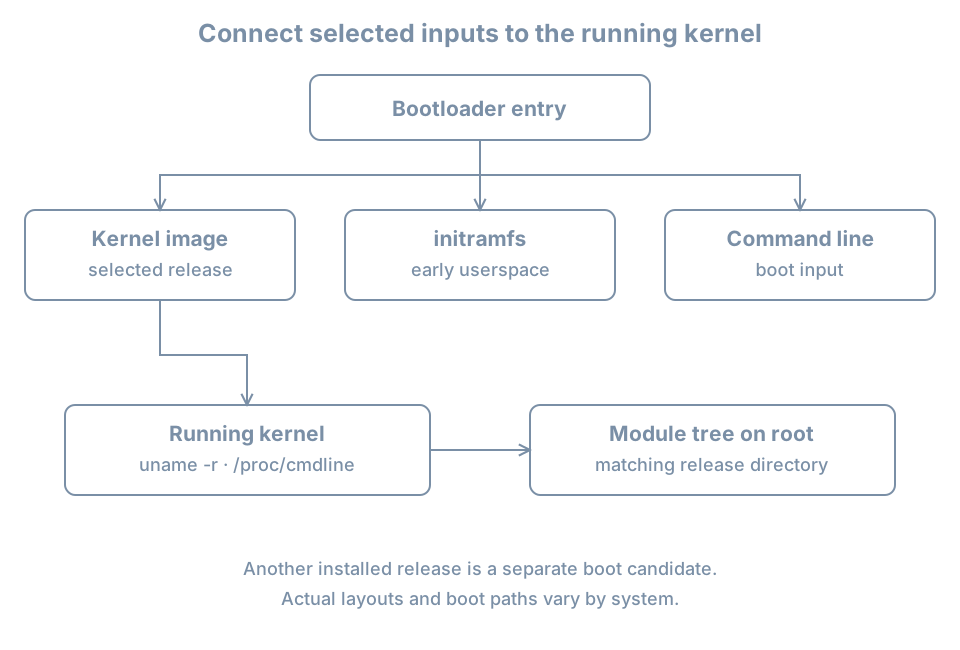
A loader can pass a command line alongside the selected image. Early userspace and the kernel use some of its arguments at different stages. For example, a root= value may help identify the intended root device, but it is not by itself proof of the filesystem ultimately mounted there.
Identify the running kernel and root
Log in to the original bl02 console and confirm the host and root:
hostnamectl
uname -r
cat /proc/cmdline
findmnt --target / --output TARGET,SOURCE,FSTYPE,OPTIONS
uname -r reports the release of the running kernel. /proc/cmdline reports the command line exposed by this boot; it is stronger evidence of effective input than a default value in an ungenerated configuration file. findmnt shows the current mounted root source and filesystem.
An illustrative output might include:
6.x.y-example-generic
BOOT_IMAGE=/vmlinuz-6.x.y-example-generic root=/dev/mapper/example--vg-root ro
These are fictional values. Actual releases, paths and arguments will differ. BOOT_IMAGE can be supplied by the bootloader as a hint, and its pathname is interpreted in the bootloader’s context; it is not guaranteed to be a directly usable Linux path. Compare it with the loader’s configuration and mounted /boot rather than mechanically prepending a directory.
ro on the initial command line can request an initially read-only root. A later mount operation can make the live root read-write, so inspect current mount options rather than concluding that the current root is read-only from the command line alone. Avoid placing passwords or other secrets on a kernel command line: it is visible to processes through /proc/cmdline on typical systems and may be retained in logs.
The kernel parameter documentation describes many kernel-recognized arguments and notes that other arguments can be passed to init. An argument’s presence is not proof that a particular component recognized or applied it. Confirm the relevant component’s documentation and observed behavior.
Inventory files for the running release
Set a shell variable from the actual running kernel and inspect the matching conventional paths:
KREL=$(uname -r)
printf 'Running release: %s\n' "$KREL"
ls -l "/boot/vmlinuz-$KREL" "/boot/initrd.img-$KREL"
ls -ld "/lib/modules/$KREL"
findmnt --target /boot --output TARGET,SOURCE,FSTYPE,OPTIONS
For the reference installation, the image, initramfs and module directory should normally exist for the running release. If a path is missing, preserve the error and investigate how this particular kernel was booted and packaged. A missing conventional on-disk initramfs does not prove the system never booted: the booted image may have been supplied from another location or the file could have changed after startup.
The /boot query reports the filesystem containing /boot. It may be root or a separate mount. If the prior installation record expects a separate /boot, check it with findmnt --mountpoint /boot as well. Looking at an unmounted directory on root can make a healthy separate boot filesystem appear empty.
List candidates without assuming that the highest-looking filename is the current one:
ls -lh /boot/vmlinuz-* /boot/initrd.img-*
ls -1 /lib/modules
A shell glob with no matches can produce an error; record it instead of treating the literal pattern as a file. Names usually associate a kernel image and initramfs by their full release string. Multiple releases can coexist. A newer installed release is an available candidate only if its files, loader entry and boot dependencies are correct; installation does not itself switch the already running kernel.
Package metadata supplies another view:
dpkg-query -W -f='${db:Status-Abbrev} ${binary:Package} ${Version}\n' \
  'linux-image-*' 'linux-modules-*'
Rows can include package states other than installed. Read the status abbreviations and actual versions rather than counting every row as an active kernel. If no packages match one pattern, dpkg-query may report that fact. Package inventory, files on disk and the running release answer related but different questions.
Follow a module without loading it
The running kernel’s module directory contains modules and metadata associated with its release. lsmod shows modules currently loaded into the kernel:
lsmod | head -20This is a snapshot of loaded modules, not a complete inventory of built-in drivers, available modules or working devices. Earlier device discovery showed how to relate a network interface to its actual driver. If that driver is named virtio_net and modinfo is available, inspect it without loading or unloading anything:
modinfo -k "$(uname -r)" virtio_netUse your observed driver name if different. modinfo can report a module’s filename, aliases, dependencies, supported parameters and other metadata; fields vary. A built-in driver may be represented as built-in or may lack a separate module file. A module file’s existence does not prove that it is loaded, bound to the intended device, compatible with the running kernel or permitted by the host’s module-signing policy. The modinfo manual describes lookup by kernel release.
The exact version string matters. Copying an arbitrary .ko file into a different release directory does not establish compatibility. An out-of-tree driver may need a build for each kernel and may also need to satisfy signing policy. Diagnose its package, build and signing evidence before changing anything; do not disable security checks or unload a working disk or network driver during this lab.
Distinguish planned arguments from this boot
For the GRUB installation, compare current observations with the configuration sources and generated output:
cat /proc/cmdline
sudo grep -nE '^GRUB_CMDLINE_LINUX(_DEFAULT)?=' /etc/default/grub
sudo grep -nE '^[[:space:]]*(linux|initrd)[[:space:]]' /boot/grub/grub.cfg
The source assignments express defaults used when configuration is generated. Drop-ins, scripts, menu selection, one-time edits and conditional logic can alter the resulting choice. The generated linux and initrd lines are candidates; several entries can be present. Do not assume the first line printed is the one that booted. Reconcile the selected menu entry with the console record and /proc/cmdline; if the exact selection was not captured, mark it uncertain.
GRUB can use paths relative to a filesystem it selects, while Linux presents mounted paths after boot. A line mentioning /vmlinuz-... can refer to a file on a separately mounted /boot filesystem. Determine the preceding GRUB search/root commands and the partition map before comparing paths. The command-line arguments are not a safe place to improvise boot fixes on the original host.
Worked diagnosis: new kernel installed, old one running
Suppose package inventory shows releases A and B, but uname -r shows A after an update. Ask whether a reboot was expected and whether B was actually selected:
- Compare the update record and current boot time; do not infer a reboot from package installation.
- Verify the B image, initramfs and module directory using the observed complete B release string, without removing A.
- Inspect the loader’s available entries and console selection. A generated entry does not prove it was successfully booted.
- Check the current
/proc/cmdline,uname -rand root mount after any planned reboot. - If B fails while A works, retain the failure message and the working entry. Investigate the failing stage and matching artifacts before attempting repair.
If an update left no B initramfs or module tree, that is an inconsistency to investigate with package and installation logs. Rebuilding initramfs or repairing a package is a change with prerequisites; the next chapter explains early userspace and its construction. Do not delete a working older kernel merely because the newer one is installed.
Practice and acceptance
Create a table with the current release, current command line, root mount, filesystem containing /boot, matching image/initramfs/module paths, and any other installed candidate. Record whether each observation is runtime evidence, an on-disk artifact or configuration intent. Explain one reason these views could differ without implying corruption.
If you have no second installed kernel, use the fictional A/B scenario above as a reasoning exercise. Do not install or remove kernels just to manufacture one. Keep the record outside the guest and redact sensitive path or identity details before sharing.
Recall card
- Installing a kernel and running it are different events.
- Compare the full release across image, initramfs and module tree; layouts can vary.
/proc/cmdlineis current-boot input, while loader configuration describes choices.- A module on disk, a loaded module and a driver bound to a device are different states.
- Preserve a known working boot path while investigating a failed update.