Async call graphs: asking asyncio who is awaiting whom
Async call graphs: asking asyncio who is awaiting whom
Thesis
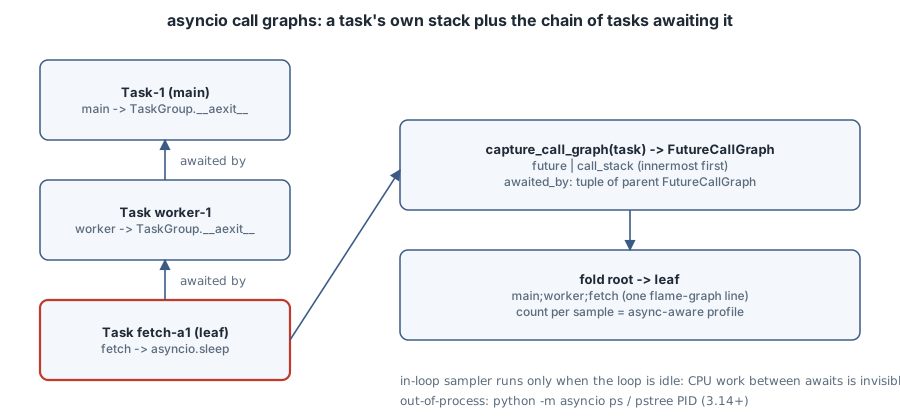
A normal Python traceback answers “how did I get here?” by walking the frame stack. In asyncio that answer is almost useless. A suspended task has a short stack (its coroutine and whatever it is awaiting), and the task that caused it to exist is not on that stack at all. It is a different task, blocked in await or in a TaskGroup.__aexit__ somewhere else. To understand a stuck request, or to build a profiler that says “40% of wall time is handler → db_query”, you need a second dimension: which task is awaiting this one.
Since Python 3.14, asyncio keeps that edge and exposes it. asyncio.capture_call_graph() returns a task’s own call stack plus the chain of tasks awaiting it, asyncio.print_call_graph() and asyncio.format_call_graph() render it, and the same data powers the out-of-process python -m asyncio ps and pstree commands (asyncio call graph introspection).
This chapter uses the in-process API. You print the await chain of a leaf task, then build a 50-line async-aware sampling profiler that produces flame-graph “folded” stacks. Then you meet the limit that pushes production profilers out of process: a sampler that runs on the event loop never sees the CPU work that blocks it.
All listings run on CPython 3.15.0 (uv run --python 3.15.0 --no-project python FILE). They produce the same results on 3.14.8.
Mental model
| API (3.14+) | Returns | Use it for |
|---|---|---|
asyncio.capture_call_graph(fut=None, *, depth=1, limit=None) |
FutureCallGraph or None |
Programmatic access: profilers, watchdogs, metrics |
asyncio.format_call_graph(...) |
str |
Logging a stuck task |
asyncio.print_call_graph(..., file=None) |
prints | Interactive debugging |
FutureCallGraph.call_stack |
tuple of FrameCallGraphEntry(frame), innermost first |
The task’s own coroutine chain |
FutureCallGraph.awaited_by |
tuple of FutureCallGraph |
Parent tasks (more than one if several tasks await the same future) |
asyncio.future_add_to_awaited_by(fut, waiter) |
For authors of custom future-like objects, so they join the graph | |
python -m asyncio ps PID / pstree PID |
table / tree | The same graph read from another process |
With no argument, capture_call_graph() describes the current task. That is why it must be called from code running on the loop. depth skips that many frames at the top of the current stack (default 1, the caller of capture_call_graph), and limit caps how many entries of the call stack are kept.
Case 1: print the await chain of a leaf task
# callgraph.py -- who is awaiting whom, from inside the program
import asyncio

async def fetch(name, delay):
    await asyncio.sleep(delay)
    return name

async def worker(n):
    async with asyncio.TaskGroup() as tg:
        tg.create_task(fetch(f"a{n}", 0.2), name=f"fetch-a{n}")
        tg.create_task(fetch(f"b{n}", 0.2), name=f"fetch-b{n}")

async def watchdog():
    await asyncio.sleep(0.05)
    # every task the loop knows about, and its await chain
    for t in sorted(asyncio.all_tasks(), key=lambda t: t.get_name()):
        if t.get_name().startswith("fetch-a1"):
            asyncio.print_call_graph(t)

async def main():
    async with asyncio.TaskGroup() as tg:
        tg.create_task(worker(1), name="worker-1")
        tg.create_task(worker(2), name="worker-2")
        tg.create_task(watchdog(), name="watchdog")

asyncio.run(main())
uv run --python 3.15.0 --no-project python callgraph.py* Task(name='fetch-a1', id=0x7fa92f30ba10)
+ Call stack:
| File '/home/box/.local/share/uv/python/cpython-3.15.0-linux-x86_64-gnu/lib/python3.15/asyncio/tasks.py', line 721, in async sleep()
| File '/tmp/cg/callgraph.py', line 5, in async fetch()
+ Awaited by:
* Task(name='worker-1', id=0x7fa92f2118b0)
+ Call stack:
| File '/home/box/.local/share/uv/python/cpython-3.15.0-linux-x86_64-gnu/lib/python3.15/asyncio/taskgroups.py', line 125, in async TaskGroup._aexit()
| File '/home/box/.local/share/uv/python/cpython-3.15.0-linux-x86_64-gnu/lib/python3.15/asyncio/taskgroups.py', line 75, in async TaskGroup.__aexit__()
| File '/tmp/cg/callgraph.py', line 9, in async worker()
+ Awaited by:
* Task(name='Task-1', id=0x7fa92f211a90)
+ Call stack:
| File '/home/box/.local/share/uv/python/cpython-3.15.0-linux-x86_64-gnu/lib/python3.15/asyncio/taskgroups.py', line 125, in async TaskGroup._aexit()
| File '/home/box/.local/share/uv/python/cpython-3.15.0-linux-x86_64-gnu/lib/python3.15/asyncio/taskgroups.py', line 75, in async TaskGroup.__aexit__()
| File '/tmp/cg/callgraph.py', line 21, in async main()Read it from the top. fetch-a1 is suspended in asyncio.sleep inside fetch. That is its whole stack, the same as a traceback would show. The useful part is Awaited by: worker-1 is suspended in TaskGroup.__aexit__ at line 9 of worker, waiting for its children. It in turn is awaited by Task-1, the task asyncio.run created for main, also inside a TaskGroup exit. Without this graph, fetch-a1 and worker-1 would look like two unrelated sleeping tasks.
Note the task names. create_task(..., name=...) costs nothing, and it is the difference between Task-17 and fetch-a1 in every one of these outputs.
Case 2: an async-aware sampling profiler in 50 lines
A sampling profiler takes the stack many times a second and counts identical stacks. For async code, “the stack” has to include the awaiting tasks, or every sample would look like sleep with no caller. The listing walks each task’s graph to the root, drops asyncio’s own tasks.py and taskgroups.py frames, and prints Brendan Gregg’s folded format (root;caller;leaf count), which flamegraph.pl and speedscope read directly.
# asyncprof.py -- an in-loop sampler that folds async stacks for a flame graph
import asyncio, collections, time

def busy(ms):                       # pretend CPU work between awaits
    end = time.perf_counter() + ms / 1000
    while time.perf_counter() < end:
        pass

async def db_query():
    await asyncio.sleep(0.03)

async def render():
    busy(2)
    await asyncio.sleep(0.01)

async def handler(i):
    await db_query()
    await render()

def folded(g):
    """Walk one FutureCallGraph to the root; return 'root;...;leaf'."""
    frames = []                     # innermost first
    while g is not None:
        frames += [e.frame.f_code.co_qualname for e in g.call_stack
                   if not e.frame.f_code.co_filename.endswith(
                       ("tasks.py", "taskgroups.py"))]
        g = g.awaited_by[0] if g.awaited_by else None
    return ";".join(reversed(frames))

async def sampler(stacks, period=0.005):
    me = asyncio.current_task()
    while True:
        for t in asyncio.all_tasks():
            if t is me or t.done():
                continue
            g = asyncio.capture_call_graph(t)
            if g is not None:
                stacks[folded(g)] += 1
        await asyncio.sleep(period)

async def main():
    stacks = collections.Counter()
    prof = asyncio.create_task(sampler(stacks), name="sampler")
    async with asyncio.TaskGroup() as tg:
        for i in range(20):
            tg.create_task(handler(i), name=f"req-{i}")
    prof.cancel()
    for stack, n in stacks.most_common():
        print(f"{n:4d} {stack}")

asyncio.run(main())
uv run --python 3.15.0 --no-project python asyncprof.py 100 main;handler;db_query
23 main;handler;render
20 main;handler
8 mainEach request spends about 30 ms in db_query, then 2 ms of CPU in render, then 10 ms sleeping in render. The counts follow the waiting time: db_query dominates, and render gets about a quarter as much. main;handler with no leaf is a task that has been scheduled but not yet started, or has just woken and not yet stepped into its next coroutine. main alone is Task-1 waiting for its TaskGroup.
The trap: an in-loop sampler cannot see what blocks the loop
busy(2) burns 2 ms of CPU in every request, 40 ms in total. Not one sample shows it. The sampler is a task on the same event loop. It only runs when the loop is between steps, which means it is never running while busy() is. An in-loop profiler measures where tasks wait, not where the loop spends CPU. Profiling blocked event loops is exactly the case you most need a profiler for, and an in-loop profiler is blind to it.
That is why production async profilers sample from outside the loop. They use a separate thread, or a separate process that reads interpreter memory, the way python -m asyncio pstree PID does. These tools read the same task and awaiter structure without needing the loop to yield. Use the in-loop API for watchdogs (“this request has been awaiting the same thing for 5 s; log its graph”) and for answering “what are my tasks waiting on”. Use an out-of-process sampler for CPU hotspots.
Two smaller traps:
- Version gate. On 3.13
asyncio.capture_call_graphdoes not exist. The sampler task dies withAttributeErrorat its first sample, and because nothing awaits that task,asyncprof.pyon 3.13 prints nothing at all and exits 0. Checksys.version_info >= (3, 14)up front, or await the profiler task so its exception surfaces. - Custom awaitables are invisible unless they call
asyncio.future_add_to_awaited_by(). Futures from third-party event-loop libraries may cut the chain short.
Boring rule
Name your tasks. When a task looks stuck, log asyncio.format_call_graph(task), not task.get_stack(), because the awaiting chain is the part you need. For time spent in CPU work, profile from outside the loop.
Exercises
- Change
watchdogto log, usingformat_call_graph, every task whose graph has not changed between two samples 100 ms apart. - Pass
limit=1tocapture_call_graphin the sampler. Which frames disappear from the folded output, and why does the profile stay readable? - Feed
asyncprof.py’s output to speedscope. Then move the 2 ms of CPU to abusy(20)and compare the wall time with what the flame graph shows. - Write a tiny custom awaitable and use
future_add_to_awaited_byso it appears inprint_call_graph.
Sources
- Python docs, asyncio: Call Graph Introspection
- Python docs, What’s New in Python 3.14: asyncio introspection
- Python docs, asyncio Task object:
create_taskname,all_tasks - B. Gregg, Flame Graphs and the folded stack format