Linked Lists
Linked Lists
A linked list is a linear data structure where elements are stored in discrete node objects connected via pointers (next and prev) rather than contiguous memory slots. The boring default in Python is almost always a standard list, but building singly and doubly linked lists teaches explicit reference manipulation, recursive pointer traversal, and the trade-offs of CPU cache locality.
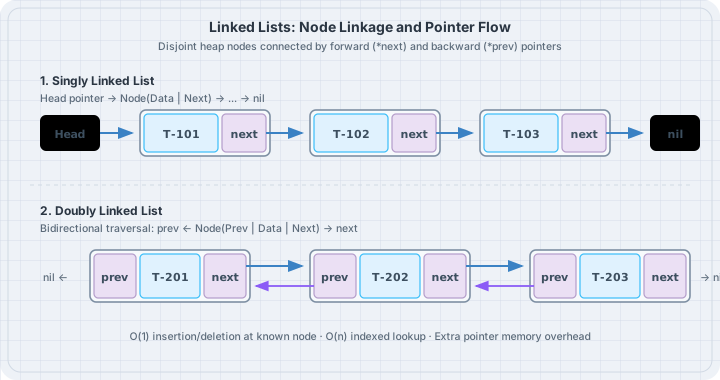
Mental model
In a singly linked list, each node holds a data value and a reference to the next node. In a doubly linked list, each node holds references to both its successor (next) and predecessor (prev).
Singly Linked:
[Head] -> [Data: 101 | Next] -> [Data: 102 | Next] -> None

Doubly Linked:
None <- [Prev | Data: 101 | Next] <===> [Prev | Data: 102 | Next] -> None
Python List vs Linked List: The Cache Reality
Python’s built-in list is a dynamically resized contiguous array of pointers to objects:
| Feature | Python list |
Doubly Linked List |
|---|---|---|
| Contiguity | Pointers stored contiguously | Nodes scattered arbitrarily across the heap |
| Memory Overhead | Very compact (single array) | Heavy (each node is a separate Python object with dict/slots) |
| Prepend / Insert at 0 | \(O(n)\) (shifts pointer array) | \(O(1)\) (rewires pointers) |
Random Access items[i] |
\(O(1)\) instant lookup | \(O(n)\) linear traversal |
| Cache Locality | High | Low (frequent CPU cache misses) |
Use linked lists when building complex structural graph foundations or an LRU cache where individual nodes must be moved between head and tail in \(O(1)\) time without index lookups.
Worked examples
Case 1: Singly Linked List with in-place reversal
Save as singly_linked.py. Implement a generic singly linked list for desk routing tickets and reverse it in place.
# singly_linked.py
from dataclasses import dataclass
from typing import Iterator


@dataclass
class Node[T]:
    value: T
    next: "Node[T] | None" = None


class SinglyLinkedList[T]:
    def __init__(self) -> None:
        self.head: Node[T] | None = None
        self._size = 0

    def append(self, val: T) -> None:
        new_node = Node(value=val)
        if self.head is None:
            self.head = new_node
            self._size += 1
            return

        curr = self.head
        while curr.next is not None:
            curr = curr.next
        curr.next = new_node
        self._size += 1

    def reverse(self) -> None:
        prev: Node[T] | None = None
        curr = self.head
        while curr is not None:
            next_node = curr.next
            curr.next = prev
            prev = curr
            curr = next_node
        self.head = prev

    def __iter__(self) -> Iterator[T]:
        curr = self.head
        while curr is not None:
            yield curr.value
            curr = curr.next

    def __len__(self) -> int:
        return self._size


def main() -> None:
    tickets: SinglyLinkedList[str] = SinglyLinkedList()
    tickets.append("Ticket-101")
    tickets.append("Ticket-102")
    tickets.append("Ticket-103")

    print("Original order:", list(tickets))

    print("Reversing linked list in place...")
    tickets.reverse()
    print("Reversed order: ", list(tickets))


if __name__ == "__main__":
    main()
Run:
uv run python singly_linked.pyOutput:
Original order: ['Ticket-101', 'Ticket-102', 'Ticket-103']
Reversing linked list in place...
Reversed order:  ['Ticket-103', 'Ticket-102', 'Ticket-101']
Case 2: Doubly Linked List with O(1) Node Removal
Save as doubly_linked.py. Implement a doubly linked list where any node can unlink itself from the chain in \(O(1)\) time.
# doubly_linked.py
class DNode[T]:
    __slots__ = ("value", "prev", "next")

    def __init__(self, value: T) -> None:
        self.value: T = value
        self.prev: DNode[T] | None = None
        self.next: DNode[T] | None = None


class DoublyLinkedList[T]:
    def __init__(self) -> None:
        self.head: DNode[T] | None = None
        self.tail: DNode[T] | None = None
        self._size = 0

    def append(self, val: T) -> DNode[T]:
        node = DNode(val)
        if self.tail is None:
            self.head = node
            self.tail = node
        else:
            node.prev = self.tail
            self.tail.next = node
            self.tail = node
        self._size += 1
        return node

    def remove(self, node: DNode[T]) -> None:
        if node.prev is not None:
            node.prev.next = node.next
        else:
            self.head = node.next

        if node.next is not None:
            node.next.prev = node.prev
        else:
            self.tail = node.prev

        node.next = None
        node.prev = None
        self._size -= 1

    def to_list(self) -> list[T]:
        items: list[T] = []
        curr = self.head
        while curr is not None:
            items.append(curr.value)
            curr = curr.next
        return items


def main() -> None:
    dll: DoublyLinkedList[int] = DoublyLinkedList()
    n1 = dll.append(201)
    n2 = dll.append(202)
    n3 = dll.append(203)

    print("Initial items:", dll.to_list())

    print(f"Removing middle node {n2.value} in O(1)...")
    dll.remove(n2)
    print("After middle removal:", dll.to_list())

    print(f"Removing head node {n1.value} in O(1)...")
    dll.remove(n1)
    print("After head removal:  ", dll.to_list())
    assert dll.tail is n3
Run:
uv run python doubly_linked.pyOutput:
Initial items: [201, 202, 203]
Removing middle node 202 in O(1)...
After middle removal: [201, 203]
Removing head node 201 in O(1)...
After head removal:   [203]
The trap
The most common trap in Python linked lists is memory bloat. Each Python object carries a substantial overhead (at least 56 bytes for an object dictionary and garbage collector headers). If you allocate 1,000,000 Node instances without __slots__ = ("value", "prev", "next"), your application consumes ~160 MB of memory just for node envelopes, compared to ~8 MB for a native list.
Always declare __slots__ on node classes to prevent the creation of per-instance __dict__ structures.
The boring rule
- Use standard Python
listby default. It has superior cache locality and is implemented in C. - If you need efficient FIFO queue operations or deque pushes, use
collections.dequeinstead of writing a custom linked list. - When authoring custom node classes, always add
__slots__ = (...)to eliminate per-instance dictionary overhead. - When unlinking a node, explicitly clear
node.next = Noneandnode.prev = Noneto break cyclic references and aid Python’s reference-counting garbage collector.
Try this
- Implement
find(predicate)onSinglyLinkedListthat returns the first matching node reference. - Build an
LRUCache(capacity=3)using a combination of PythondictandDoublyLinkedListwhere reading an item moves its node to the head in \(O(1)\) time.