Config-based hooks: sharing hooks without copying files into .git/hooks
Config-based hooks: sharing hooks without copying files into .git/hooks
After this page you can define Git hooks in configuration instead of as files named after events: several hooks per event, defined once in ~/.gitconfig and reused by every repository, switched off per repository, shipped with a project through include.path, and (for server-side events) run in parallel. You will also know the four places this goes wrong: an event-wide off switch that doesn’t switch everything off, an included hook file that runs whatever the last pull brought, older Git versions that ignore all of it silently, and parallel hooks that don’t overlap.
Thesis
Until Git 2.54 a hook was a file: Git looked for an executable called pre-commit (or commit-msg, pre-push, …) in $GIT_DIR/hooks, or in core.hooksPath if set, and ran it. One event, one file. Sharing it meant copying it into every clone, or pointing every clone’s core.hooksPath at one directory and writing a dispatcher script to run several checks from it.
Git 2.54 (2026-04-20) added config-based hooks. A hook is now a named block in any Git config file:
[hook "no-todo"]
    event = pre-commit
command = ~/bin/no-todohook.<name>.eventis multi-valued: one hook can serve many events, and many hooks can serve one event.hook.<name>.commandis a path or a shell one-liner. The last value parsed wins.hook.<name>.enabled = falseswitches one hook off, for example in one repository’s.git/config, while it stays defined in~/.gitconfig.- Git 2.55 (2026-06-29) added
hook.<name>.parallelandhook.jobs/hook.<event>.jobsto run several hooks for the same event at once, and the event-widehook.<event>.enabledswitch. Thegit-hook(1)manual is unchanged in 2.56.
What did not change: client-side hooks are still a local convenience. They are not cloned, --no-verify still skips them, and the real policy still lives on the server and in CI. Config-based hooks make the local half easier to share. They don’t make it enforceable.
Mental model
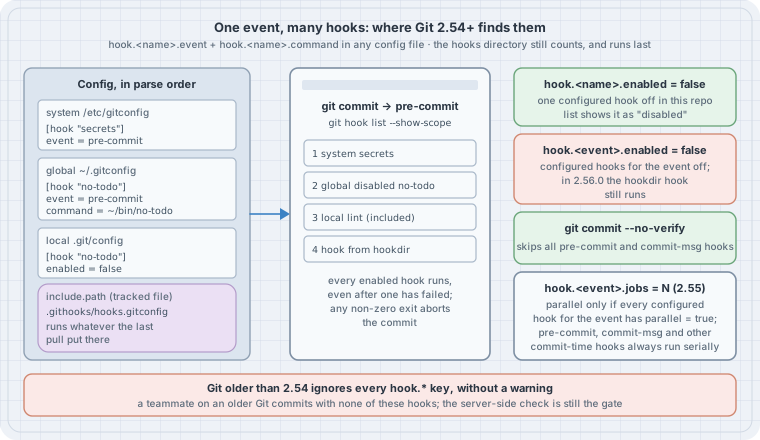
git commit
  └─ event "pre-commit"
       run list = configured hooks, in the order their hook.<name>.event lines were parsed
                  (system → global → local → worktree → -c; include.path files where included)
                + the traditional hook file (core.hooksPath, else .git/hooks), LAST
every enabled hook runs; any non-zero exit aborts the commit| Key (scope) | Meaning | Since |
|---|---|---|
hook.<name>.command |
What to run: a path or a shell one-liner. Last value wins | 2.54 |
hook.<name>.event |
Which event(s) run it. Multi-valued; an empty value resets the list | 2.54 |
hook.<name>.enabled |
false switches this hook off without deleting it |
2.54 |
hook.<event>.enabled |
false switches off the configured hooks for that event (see Case 2) |
2.55 |
hook.<name>.parallel |
true declares this hook safe to run concurrently with the others |
2.55 |
hook.jobs, hook.<event>.jobs |
How many hooks may run at once (-1 = CPU count). Default 1 |
2.55 |
git hook list [--show-scope] <event> |
Print the run list for an event, with the config scope of each hook | 2.54 |
git hook run [-j N] <event> [-- args] |
Run an event’s hooks by hand, the way Git would | 2.36 (config hooks 2.54, -j 2.55) |
A <name> must not be an event name: hook.pre-commit.command is a fatal error, because hook.pre-commit.enabled and hook.pre-commit.jobs already mean “the event” (git-config(1), hook.<friendly-name>.event).
Worked examples (Cases)
Run on Debian 13 (Linux 6.12) with Git 2.56.0, the current release (2026-09-28), built from the release tarball in user space. The box’s distribution Git is 2.47.3, and Case 4 uses it on purpose. Every listing below was run, and every output block is pasted from the run.
Source this file first. It keeps your own ~/.gitconfig out of the way by pointing “global” at a throwaway file, so Case 1 can write to it safely:
# env.sh — source this so your hashes match the transcripts (needs git 2.55+)
export GIT_AUTHOR_NAME="Dev" GIT_AUTHOR_EMAIL="dev@example.com"
export GIT_COMMITTER_NAME="Dev" GIT_COMMITTER_EMAIL="dev@example.com"
export GIT_AUTHOR_DATE="2026-10-01T09:00:00Z" GIT_COMMITTER_DATE="2026-10-01T09:00:00Z"
export GIT_CONFIG_GLOBAL=/tmp/hooklab/global.gitconfig GIT_CONFIG_NOSYSTEM=1
export GIT_CONFIG_COUNT=1 GIT_CONFIG_KEY_0=init.defaultBranch GIT_CONFIG_VALUE_0=main
Run the cases in order; they share /tmp/hooklab.
Case 1: Two hooks on one event, defined once for every repository
Two small checks, no-todo and no-big, live in ~/bin-style scripts and are registered in the global config. The repository has no hook files at all:
#!/usr/bin/env bash
# lab-01-one-event-two-hooks.sh — two named hooks on pre-commit, defined in config, no files in .git/hooks
set -euo pipefail
rm -rf /tmp/hooklab && mkdir -p /tmp/hooklab/bin && cd /tmp/hooklab
: > global.gitconfig
cat > bin/no-todo <<'SH'
#!/bin/sh
# bin/no-todo — refuse staged lines that add "TODO"
if git diff --cached -U0 | grep -q '^+.*TODO'; then
  echo "no-todo: staged change adds a TODO" >&2; exit 1
fi
echo "no-todo: ok"
SH
cat > bin/no-big <<'SH'
#!/bin/sh
# bin/no-big — refuse staged files over 1 MiB
git diff --cached --name-only -z | xargs -0 -r -I{} sh -c \
  'test $(wc -c < "{}") -le 1048576 || { echo "no-big: {} is over 1 MiB" >&2; exit 1; }' || exit 1
echo "no-big: ok"
SH
chmod +x bin/*
git config set --global hook.no-todo.command /tmp/hooklab/bin/no-todo
git config set --global --append hook.no-todo.event pre-commit
git config set --global hook.no-big.command /tmp/hooklab/bin/no-big
git config set --global --append hook.no-big.event pre-commit
git init -q repo && cd repo
ls .git/hooks | grep -v '\.sample$' || echo "(no active hook files in .git/hooks)"
git hook list --show-scope pre-commit
echo 'print("hi")' > app.py && git add app.py
git commit -qm "add app" && git log --oneline
echo '# TODO: remove' >> app.py && git add app.py
git commit -qm "add todo" || echo "commit refused, exit $?"
(no active hook files in .git/hooks)
global no-todo
global no-big
no-todo: ok
no-big: ok
f652878 add app
no-todo: staged change adds a TODO
no-big: ok
commit refused, exit 1Three things to read off this:
.git/hookshas only the.samplefilesgit initcopies in. The hooks come entirely from config, andgit hook list --show-scopesays from which scope.- On the refused commit both hooks ran:
no-big: okis printed afterno-todofailed. Git runs every hook for the event and then refuses if any of them exited non-zero. Write each hook as if it were the only one, with its own clear message. git config set --appendis the Git 2.46+ spelling. With the oldergit configsyntax, the equivalent of--appendis--add;git config --global --append …is rejected as an unknown option.
Case 2: Order, the hooks directory, and the off switches
Add a traditional .git/hooks/pre-commit file to the same repository and try each way of turning hooks off:
#!/usr/bin/env bash
# lab-02-order-and-off-switches.sh — config hooks + a .git/hooks file: order, disabling, --no-verify
set -euo pipefail
cd /tmp/hooklab/repo
git restore --staged app.py && git checkout -q -- app.py
printf '#!/bin/sh\necho "legacy .git/hooks/pre-commit"\n' > .git/hooks/pre-commit
chmod +x .git/hooks/pre-commit
git hook list --show-scope pre-commit
echo "--- run the event by hand"
git hook run pre-commit
echo "--- this repo opts out of one global hook"
git config set --local hook.no-big.enabled false
git hook list --show-scope pre-commit
echo "--- switch the whole event off for this repo"
git config set --local hook.pre-commit.enabled false
git hook run pre-commit; echo "exit $?"
git config unset --local hook.pre-commit.enabled
echo "--- --no-verify skips config hooks too"
echo '# TODO: later' >> app.py && git add app.py
git commit -q --no-verify -m "wip: todo (skipped hooks)" && git log --oneline -1
global no-todo
global no-big
hook from hookdir
--- run the event by hand
no-todo: ok
no-big: ok
legacy .git/hooks/pre-commit
--- this repo opts out of one global hook
global no-todo
global disabled no-big
hook from hookdir
--- switch the whole event off for this repo
legacy .git/hooks/pre-commit
exit 0
--- --no-verify skips config hooks too
092fc2a wip: todo (skipped hooks)- The traditional hook is still honoured and runs last, after every configured hook.
git hook listshows it ashook from hookdir. Ifcore.hooksPathis set, that directory replaces.git/hooksas the “hookdir” and the configured hooks still run; on this box, settingcore.hooksPathto a shared directory madegit hook list pre-commitprintno-todo,no-big,hook from hookdir, and the hookdir hook it ran was the shared one. hook.no-big.enabled=falsein.git/configturns off a hook defined in~/.gitconfigfor this repository only, and the list marks itdisabled. This is the clean way to opt one repository out of a personal or company-wide hook.hook.pre-commit.enabled=falseswitched off both configured hooks, but the.git/hooks/pre-commitfile still ran.git-config(1)describes the event switch as “no hooks fire for that event”. In Git 2.56.0 the code that applies it (list_hooks_add_configured()inhook.c) marks only configured hooks as event-disabled;list_hooks_add_default()adds the hookdir hook afterwards without that check. Don’t rely on this switch to silence a legacy hook file; remove or rename the file.--no-verifyskipped the configured hooks as well as the file, and theTODOwas committed. It skipspre-commitandcommit-msghooks of every kind.
Case 3: Shipping hook config with the project
Config is not cloned, any more than .git/hooks is. What a project can ship is a tracked config file that each developer chooses to include. The project keeps the hook script and its definition under .githooks/; a clone opts in once with include.path:
#!/usr/bin/env bash
# lab-03-shared-from-repo.sh — ship hook config in the repo; each clone opts in with include.path
set -euo pipefail
cd /tmp/hooklab && rm -rf proj proj.git alice && : > global.gitconfig
git init -q proj && cd proj
mkdir .githooks
cat > .githooks/check-subject <<'SH'
#!/bin/sh
# .githooks/check-subject — commit-msg: subject line at most 50 characters
len=$(head -n1 "$1" | wc -c)
[ "$len" -le 51 ] || { echo "check-subject: subject is $((len-1)) chars (max 50)" >&2; exit 1; }
SH
chmod +x .githooks/check-subject
cat > .githooks/hooks.gitconfig <<'CFG'
# .githooks/hooks.gitconfig — reviewed hook definitions; clones opt in with include.path
[hook "check-subject"]
    event = commit-msg
    command = .githooks/check-subject
CFG
git add .githooks && git commit -qm "ship commit-msg policy" && cd ..
git clone -q --bare proj proj.git && git clone -q proj.git alice && cd alice
echo "--- fresh clone: nothing runs"
git hook list commit-msg || true
git config set --local include.path ../.githooks/hooks.gitconfig
echo "--- after opting in"
git hook list --show-scope commit-msg
git config list --show-origin | grep '^file:.*hook\.'
git commit -q --allow-empty -m "this subject line is far too long to pass the policy check" || echo "refused"
git commit -q --allow-empty -m "short subject" && git log --oneline -1
echo "--- from a subdirectory: the relative command still resolves"
mkdir -p src && cd src && git commit -q --allow-empty -m "from src/" && git log --oneline -1
--- fresh clone: nothing runs
warning: no hooks found for event 'commit-msg'
--- after opting in
local check-subject
file:.git/../.githooks/hooks.gitconfig hook.check-subject.event=commit-msg
file:.git/../.githooks/hooks.gitconfig hook.check-subject.command=.githooks/check-subject
check-subject: subject is 58 chars (max 50)
refused
7831542 short subject
--- from a subdirectory: the relative command still resolves
1c40431 from src/- A fresh clone runs nothing. Opting in is one
git config set --local include.path ../.githooks/hooks.gitconfig; the path is relative to the directory of the including file,.git/, which is why--show-originprints.git/../.githooks/hooks.gitconfig. git hook list --show-scopereports an included hook under the scope of the file that included it:local.- Hooks run from the top of the working tree (
githooks(5)), socommand = .githooks/check-subjectworks fromsrc/too.
Compared with core.hooksPath=.githooks, this keeps the project’s hooks and your own global ones, needs no dispatcher script, and lets a developer disable one project hook with hook.<name>.enabled=false without editing tracked files.
Case 4: The teammate on an older Git
Same clone, same policy, two Git versions:
#!/usr/bin/env bash
# lab-04-old-git.sh — the same clone, committed with an older Git: config hooks silently do nothing
set -uo pipefail
cd /tmp/hooklab/alice
for g in git /usr/bin/git; do
  echo "--- $($g --version)"
  $g hook list commit-msg 2>&1 | head -1
  $g commit -q --allow-empty -m "a subject line that is much longer than fifty characters" \
    && { echo "commit accepted: $($g log -1 --format=%s)"; $g reset -q --soft HEAD~1; } \
    || echo "commit refused"
done
--- git version 2.56.0
check-subject
check-subject: subject is 56 chars (max 50)
commit refused
--- git version 2.47.3
error: unknown subcommand: `list'
commit accepted: a subject line that is much longer than fifty charactersGit 2.47.3 has no idea what hook.check-subject.* means, and unknown config keys are not an error in Git, so the over-long subject was accepted without a word. Git 2.47.3 does have git hook run (it dates from 2.36), but not git hook list. That is the safest single check to put in a setup script: if git hook list commit-msg fails, the developer’s hooks are not running. Stating “requires Git 2.54+” in the contributing guide matters more than usual here, because the failure is silent.
Case 5: An included hook runs whatever the last pull brought
include.path to a tracked file, like core.hooksPath to a tracked directory, means “run the version of these files that is checked out right now”. Another contributor changes the hook script, the change is merged, Alice pulls:
#!/usr/bin/env bash
# lab-05-trust-on-pull.sh — an included hook file runs whatever the last pull brought
set -euo pipefail
cd /tmp/hooklab && rm -rf mallory
git clone -q proj.git mallory && cd mallory
cat > .githooks/check-subject <<'SH'
#!/bin/sh
# .githooks/check-subject — (changed upstream)
echo "check-subject: this line arrived with the last pull and runs as $(id -un)" >&2
SH
git commit -qam "tweak subject check" && git push -q origin main
cd ../alice && git pull -q --rebase origin main
echo "--- review what the pull changed under .githooks before the next commit"
git diff --stat ORIG_HEAD HEAD -- .githooks
git commit -q --allow-empty -m "next commit"
--- review what the pull changed under .githooks before the next commit
.githooks/check-subject | 5 ++---
1 file changed, 2 insertions(+), 3 deletions(-)
check-subject: this line arrived with the last pull and runs as boxThe new script ran on Alice’s next commit, under her user, with her credentials and SSH agent in reach. Nothing asked. This is not a Git bug; it is what opting in to a tracked hook means, and it is the reason git clone never runs hooks in the first place. Treat .githooks/ like CI workflow files:
- Protect the path with code-owner review on the server (a
CODEOWNERSrule for/.githooks/) so changes to it need a named reviewer. - After a pull, check
git diff --stat ORIG_HEAD HEAD -- .githooks(as above) orgit log -p ORIG_HEAD..HEAD -- .githooksbefore your next commit. - Point
commandat something that cannot change under you when it matters: a tool installed from a package with a pinned version, rather than a script in the working tree.
Case 6: Parallel hooks on the server
Parallelism is for slow, independent hooks such as notifications after a push. Commit-time hooks always run one at a time: git-hook(1) lists applypatch-msg, pre-commit, prepare-commit-msg, commit-msg, post-commit, post-checkout and push-to-checkout as always serial, because they share the index, working tree or message file. post-receive on a bare repository is a good candidate. Two hooks each sleep one second to stand in for a slow webhook; the push is timed:
#!/usr/bin/env bash
# lab-06-parallel-post-receive.sh — two slow server-side hooks: serial vs hook.<event>.jobs
set -euo pipefail
cd /tmp/hooklab && rm -rf srv.git dev && : > global.gitconfig
git init -q --bare srv.git
cat > notify <<'SH'
#!/bin/sh
# notify — post-receive: read the first "<old> <new> <ref>" line, then a slow "webhook"
read -r old new ref
start=$(date +%s%N); sleep 1
echo "$1: $ref, slow part began at +$(( (start - $(cat /tmp/hooklab/t0)) / 1000000 )) ms"
SH
cat > notify-drain <<'SH'
#!/bin/sh
# notify-drain — same, but read ALL of stdin (to EOF) before the slow part
refs=$(cat)
start=$(date +%s%N); sleep 1
echo "$1: slow part began at +$(( (start - $(cat /tmp/hooklab/t0)) / 1000000 )) ms"
SH
chmod +x notify notify-drain
git -C srv.git config set hook.chat.command "/tmp/hooklab/notify chat"
git -C srv.git config set --append hook.chat.event post-receive
git -C srv.git config set hook.ci.command "/tmp/hooklab/notify ci"
git -C srv.git config set --append hook.ci.event post-receive
git init -q dev && cd dev && git remote add origin ../srv.git
push() { git commit -q --allow-empty -m "$1"; date +%s%N > /tmp/hooklab/t0
         s=$(date +%s%N); git push -q origin main 2>&1 | sed 's/^remote: /  remote: /; s/ *$//'
         echo "  push took $(( ($(date +%s%N) - s) / 1000000 )) ms"; }
echo "--- default: serial"; push one
git -C ../srv.git config set hook.post-receive.jobs 2
echo "--- jobs=2, but no hook declares parallel=true: still serial"; push two
git -C ../srv.git config set hook.chat.parallel true
git -C ../srv.git config set hook.ci.parallel true
echo "--- jobs=2 and both hooks parallel=true"; push three
git -C ../srv.git config set hook.chat.command "/tmp/hooklab/notify-drain chat"
git -C ../srv.git config set hook.ci.command "/tmp/hooklab/notify-drain ci"
echo "--- same, but each hook drains stdin to EOF first"; push four
--- default: serial
remote: chat: refs/heads/main, slow part began at +12 ms
remote: ci: refs/heads/main, slow part began at +1017 ms
push took 2023 ms
--- jobs=2, but no hook declares parallel=true: still serial
remote: chat: refs/heads/main, slow part began at +13 ms
remote: ci: refs/heads/main, slow part began at +1017 ms
push took 2023 ms
--- jobs=2 and both hooks parallel=true
remote: chat: refs/heads/main, slow part began at +14 ms
remote: ci: refs/heads/main, slow part began at +14 ms
push took 1020 ms
--- same, but each hook drains stdin to EOF first
remote: chat: slow part began at +1021 ms
remote: ci: slow part began at +17 ms
push took 2028 ms- Serial by default.
cistarts about 1,000 ms afterchat; the push takes 2 s. hook.post-receive.jobs=2alone changes nothing. Every configured hook for the event must also declarehook.<name>.parallel=true. One hook without it keeps the whole event serial. That is deliberate: the hook’s author, not the admin, says whether it is safe to run alongside others.- Both declared parallel: both start at +14 ms and the push takes 1 s.
- The same hooks reading stdin to EOF first: the push is back to 2 s.
cistarts at +17 ms, butchatdoesn’t get end-of-file on its stdin untilciexits. While the hooks were running,/proc/<pid>/fdof the second hook process showed two extra pipe descriptors (fd 8 and 9) besides its own stdin and stdout. That is consistent with the second child inheriting the write end of the first child’s stdin pipe, which would hold that pipe open until the second hook exits. Whatever the exact cause, the effect on Git 2.56.0 is measurable: a parallelpost-receivehook that reads all of stdin before doing its slow work gains nothing. Read the ref lines you need, then start the slow part, and measure on your own server before counting on the speed-up.
With jobs above 1, Git also merges hook stdout into stderr for pre-push so parallel output can be de-interleaved (git-config(1), hook.jobs). A pre-push hook that writes something meaningful to stdout behaves differently when run in parallel.
The trap
Config-based hooks feel like policy, because they live in config next to everything else and can be set centrally in /etc/gitconfig or a tracked include. They are still courtesy. A teammate on Git 2.47 runs none of them and sees no warning (Case 4). --no-verify skips them all (Case 2). The event-wide off switch leaves a legacy hook file running (Case 2). An included hook runs whatever the last merge put into the working tree (Case 5). And jobs=4 on its own is a no-op until every hook declares parallel=true, and even then may not overlap (Case 6). If a rule must hold for every commit that reaches main, it belongs in a server-side check or a required CI job. The hook only gets it to the developer sooner.
The boring rule
Define hooks as named
hook.<name>blocks, one check per hook, and look at the result withgit hook list --show-scope <event>. Share project hooks as a tracked.githooks/hooks.gitconfigthat each clone includes on purpose, guarded by code-owner review. Opt a repository out withhook.<name>.enabled=false, and delete legacy.git/hooksfiles rather than relying on the event switch. Require Git 2.54+ and check it in setup. Run anything that must hold for everyone on the server, not in a hook.
Try this
- Move one hook you already use from
.git/hooks/into~/.gitconfigas ahook.<name>block, and confirm withgit hook list --show-scope <event>that it appears once, and not twice. - Give one hook two events (
git config set --append hook.lint.event pre-push) and rungit hook run pre-push -- origin https://example.invalidto see it fire without pushing. - In Case 3’s repository, set
hook.check-subject.enabled=falsein.git/configand confirm a long subject goes through, while.githooks/hooks.gitconfigstays unchanged. - Add a third
post-receivehook to Case 6 withoutparallel=true. Predict the push time before you run it. - Write a
scripts/setup.shthat fails with a clear message ifgit hook list commit-msgfails, and run it under the older Git on your machine if you have one.
Sources
git-hook(1)(Git 2.56 manual, and the 2.54.0 version for what 2.54 already had: https://git-scm.com/docs/git-hook/2.54.0): config-defined hooks,list --show-scope,run -j, always-serial events, the WRAPPERS section: https://git-scm.com/docs/git-hookgit-config(1),hook.*keys (command,event,enabled,parallel,hook.jobs,hook.<event>.jobs): https://git-scm.com/docs/git-configgithooks(5): hook events, working directory,core.hooksPath: https://git-scm.com/docs/githooksgit-config(1), “Includes” (include.path, relative paths): https://git-scm.com/docs/git-config#_includes- Git 2.54.0 release notes (“Hook commands are now allowed to be defined (possibly centrally) in the configuration files”): https://github.com/git/git/blob/master/Documentation/RelNotes/2.54.0.adoc
- Git 2.55.0 release notes (“Hook scripts defined via the configuration system can now be configured to run in parallel”): https://github.com/git/git/blob/master/Documentation/RelNotes/2.55.0.adoc
- Git 2.56.0 source,
hook.c(list_hooks(),list_hooks_add_configured(),get_hook_jobs()): https://github.com/git/git/blob/v2.56.0/hook.c - GitHub Docs, “About code owners” (protecting
/.githooks/): https://docs.github.com/en/repositories/managing-your-repositorys-settings-and-features/customizing-your-repository/about-code-owners