Watching the filesystem: inotify vs fanotify
Overview
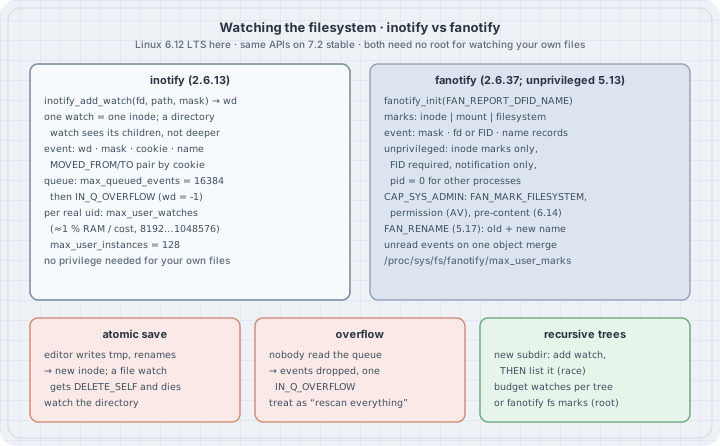
Thesis: Linux can tell you when files change, so you do not have to poll. Two kernel APIs do this. inotify (Linux 2.6.13) watches individual inodes. It needs no privilege and is what tail -f, editors, file managers, build watchers and systemd .path units use. fanotify (2.6.37) can mark a whole mount or filesystem and can even block an open until a scanner answers. Those powers need CAP_SYS_ADMIN. Since Linux 5.13 there is also a restricted unprivileged mode. Both APIs have sharp edges that show up in production: watches are not recursive, the queue overflows and drops events, editors replace files instead of writing them, and every watch counts against per-user limits. When a watcher “randomly misses changes”, one of those four is almost always the reason.
Typical operator and programmer jobs:
- Explain why a dev server or log shipper stopped reacting after an editor save, a
git checkoutor a log rotation. - Find which process uses up the user’s inotify watches when tools fail with “no space left on device” or “too many open files”.
- Write a watcher that survives event bursts (handle
IN_Q_OVERFLOW) and new subdirectories (the add-then-scan race). - Decide when fanotify fits better (whole-filesystem audit, on-access scanning, pre-content hooks) and what it needs.
uname -r
python3 --version
tail --version | head -1
6.12.94+
Python 3.13.5
tail (GNU coreutils) 9.7All output below comes from a Debian 13 host, kernel 6.12 (an LTS series), x86_64, as an unprivileged user (uid=1000, no capabilities). Every listing ran there as shown. The examples call the syscalls through Python’s standard ctypes module, so they need no extra packages. inotifywait/inotifywatch from inotify-tools wrap the same API on the command line. They were not installed on this box, so their use is described from their manual and not run.
Mental model
inotify works like this:
inotify_init1()returns a file descriptor: an instance with its own event queue.inotify_add_watch(fd, path, mask)resolvespathonce, attaches a watch to that inode and returns a watch descriptor (wd, a small integer).- From then on the kernel appends
struct inotify_event { wd, mask, cookie, len, name[] }records to the queue, and youread()them. The fd works withpoll/epolllike any other.
Three consequences follow, and most surprises come from them:
- A watch follows the inode, not the name. If someone renames a new file over the watched one, your watch stays attached to the old inode. That inode is unlinked, you get
IN_DELETE_SELFandIN_IGNORED, and the watch is gone. - A directory watch sees its direct children only. A change in
dir/sub/fileproduces nothing on the watch fordir. Recursive watching means one watch per directory, added by you, with a race each time a directory appears. - The queue is bounded. After
max_queued_events(16384 by default) unread events, further events are dropped and a singleIN_Q_OVERFLOWevent withwd = -1is queued. You learn that you lost something, but not what.
fanotify inverts the design:
fanotify_init()creates a group, andfanotify_mark()attaches marks to an inode, a mount or a whole filesystem.- Classic fanotify hands you an open file descriptor of the object in every event. That is why it needs
CAP_SYS_ADMIN: a listener could otherwise gain access to files it could not open. - In modern “FID” mode (
FAN_REPORT_FID,FAN_REPORT_DFID_NAME, Linux 5.1 and 5.9) events carry a file handle plus the entry name instead. - With FID reporting, an unprivileged user may use inode marks for notification-only events (Linux 5.13).
- A mount or filesystem mark removes the recursion problem entirely: everything below it is covered. Only privileged listeners get them.
Syntax
#include <sys/inotify.h>
int fd = inotify_init1(IN_NONBLOCK | IN_CLOEXEC);
int wd = inotify_add_watch(fd, "/srv/app/conf.d", IN_CLOSE_WRITE | IN_MOVED_TO | IN_DELETE);
inotify_rm_watch(fd, wd);
/* read(fd, buf, len) returns one or more struct inotify_event */

#include <sys/fanotify.h>
int g = fanotify_init(FAN_CLASS_NOTIF | FAN_REPORT_DFID_NAME, O_RDONLY);
fanotify_mark(g, FAN_MARK_ADD, FAN_CREATE | FAN_DELETE | FAN_MOVE | FAN_ONDIR, AT_FDCWD, "/srv/app");
/* privileged only: FAN_MARK_ADD | FAN_MARK_FILESYSTEM, FAN_OPEN_PERM, FAN_CLASS_CONTENT ... */| Knob | Where | Default here | Meaning |
|---|---|---|---|
max_user_watches |
/proc/sys/fs/inotify/ |
127859 | inotify watches per real user ID, across all their processes. Since 5.11 the default is 1 % of RAM divided by the cost of one watch, clamped to 8192…1048576. |
max_user_instances |
/proc/sys/fs/inotify/ |
128 | inotify instances (fds) per real user ID |
max_queued_events |
/proc/sys/fs/inotify/ |
16384 | queue length per instance before IN_Q_OVERFLOW |
max_user_marks |
/proc/sys/fs/fanotify/ |
136162 | fanotify marks per user (scaled to RAM, like inotify) |
max_user_groups |
/proc/sys/fs/fanotify/ |
128 | fanotify groups per user |
max_queued_events |
/proc/sys/fs/fanotify/ |
16384 | per-group queue; FAN_UNLIMITED_QUEUE lifts it (privileged) |
/proc/sys/fs/inotify/max_queued_events:16384
/proc/sys/fs/inotify/max_user_instances:128
/proc/sys/fs/inotify/max_user_watches:127859
/proc/sys/fs/fanotify/max_queued_events:16384
/proc/sys/fs/fanotify/max_user_groups:128
/proc/sys/fs/fanotify/max_user_marks:136162
MemTotal:       16386368 kB
(16 GiB of RAM: 1 % of 16386368 kB / 127859 ≈ 1.3 KiB “cost” per watch. The constant INOTIFY_WATCH_COST in fs/notify/inotify/inotify_user.c counts the mark plus two inodes it may pin.)
| inotify mask | Fires when |
|---|---|
IN_CREATE / IN_DELETE |
an entry appeared / vanished in a watched directory |
IN_MODIFY |
data was written (once per write(), merged if unread) |
IN_CLOSE_WRITE |
a file opened for writing was closed. The “file is complete” signal. |
IN_MOVED_FROM / IN_MOVED_TO |
rename out of / into a watched directory; the pair shares a cookie |
IN_ATTRIB |
metadata: mode, owner, timestamps, link count |
IN_DELETE_SELF / IN_MOVE_SELF |
the watched object itself was deleted / moved |
IN_IGNORED |
the watch was removed (explicitly, or because its inode died or the fs was unmounted) |
IN_Q_OVERFLOW |
events were dropped; wd is -1 |
IN_ISDIR |
flag: the subject is a directory |
Safety
- Watching is read-only. None of the examples change anything outside a fresh
mktemp -ddirectory under/tmp. - Raising the sysctls (
sysctl fs.inotify.max_user_watches=…) needs root and affects every user on the host. It was not run here. Persist such changes in/etc/sysctl.d/*.confonly after you have found the process using them up (Example 4). - fanotify permission events (
FAN_OPEN_PERM,FAN_ACCESS_PERM, pre-content events) make other processes wait for your answer. A buggy listener that stops reading can hang everyopen()on the filesystem, including the shell you would use to kill it. Develop those on a throwaway VM, never on the host you are logged into. - Do not deliberately exhaust
max_user_watchesormax_user_instanceson a shared machine to “see the error”. Every other process of your user ID (editors, desktop daemons, language servers) loses the ability to watch at the same moment. That is why this chapter describesENOSPC/EMFILEfrom the documentation instead of triggering them.
Examples with Explanations
1. One directory watch, everyday operations
A tiny wrapper, used by the next examples:
# inotify.py — a tiny ctypes wrapper around inotify(7); no third-party modules
import ctypes, ctypes.util, os, struct

libc = ctypes.CDLL(ctypes.util.find_library("c"), use_errno=True)
libc.inotify_add_watch.argtypes = [ctypes.c_int, ctypes.c_char_p, ctypes.c_uint32]

MASKS = {  # <sys/inotify.h>
    "ACCESS": 0x1, "MODIFY": 0x2, "ATTRIB": 0x4, "CLOSE_WRITE": 0x8, "CLOSE_NOWRITE": 0x10,
    "OPEN": 0x20, "MOVED_FROM": 0x40, "MOVED_TO": 0x80, "CREATE": 0x100, "DELETE": 0x200,
    "DELETE_SELF": 0x400, "MOVE_SELF": 0x800, "UNMOUNT": 0x2000, "Q_OVERFLOW": 0x4000,
    "IGNORED": 0x8000, "ISDIR": 0x40000000,
}
IN_ALL_EVENTS = 0xFFF
IN_NONBLOCK, IN_CLOEXEC = os.O_NONBLOCK, os.O_CLOEXEC
EVENT = struct.Struct("iIII")            # wd, mask, cookie, len  (+ name[len])

def init(flags=IN_CLOEXEC):
    fd = libc.inotify_init1(flags)
    if fd < 0:
        raise OSError(ctypes.get_errno(), os.strerror(ctypes.get_errno()))
    return fd

def add_watch(fd, path, mask=IN_ALL_EVENTS):
    wd = libc.inotify_add_watch(fd, os.fsencode(path), mask)
    if wd < 0:
        e = ctypes.get_errno()
        raise OSError(e, os.strerror(e), path)
    return wd

def names(mask):
    return "|".join(n for n, b in MASKS.items() if mask & b)

def read_events(fd, bufsize=65536):
    """Yield (wd, mask, cookie, name) for everything currently queued."""
    try:
        buf = os.read(fd, bufsize)
    except BlockingIOError:
        return
    off = 0
    while off < len(buf):
        wd, mask, cookie, n = EVENT.unpack_from(buf, off)
        name = buf[off + EVENT.size: off + EVENT.size + n].rstrip(b"\0").decode()
        off += EVENT.size + n
        yield wd, mask, cookie, name
# watch_dir.py — what one directory watch reports for everyday file operations
import os, shutil, tempfile, inotify
d = tempfile.mkdtemp(prefix="ino-")
fd = inotify.init(inotify.IN_NONBLOCK | inotify.IN_CLOEXEC)
wd = inotify.add_watch(fd, d)
def step(label, action):
action()
print(f"-- {label}")
for wd_, mask, cookie, name in inotify.read_events(fd):
extra = f" cookie={cookie}" if cookie else ""
print(f" wd={wd_} {inotify.names(mask):<22} {name or '(the watched dir)'}{extra}")
p = os.path.join(d, "notes.txt")
step("echo hi > notes.txt", lambda: open(p, "w").write("hi\n"))
step("cat notes.txt", lambda: open(p).read())
step("chmod 600 notes.txt", lambda: os.chmod(p, 0o600))
step("mv notes.txt todo.txt", lambda: os.rename(p, os.path.join(d, "todo.txt")))
step("mkdir sub && touch sub/deep.txt", lambda: (os.mkdir(os.path.join(d, "sub")),
open(os.path.join(d, "sub", "deep.txt"), "w").close()))
step("rm -r the directory itself", lambda: shutil.rmtree(d))$ python3 watch_dir.py
-- echo hi > notes.txt
wd=1 CREATE notes.txt
wd=1 OPEN notes.txt
wd=1 MODIFY notes.txt
wd=1 CLOSE_WRITE notes.txt
-- cat notes.txt
wd=1 OPEN notes.txt
wd=1 ACCESS notes.txt
wd=1 CLOSE_NOWRITE notes.txt
-- chmod 600 notes.txt
wd=1 ATTRIB notes.txt
-- mv notes.txt todo.txt
wd=1 MOVED_FROM notes.txt cookie=808168
wd=1 MOVED_TO todo.txt cookie=808168
-- mkdir sub && touch sub/deep.txt
wd=1 CREATE|ISDIR sub
-- rm -r the directory itself
wd=1 OPEN|ISDIR (the watched dir)
wd=1 ACCESS|ISDIR (the watched dir)
wd=1 DELETE todo.txt
wd=1 OPEN|ISDIR sub
wd=1 ACCESS|ISDIR sub
wd=1 CLOSE_NOWRITE|ISDIR sub
wd=1 DELETE|ISDIR sub
wd=1 CLOSE_NOWRITE|ISDIR (the watched dir)
wd=1 DELETE_SELF (the watched dir)
wd=1 IGNORED (the watched dir)What to read from it:
- Writing a file gives
CREATE,OPEN,MODIFY,CLOSE_WRITE. If you act onMODIFYyou may read a half-written file. Act onCLOSE_WRITE(or onMOVED_TO, see Example 2). - Reading produces events too (
OPEN,ACCESS,CLOSE_NOWRITE). A watcher that subscribes toIN_ALL_EVENTSand reacts to everything will wake itself up by reading the files it was told about. Ask for the events you need. - Rename is two events with the same
cookie. If only one side is inside your watched set, you get only one half: aMOVED_FROMwithout a partner means “gone”, a loneMOVED_TOmeans “appeared”. mkdir sub && touch sub/deep.txt: onlyCREATE|ISDIR sub.deep.txtis invisible, because the watch on the parent does not cover grandchildren.- Removing the watched directory ends with
DELETE_SELFandIGNORED. The kernel dropped the watch, and thewdnumber may later be reused.
2. The editor trap: a watch on the file dies after the first save
Many editors and config tools (and sed -i, install, most deploy tools) save atomically: they write a temporary file and rename() it over the target. Readers then never see a half-written file, but the target is a new inode:
# atomic_save.py — watch a FILE, then save it the way editors do (write temp, rename over)
import os, tempfile, inotify

d = tempfile.mkdtemp(prefix="ino-")
cfg = os.path.join(d, "app.conf")
open(cfg, "w").write("v=1\n")

fd = inotify.init(inotify.IN_NONBLOCK)
wd_file = inotify.add_watch(fd, cfg)            # watch the file itself
wd_dir = inotify.add_watch(fd, d, inotify.MASKS["CLOSE_WRITE"] | inotify.MASKS["MOVED_TO"])
who = {wd_file: "file-watch", wd_dir: "dir-watch "}

def save(text):                                 # atomic replace: new inode, same name
    tmp = cfg + ".tmp"
    open(tmp, "w").write(text)
    os.rename(tmp, cfg)

for n in (2, 3):
    save(f"v={n}\n")
    print(f"-- save #{n - 1} (v={n})")
    for wd, mask, cookie, name in inotify.read_events(fd):
        print(f"   {who.get(wd, wd)} {inotify.names(mask):<12} {name}")
$ python3 atomic_save.py
-- save #1 (v=2)
dir-watch CLOSE_WRITE app.conf.tmp
dir-watch MOVED_TO app.conf
file-watch ATTRIB
file-watch DELETE_SELF
file-watch IGNORED
-- save #2 (v=3)
dir-watch CLOSE_WRITE app.conf.tmp
dir-watch MOVED_TO app.confThe file watch sees the old inode lose its name (ATTRIB: the link count dropped), get freed (DELETE_SELF) and lose the watch (IGNORED). The second save is silent for it, and a program that watches the file stops reloading after the first edit. The directory watch keeps working: MOVED_TO app.conf is the one reliable “the new version is in place” signal.
GNU tail shows both strategies. tail -f follows the descriptor (one watch on the file, IN_MODIFY only). tail -F follows the name: it also watches the directory for creates, deletes and renames, so it can reopen a rotated or replaced log:
# tailf.sh — GNU tail -f / -F use inotify; see their watches in /proc
show() {   # print every inotify watch held by PID $1
  for fd in /proc/$1/fd/*; do
    [ "$(readlink "$fd")" = anon_inode:inotify ] && grep '^inotify' /proc/$1/fdinfo/${fd##*/} | cut -d' ' -f1-5
  done
}
f=$(mktemp)
printf 'file %s: ino %x   dir /tmp: ino %x\n' "$f" "$(stat -c %i "$f")" "$(stat -c %i /tmp)"
tail -f "$f" > /dev/null &  p1=$!
tail -F "$f" > /dev/null &  p2=$!
sleep 0.3
echo "tail -f:"; show $p1
echo "tail -F:"; show $p2
kill $p1 $p2; rm -f "$f"
$ bash tailf.sh
file /tmp/tmp.NNcmyC9GoV: ino 17c178 dir /tmp: ino bd
tail -f:
inotify wd:1 ino:17c178 sdev:fe00010 mask:2
tail -F:
inotify wd:2 ino:17c178 sdev:fe00010 mask:c06
inotify wd:1 ino:bd sdev:fe00010 mask:784The fdinfo lines name the watched inode in hex. Mask 2 is IN_MODIFY. Mask c06 adds IN_ATTRIB|IN_DELETE_SELF|IN_MOVE_SELF on the file, and 784 on /tmp (inode bd) is IN_ATTRIB|IN_MOVED_TO|IN_CREATE|IN_DELETE|IN_DELETE_SELF. Use tail -F for logs that get rotated.
3. Overflow: what you get when you read too slowly
# overflow.py — what happens when nobody reads the queue: IN_Q_OVERFLOW
import os, tempfile, inotify

limit = int(open("/proc/sys/fs/inotify/max_queued_events").read())
d = tempfile.mkdtemp(prefix="ino-")
fd = inotify.init(inotify.IN_NONBLOCK)
inotify.add_watch(fd, d, inotify.MASKS["CREATE"] | inotify.MASKS["CLOSE_WRITE"])

files = 10_000                       # 2 events each: CREATE + CLOSE_WRITE = 20,000 events
for i in range(files):
    open(os.path.join(d, f"f{i:05}"), "w").close()

got, overflow, last = 0, 0, None
while True:
    batch = list(inotify.read_events(fd))
    if not batch:
        break
    for wd, mask, cookie, name in batch:
        if mask & inotify.MASKS["Q_OVERFLOW"]:
            overflow += 1
            print(f"Q_OVERFLOW: wd={wd} name={name!r} after {got} events (last name {last})")
        else:
            got, last = got + 1, name
print(f"max_queued_events={limit}  generated={2 * files}  delivered={got}  lost={2 * files - got}")
$ python3 overflow.py
Q_OVERFLOW: wd=-1 name='' after 16384 events (last name f08191)
max_queued_events=16384 generated=20000 delivered=16384 lost=361610,000 new files produced 20,000 events. The queue held exactly max_queued_events (16384 events, files f00000 to f08191). The remaining 3616 events were dropped, and a single IN_Q_OVERFLOW with wd=-1 marks the gap. One git checkout, npm install or tar x easily produces such a burst. A correct watcher therefore treats IN_Q_OVERFLOW as “my picture is stale”: it rescans the tree, or closes the instance and rebuilds its watches. Reading faster (a dedicated reader thread, large read() buffers) makes it rarer but never impossible.
The inotify man page also notes that identical consecutive unread events are coalesced (same wd, mask, cookie and name). Ten quick write()s to one file can arrive as one IN_MODIFY, so you cannot count writes with inotify.
4. Who is using up the watches?
When a tool fails to add a watch, inotify_add_watch() returns ENOSPC (“No space left on device”, a misleading message: the user’s max_user_watches is exhausted, not the disk). When it cannot create an instance, inotify_init1() returns EMFILE (“Too many open files”: max_user_instances reached). Both limits are per real user ID, so the culprit is often a different program of the same user, typically an IDE or language server that watches a whole node_modules. Every inotify fd lists its watches in /proc/PID/fdinfo/FD, one inotify wd: line per watch:
# who_watches.py — count inotify instances and watches per process (only processes you may inspect)
import os, re

rows = []
for pid in filter(str.isdigit, os.listdir("/proc")):
    try:
        comm = open(f"/proc/{pid}/comm").read().strip()
        inst = watches = 0
        for fd in os.listdir(f"/proc/{pid}/fd"):
            if os.readlink(f"/proc/{pid}/fd/{fd}") == "anon_inode:inotify":
                inst += 1
                watches += sum(1 for l in open(f"/proc/{pid}/fdinfo/{fd}") if l.startswith("inotify wd:"))
        if inst:
            rows.append((watches, inst, int(pid), comm))
    except (PermissionError, FileNotFoundError, ProcessLookupError):
        continue
lim = {k: int(open(f"/proc/sys/fs/inotify/{k}").read()) for k in ("max_user_watches", "max_user_instances")}
print(f"limits: max_user_watches={lim['max_user_watches']} max_user_instances={lim['max_user_instances']}")
print(f"{'PID':>7} {'COMM':<16} {'INSTANCES':>9} {'WATCHES':>8}")
for w, i, pid, comm in sorted(rows, reverse=True)[:8]:
    print(f"{pid:>7} {comm:<16} {i:>9} {w:>8}")
print(f"total: {sum(r[1] for r in rows)} instances, {sum(r[0] for r in rows)} watches")
$ python3 who_watches.py
limits: max_user_watches=127859 max_user_instances=128
PID COMM INSTANCES WATCHES
184516 node 1 75
189580 bamfdaemon 1 5
18492 bamfdaemon 1 5
189262 plank 1 4
25625 bamfdaemon 1 4
25400 plank 1 4
18317 plank 1 4
14946 bamfdaemon 1 4
total: 17 instances, 128 watchesRun as yourself, it sees your own processes (/proc/PID/fd of other users needs root). On a busy developer machine the top entry is usually the editor or a file-watching dev server with tens of thousands of watches. Exclude build output and dependency directories in its settings before you raise the limit.
5. fanotify without root: what the 5.13 unprivileged mode allows
# fan.py — unprivileged fanotify (Linux 5.13+): directory-entry events with FID + name records
import ctypes, ctypes.util, os, struct, tempfile

libc = ctypes.CDLL(ctypes.util.find_library("c"), use_errno=True)
libc.fanotify_mark.argtypes = [ctypes.c_int, ctypes.c_uint, ctypes.c_uint64, ctypes.c_int, ctypes.c_char_p]

# <linux/fanotify.h>
FAN_CLASS_NOTIF, FAN_REPORT_FID, FAN_REPORT_DIR_FID, FAN_REPORT_NAME = 0x0, 0x200, 0x400, 0x800
FAN_REPORT_DFID_NAME = FAN_REPORT_DIR_FID | FAN_REPORT_NAME
FAN_MARK_ADD, FAN_MARK_MOUNT, FAN_MARK_FILESYSTEM = 0x1, 0x10, 0x100
FAN_MOVED_FROM, FAN_MOVED_TO, FAN_CREATE, FAN_DELETE = 0x40, 0x80, 0x100, 0x200
FAN_ONDIR = 0x40000000
AT_FDCWD = -100
NAMES = {FAN_CREATE: "CREATE", FAN_MOVED_FROM: "MOVED_FROM", FAN_MOVED_TO: "MOVED_TO",
         FAN_DELETE: "DELETE", FAN_ONDIR: "ONDIR"}

def call(fn, *a):
    r = fn(*a)
    if r < 0:
        e = ctypes.get_errno()
        raise OSError(e, os.strerror(e))
    return r

FAN_CLASS_CONTENT, FAN_UNLIMITED_QUEUE = 0x4, 0x10
print("uid", os.getuid(), "CapEff", [l.split()[1] for l in open("/proc/self/status") if l.startswith("CapEff")][0])
for label, flags in [("FAN_CLASS_NOTIF (no FID)", FAN_CLASS_NOTIF),
                     ("FAN_CLASS_CONTENT|FID", FAN_CLASS_CONTENT | FAN_REPORT_FID),
                     ("FAN_UNLIMITED_QUEUE|FID", FAN_UNLIMITED_QUEUE | FAN_REPORT_FID)]:
    try:
        os.close(call(libc.fanotify_init, flags, os.O_RDONLY))
        print(f"fanotify_init({label:<26}) -> ok")
    except OSError as e:
        print(f"fanotify_init({label:<26}) -> {e.strerror}")
fd = call(libc.fanotify_init, FAN_CLASS_NOTIF | FAN_REPORT_DFID_NAME, os.O_RDONLY)
print(f"fanotify_init({'FAN_REPORT_DFID_NAME':<26}) -> fd {fd}")

d = tempfile.mkdtemp(prefix="fan-")
mask = FAN_CREATE | FAN_DELETE | FAN_MOVED_FROM | FAN_MOVED_TO | FAN_ONDIR
call(libc.fanotify_mark, fd, FAN_MARK_ADD, mask, AT_FDCWD, d.encode())
print(f"fanotify_mark({'inode mark (directory)':<26}) -> ok")

for label, flags, m in [("FAN_MARK_FILESYSTEM", FAN_MARK_ADD | FAN_MARK_FILESYSTEM, FAN_CREATE),
                        ("FAN_MARK_MOUNT", FAN_MARK_ADD | FAN_MARK_MOUNT, FAN_CREATE)]:
    try:
        call(libc.fanotify_mark, fd, flags, m, AT_FDCWD, d.encode())
        print(f"fanotify_mark({label:<26}) -> ok")
    except OSError as e:
        print(f"fanotify_mark({label:<26}) -> {e.strerror}")

os.mkdir(f"{d}/sub")
open(f"{d}/a.txt", "w").close()
os.rename(f"{d}/a.txt", f"{d}/b.txt")
os.unlink(f"{d}/b.txt")
os.spawnlp(os.P_WAIT, "touch", "touch", f"{d}/by-child")     # an event from another process

META = struct.Struct("IBBHQii")        # event_len, vers, reserved, metadata_len, mask, fd, pid
buf, off = os.read(fd, 65536), 0
while off < len(buf):
    ev_len, vers, _, meta_len, emask, efd, pid = META.unpack_from(buf, off)
    info, name = off + meta_len, None
    while info < off + ev_len:                                   # info records follow the metadata
        itype, _, ilen = struct.unpack_from("BBH", buf, info)
        if itype == 2:                                           # FAN_EVENT_INFO_TYPE_DFID_NAME
            hbytes, = struct.unpack_from("I", buf, info + 4 + 8)  # skip header + fsid
            name = buf[info + 4 + 8 + 8 + hbytes: info + ilen].split(b"\0")[0].decode()
        info += ilen
    who = "self" if pid == os.getpid() else pid
    print(f"  {'|'.join(v for k, v in NAMES.items() if emask & k):<18} name={name:<9} fd={efd} pid={who}")
    off += ev_len
os.unlink(f"{d}/by-child"); os.rmdir(f"{d}/sub"); os.rmdir(d)
$ python3 fan.py
uid 1000 CapEff 0000000000000000
fanotify_init(FAN_CLASS_NOTIF (no FID) ) -> Operation not permitted
fanotify_init(FAN_CLASS_CONTENT|FID ) -> Operation not permitted
fanotify_init(FAN_UNLIMITED_QUEUE|FID ) -> Operation not permitted
fanotify_init(FAN_REPORT_DFID_NAME ) -> fd 5
fanotify_mark(inode mark (directory) ) -> ok
fanotify_mark(FAN_MARK_FILESYSTEM ) -> Operation not permitted
fanotify_mark(FAN_MARK_MOUNT ) -> Operation not permitted
CREATE|ONDIR name=sub fd=-1 pid=self
CREATE|MOVED_FROM name=a.txt fd=-1 pid=self
MOVED_TO|DELETE name=b.txt fd=-1 pid=self
CREATE name=by-child fd=-1 pid=0Line by line:
- Classic mode (event carries an fd) is refused to an unprivileged user (
EPERM). So are content/permission classes and the unlimited queue. - FID mode with names works (
FAN_REPORT_DFID_NAME): each event identifies the parent directory by file handle and carries the entry name.fd=-1because no fd is opened for you. - Only inode marks.
FAN_MARK_FILESYSTEMandFAN_MARK_MOUNTfail withEPERM. Without root, fanotify is not recursive either. - Events merge.
CREATE|MOVED_FROM a.txtandMOVED_TO|DELETE b.txtare each one event: unread events for the same directory entry from the same process collapse into one record with several mask bits. The final state is clear (a.txt came and left, b.txt came and left), but the order is not. inotify kept the order (Example 1). - No pid for other processes. The
touchchild showspid=0. An unprivileged listener only learns the pid when it caused the event itself.
The man page fanotify_init(2) lists exactly these restrictions for unprivileged callers. fanotify renames are better than inotify’s cookie pairs since Linux 5.17 (backported to 5.15.154 and 5.10.220): FAN_RENAME delivers one event with both the old and the new directory+name records, even across two marked directories:
# fan_rename.py — FAN_RENAME (Linux 5.17+): one event carrying both the old and the new name
import ctypes, ctypes.util, os, struct, tempfile

libc = ctypes.CDLL(ctypes.util.find_library("c"), use_errno=True)
libc.fanotify_mark.argtypes = [ctypes.c_int, ctypes.c_uint, ctypes.c_uint64, ctypes.c_int, ctypes.c_char_p]
FAN_REPORT_DFID_NAME, FAN_MARK_ADD, FAN_RENAME, AT_FDCWD = 0xC00, 0x1, 0x10000000, -100
INFO = {2: "DFID_NAME", 10: "OLD_DFID_NAME", 12: "NEW_DFID_NAME"}   # FAN_EVENT_INFO_TYPE_*

fd = libc.fanotify_init(FAN_REPORT_DFID_NAME, os.O_RDONLY)
d = tempfile.mkdtemp(prefix="fan-")
os.mkdir(f"{d}/inbox"); os.mkdir(f"{d}/done")
for sub in ("inbox", "done"):
    assert libc.fanotify_mark(fd, FAN_MARK_ADD, FAN_RENAME, AT_FDCWD, f"{d}/{sub}".encode()) == 0
open(f"{d}/inbox/job-42", "w").close()
os.rename(f"{d}/inbox/job-42", f"{d}/done/job-42.ok")

buf = os.read(fd, 4096)
ev_len, _, _, meta_len, mask, _, _ = struct.unpack_from("IBBHQii", buf, 0)
print(f"one event, mask=0x{mask:x} (FAN_RENAME), {ev_len} bytes")
off = meta_len
while off < ev_len:
    itype, _, ilen = struct.unpack_from("BBH", buf, off)
    hbytes, = struct.unpack_from("I", buf, off + 12)
    name = buf[off + 20 + hbytes: off + ilen].split(b"\0")[0].decode()
    print(f"  {INFO.get(itype, itype):<14} name={name}")
    off += ilen
$ python3 fan_rename.py
one event, mask=0x10000000 (FAN_RENAME), 100 bytes
OLD_DFID_NAME name=job-42
NEW_DFID_NAME name=job-42.ok6. What privileged fanotify adds (from the docs, not run)
With CAP_SYS_ADMIN (not available here, so none of this was run):
FAN_MARK_FILESYSTEMcovers every object on a filesystem, andFAN_MARK_MOUNTcovers a mount. That is the scalable answer to “watch this huge tree”: one mark instead of a watch per directory, no add-then-scan race. Mount marks cannot report directory-entry events (FAN_CREATEand friends); use a filesystem mark for those.- Permission events (
FAN_OPEN_PERM,FAN_OPEN_EXEC_PERM,FAN_ACCESS_PERM, classFAN_CLASS_CONTENT) make the opener wait until the listener writesFAN_ALLOWorFAN_DENY. This is how on-access virus scanners and some DLP tools work. - Pre-content events (
FAN_PRE_ACCESS, classFAN_CLASS_PRE_CONTENT, Linux 6.14) fire before a range of a file is read and come with the offset and length. A hierarchical-storage manager can fill in the data on demand. - Mount-namespace marks (
FAN_MARK_MNTNSwithFAN_REPORT_MNT, Linux 6.14) reportFAN_MNT_ATTACH/FAN_MNT_DETACHwhen mounts appear or disappear in a namespace. FAN_REPORT_PIDFD(5.15) returns a pidfd for the event’s process instead of a pid that could be recycled, andFAN_UNLIMITED_QUEUEremoves the 16384-event bound.
The trap
Trap: “I watch the config file, so I will see every change.” You see changes until the first atomic save replaces the inode (Example 2). Then IN_IGNORED, and silence. Watch the directory, filter by name, and react to CLOSE_WRITE and MOVED_TO.
Trap: “inotify is recursive if I pass a directory.” It is not (Example 1). Recursive watchers add one watch per directory. When IN_CREATE|IN_ISDIR arrives, files may already exist inside the new directory before your watch is in place. The man page’s advice: add the watch first, then list the directory and treat what you find as created.
Trap: “No space left on device — the disk is full.” From inotify_add_watch() it means max_user_watches is exhausted for your user ID. df is irrelevant. Count watches per process (Example 4) before raising the limit.
Trap: “Events tell me exactly what happened.” They can be dropped (IN_Q_OVERFLOW, Example 3), coalesced (identical inotify events) or merged (fanotify, Example 5). Use events as hints to look, then stat/scan to learn the real state.
Notes & Pitfalls
- Not every filesystem reports. Changes made by other machines on NFS, SMB, FUSE or 9p (including many VM and container bind/shared folders) do not generate local events, because the kernel never sees them. Pseudo-filesystems such as
/proc,/sysand/dev/ptscannot be monitored with inotify either (inotify(7)). Watchers on these need polling; most watcher libraries have a polling fallback setting. - Bind mounts and overlays: inotify watches inodes, so a change through any path to the same inode is reported. On overlayfs, a watch on a merged file sees changes made through the overlay, not direct edits to a lower layer.
IN_MODIFYonmmapwrites is not reported. Writes through a shared memory mapping (mmap,msync,munmap) do not produce events (inotify(7), “Limitations and caveats”).- Watch descriptors are reused after
IN_IGNORED. Drop thewd → pathentry from your map when you see it, or late events will be attributed to the wrong path. - Renames across watched directories need the cookie to pair
MOVED_FROM/MOVED_TO. The two events are usually adjacent, but not guaranteed to arrive in the sameread(). - systemd
.pathunits (PathChanged=,PathModified=,DirectoryNotEmpty=) are inotify watches held by PID 1 and the user manager, with the same non-recursive and atomic-save behaviour.PathChanged=fires onCLOSE_WRITEand moves,PathModified=also on every write. - Containers share the host kernel. Processes that run as the same host UID draw on the same
max_user_watchesbudget, even when they are in different containers.
The boring rule
Watch directories, not files. Act on IN_CLOSE_WRITE and IN_MOVED_TO, never on IN_MODIFY. Treat IN_Q_OVERFLOW as “rescan”. When you see a new subdirectory, add the watch before you list it. When a watcher says “no space left on device”, count watches per process before you touch the sysctl. Reach for fanotify only when you need whole-filesystem coverage or a say in open(), and test permission events on a machine you can afford to hang.
Try this
- In
watch_dir.py, add a watch forsubas soon asCREATE|ISDIR subarrives, thentouch sub/deep.txt. Now createsub2/a/b/cwith oneos.makedirs()call and see how many levels you catch without the “scan after adding” step. - Change
atomic_save.pyto write the file in place (open(cfg, "w")). Which watch now reports the save, and with which events? - Lower the burst in
overflow.pyuntil no overflow happens, then read the queue from a thread while generating events. How much further can you push it? - In
fan.py, addFAN_REPORT_TARGET_FID(Linux 5.17) tofanotify_init()and print how many info records each event carries. - Run
who_watches.pywhile your editor opens a large project, and again after excluding its dependency directory from file watching.
Verification
- Run unprivileged on this box: Debian 13 (trixie), Linux 6.12.94+ (x86_64), Python 3.13.5 (standard library
ctypesonly), GNU coreutils 9.7.uid=1000,CapEff 0000000000000000. All output above is pasted from one run of the listed scripts. Cookies, inode numbers, PIDs and watch counts change between runs. - Kernel limits read from
/proc/sys/fs/inotifyand/proc/sys/fs/fanotify. The default formula formax_user_watcheswas checked infs/notify/inotify/inotify_user.c(v6.12), and the fanotify defaults infs/notify/fanotify/fanotify_user.c. - Checked against kernel.org on 2026-10-19: stable 7.2.11, mainline 7.3-rc7, longterm 6.18.57 and 6.12.113. The APIs used here are unchanged on those kernels. The main fanotify additions since 6.12 are pre-content events (
FAN_PRE_ACCESS) and mount-namespace marks, both in 6.14. - Not run: raising the sysctls (root), exhausting
max_user_watches/max_user_instancesto triggerENOSPC/EMFILE(would disturb other processes on a shared host), privileged fanotify (filesystem/mount marks, permission and pre-content events,FAN_REPORT_PIDFD),inotifywait,fatraceandfsnotifywait(not installed; nothing was installed for this chapter). Those parts are written from the man pages and kernel sources below. - No packages installed, no root, no
sudo.
Sources
- man7:
inotify(7)(events, limits, coalescing, the recursive-watch race, overflow advice, BUGS),inotify_add_watch(2)(ENOSPC),inotify_init(2)(EMFILE),fanotify(7)(event merging, info records),fanotify_init(2)(unprivileged restrictions,FAN_REPORT_*),fanotify_mark(2)(FAN_RENAME,FAN_PRE_ACCESS, mark types),proc_pid_fdinfo(5) - Kernel docs: inotify — a powerful yet simple file change notification system; Documentation for /proc/sys/fs/
- Linux sources:
fs/notify/inotify/inotify_user.c(INOTIFY_WATCH_COST, default limits),fs/notify/fanotify/fanotify_user.c(unprivileged checks, defaults) - Kernel merge “fsnotify_hsm_for_v6.14-rc1” (pre-content events): https://git.kernel.org/pub/scm/linux/kernel/git/torvalds/linux.git/commit/?id=8883957b3c9de2087fb6cf9691c1188cccf1ac9c
- GNU coreutils manual,
tailinvocation (--follow=namevsdescriptor,-F) - systemd:
systemd.path(5) - kernel.org release list (versions checked 2026-10-19): https://www.kernel.org/