Unprivileged User Namespaces: What “root” Inside One Can Reach
Unprivileged User Namespaces: What “root” Inside One Can Reach
Overview
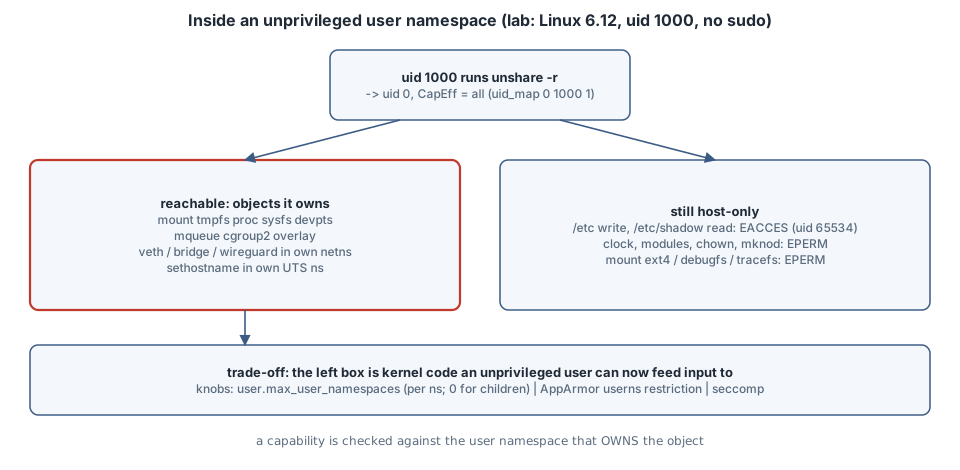
Thesis: When an ordinary user runs unshare -r, they get uid 0 and a full capability set. Those capabilities are valid only over objects owned by the new user namespace, so host files, the clock and kernel modules stay out of reach. But they also unlock kernel code that used to be reachable only by real root: mounting filesystems, rtnetlink, netfilter, cgroup and IPC setup. Unprivileged user namespaces are therefore a good isolation tool, because rootless containers, browser sandboxes and Flatpak all depend on them. They are also a real attack surface: a bug in any of that newly reachable code becomes a local privilege escalation. Whether to allow them depends on the host. This chapter measures both sides on one kernel and shows the knobs.
Version note: every probe below ran as uid 1000 on Linux 6.12.94 (x86_64, a minimal cloud kernel) with util-linux unshare and Python 3.13. No sudo was used. The distribution knobs (Ubuntu’s AppArmor restriction, Debian’s sysctl) are not present on this kernel. They are cited from their documentation and marked as not run.
Mental model
host (initial user namespace)              new user namespace  (unshare -r)
  uid 1000, CapEff = 0                        uid 0, CapEff = all
                         uid_map: "0 1000 1"
  owns: /, /etc, devices, clock, modules     owns: the mount/net/uts/ipc/pid/cgroup
                                                   namespaces created with it
A capability is checked against the user namespace that owns the object. Inside the new namespace, CAP_SYS_ADMIN lets you mount a tmpfs into a mount namespace you own. It does nothing to the host’s /etc. Host files belong to uids that are not in uid_map, so they appear as the overflow uid 65534 and the ordinary permission bits apply to you as “other” (user_namespaces(7)).
The catch is that “you may mount a tmpfs” or “you may configure a network namespace” means the kernel now runs its filesystem-parameter, netlink and netfilter code on input from an unprivileged user. That code was written and hardened at a time when only root could reach it.
Examples with Explanations
1. What namespace-root can and cannot do (runs here)
"""Run as uid 0 inside a fresh user namespace (unshare -rmnpf --mount-proc). Probe what that 'root' can do."""
import ctypes, os, errno, socket, time
libc = ctypes.CDLL(None, use_errno=True)
def mount(src, tgt, fstype, data=None):
    os.makedirs(tgt, exist_ok=True)
    r = libc.mount(src.encode(), tgt.encode(), fstype.encode(), 0, data.encode() if data else None)
    return "ok" if r == 0 else errno.errorcode[ctypes.get_errno()]
def attempt(f):
    try: f(); return "ok"
    except OSError as e: return errno.errorcode[e.errno]

st = dict(l.split(":\t") for l in open("/proc/self/status").read().splitlines() if ":\t" in l)
print("uid/gid inside      :", os.getuid(), os.getgid(), "| uid_map:", open("/proc/self/uid_map").read().split())
print("CapEff              :", st["CapEff"].strip())
print("owner of / and /etc/shadow:", os.stat("/").st_uid, os.stat("/etc/shadow").st_uid, "(65534 = unmapped host uid)")

print("\n-- filesystems: mount(2) as namespace root")
for fs in ["tmpfs", "ramfs", "proc", "sysfs", "mqueue", "devpts", "cgroup2", "bpf", "overlay", "ext4", "debugfs", "tracefs", "securityfs"]:
    data = {"overlay": "lowerdir=/usr,upperdir=/tmp/up/u,workdir=/tmp/up/w", "devpts": "newinstance,ptmxmode=0666"}.get(fs)
    if fs == "overlay":
        os.makedirs("/tmp/up", exist_ok=True); mount("none", "/tmp/up", "tmpfs"); os.makedirs("/tmp/up/u"); os.makedirs("/tmp/up/w")
    if fs == "fuse": continue
    print(f"  {fs:10s} {mount('none' if fs != 'ext4' else '/dev/null', '/tmp/m-' + fs, fs, data)}")

print("\n-- things that stay host-only")
print("  write /etc/hostname     :", attempt(lambda: open("/etc/hostname", "a")))
print("  read /etc/shadow        :", attempt(lambda: open("/etc/shadow").read()))
print("  sethostname (own UTS ns):", attempt(lambda: socket.sethostname("lab")), "->", socket.gethostname())
print("  clock_settime           :", attempt(lambda: time.clock_settime(time.CLOCK_REALTIME, time.time())))
print("  init_module/finit_module:", "EPERM" if libc.syscall(313, -1, b"", 0) != 0 and ctypes.get_errno() == errno.EPERM else errno.errorcode.get(ctypes.get_errno()))
print("  chown host file to 0    :", attempt(lambda: os.chown("/etc/hostname", 0, 0)))
print("  mknod char device       :", attempt(lambda: os.mknod("/tmp/null2", 0o020666, os.makedev(1, 3))))
unshare -rmnpfiuC --mount-proc python3 probe.py # user+mount+net+pid+ipc+uts+cgroup namespacesuid/gid inside : 0 0 | uid_map: ['0', '1000', '1']
CapEff : 000001ffffffffff
owner of / and /etc/shadow: 65534 65534 (65534 = unmapped host uid)
-- filesystems: mount(2) as namespace root
tmpfs ok
ramfs ok
proc ok
sysfs ok
mqueue ok
devpts ok
cgroup2 ok
bpf EPERM
overlay ok
ext4 EPERM
debugfs EPERM
tracefs EPERM
securityfs EPERM
-- things that stay host-only
write /etc/hostname : EACCES
read /etc/shadow : EACCES
sethostname (own UTS ns): ok -> lab
clock_settime : EPERM
init_module/finit_module: EPERM
chown host file to 0 : EPERM
mknod char device : EPERMReading it:
CapEff 000001ffffffffffhas all 41 capability bits set. That is “root” as far as the capability checks are concerned.uid_mapis0 1000 1, so uid 0 here is uid 1000 on the host.- Mounts. tmpfs, ramfs, proc, sysfs, devpts, mqueue, cgroup2 and overlay all work. These are the filesystem types that user_namespaces(7) lists as mountable with
CAP_SYS_ADMINin the namespace that owns the mount namespace. mqueue and cgroup2 need their own IPC and cgroup namespaces; without-iand-C, the first run of this probe gotEPERMfor both. ext4, debugfs, tracefs and securityfs are refused, because block-based filesystems and the kernel’s debug interfaces requireCAP_SYS_ADMINin the initial namespace. The man page also lists bpf, but on this 6.12 kernel a directmount(2)of bpffs from inside the namespace gotEPERM. Newer kernels gate a bpffs owned by a user namespace through the BPF token setup, which needs a privileged helper. - Host-only. Writing
/etc/hostnameand reading/etc/shadowfail withEACCES: these are ordinary permission checks against an unmapped owner. The clock,finit_module,chownto a host uid andmknodof a character device fail withEPERM: these capabilities are only honoured in the initial namespace.sethostnameworks, but it changes only this namespace’s UTS name.
2. The network stack is now yours to configure (runs here)
"""Inside the user+net namespace: which rtnetlink link kinds can namespace-root create?"""
from pyroute2 import IPRoute
from pyroute2.netlink.exceptions import NetlinkError
import errno
ip = IPRoute()
ip.link("add", ifname="v0", kind="veth", peer="v0p"); base = ip.link_lookup(ifname="v0")[0]
kinds = {"dummy": {}, "bridge": {}, "veth": {"peer": "t-vethp"}, "bond": {}, "vrf": {"vrf_table": 10},
         "vlan": {"link": base, "vlan_id": 7}, "macvlan": {"link": base, "macvlan_mode": "bridge"},
         "ipvlan": {"link": base}, "vxlan": {"vxlan_id": 42, "vxlan_port": 4789},
         "geneve": {"geneve_id": 7, "geneve_remote": "192.0.2.1"}, "gre": {"gre_remote": "192.0.2.1"},
         "ipip": {"ipip_remote": "192.0.2.1"}, "sit": {"sit_remote": "192.0.2.1"},
         "wireguard": {}, "ifb": {}, "nlmon": {}, "team": {}, "macsec": {"link": base}}
ok, no = [], []
for k, extra in kinds.items():
    try:
        ip.link("add", ifname="t-" + k, kind=k, **extra); ok.append(k)
    except NetlinkError as e:
        no.append(f"{k}({errno.errorcode.get(e.code, e.code)})")
print("created  :", " ".join(ok))
print("refused  :", " ".join(no))
unshare -rn /workspace/venv-qos/bin/python links.py # pyroute2 0.9.7 in a venv
/workspace/venv-qos/bin/python links.py # same script, no namespacecreated : bridge veth wireguard
refused : dummy(ENOTSUP) bond(ENOTSUP) vrf(ENOTSUP) vlan(ENOTSUP) macvlan(ENOTSUP) ipvlan(ENOTSUP) vxlan(ENOTSUP) geneve(ENOTSUP) gre(ENOTSUP) ipip(ENOTSUP) sit(ENOTSUP) ifb(ENOTSUP) nlmon(ENOTSUP) team(ENOTSUP) macsec(ENOTSUP)Without a user namespace:
pyroute2.netlink.exceptions.NetlinkError: (1, 'Operation not permitted')Inside the namespace, uid 1000 created bridge, veth and WireGuard interfaces, which are kernel drivers it could not touch a second earlier. Without the namespace, the very first request gets EPERM. The ENOTSUP list is this minimal kernel saying “not built”. On a distribution kernel, most of those link types are modules, and rtnetlink can load a module on request for a link kind. So the code an unprivileged user can reach is whatever the host kernel has built in or can load. The same is true of netfilter (nf_tables), traffic control and the other netlink families that check CAP_NET_ADMIN against the namespace.
That is the attack-surface argument in concrete form. Two well-known examples:
- CVE-2022-0185, a heap overflow in the filesystem-context parameter parser, needed
CAP_SYS_ADMIN. - CVE-2023-32233, a use-after-free in nf_tables, needed
CAP_NET_ADMIN.
On hosts that allow unprivileged user namespaces, the capability each one needed is exactly what unshare -r hands out.
3. Limits are per namespace, and a sandbox can deny nesting (runs here)
#!/bin/sh
# nest.sh — run inside `unshare -r`: user.max_user_namespaces is per user namespace
echo "limit seen in this ns: $(cat /proc/sys/user/max_user_namespaces)"
unshare -r sh -c 'echo "nested unshare -r    : ok, uid $(id -u)"'
echo 0 > /proc/sys/user/max_user_namespaces && echo "set limit in this ns : $(cat /proc/sys/user/max_user_namespaces)"
unshare -r true 2>&1 | sed 's/^/nested unshare -r    : /'
unshare -r ./nest.sh; echo "host value: $(cat /proc/sys/user/max_user_namespaces)"limit seen in this ns: 2147483647
nested unshare -r : ok, uid 0
set limit in this ns : 0
nested unshare -r : unshare: unshare failed: No space left on device
host value: 63991/proc/sys/user/max_user_namespaces is a per-user-namespace limit (sysctl/user.rst). The host value is 63991 here, and the new namespace starts with its own value of 2147483647. Creating a namespace is charged against the limits of every ancestor as well, so raising your own value does not let you escape the host’s. Lowering it to 0 inside a sandbox makes unshare fail with ENOSPC for everything that runs inside, while the host is unaffected. This is how a sandbox stops its payload from making further user namespaces, and with it the extra reach shown in Example 2.
Choosing a policy (not run here)
| Knob | Scope | Effect | Breaks |
|---|---|---|---|
sysctl user.max_user_namespaces=0 |
whole host | no new user namespaces for anyone | rootless Podman/Docker, Chromium/Firefox sandboxes, Flatpak/bubblewrap |
Ubuntu 23.10+/24.04 kernel.apparmor_restrict_unprivileged_userns=1 |
per program | unconfined programs get a namespace but no capabilities in it; AppArmor profiles with userns, are exempt |
programs without a profile that need capabilities in the namespace |
Debian kernel.unprivileged_userns_clone=0 (Debian kernel patch) |
whole host | unprivileged CLONE_NEWUSER refused |
same as the first row; the file does not exist on mainline kernels like this one |
A sandbox’s own max_user_namespaces=0 (Example 3) |
one sandbox | its children cannot nest | nothing outside the sandbox |
| A custom container seccomp profile | one container | can deny clone/unshare with CLONE_NEWUSER; note that Docker’s default profile gates namespace flags behind CAP_SYS_ADMIN except CLONE_NEWUSER / unshare --user |
rootless tools inside the container |
The trap
The trap is thinking “it’s only root inside a namespace, so it’s harmless”. The capability checks hold: Example 1 shows the host’s files, clock and modules really are out of reach. But every ok in Examples 1 and 2 is a kernel subsystem that parses input from an unprivileged user. The trap in the other direction is setting user.max_user_namespaces=0 on a developer laptop or a CI runner and then wondering why browsers lose their sandbox and rootless containers stop starting.
The boring rule
- Shared multi-user hosts and servers that run no rootless containers: restrict. Use Ubuntu’s AppArmor restriction with profiles for the tools that need user namespaces, or set the sysctl to 0 if nothing needs them.
- Desktops, CI runners and container hosts: allow, keep the kernel patched quickly, and have sandboxes set their own
max_user_namespaces=0for untrusted payloads.
Either way, check what your host actually does: cat /proc/sys/user/max_user_namespaces, and unshare -r id.
Try this
- Run
unshare -r grep Cap /proc/self/statusand decodeCapEffwithcapsh --decode=where it is available. - Re-run Example 1 without
-iand-C, and watch mqueue and cgroup2 flip toEPERM. - On Ubuntu 24.04 (not run here):
sysctl kernel.apparmor_restrict_unprivileged_userns, thenunshare -r -n ip link add br0 type bridge. Compare the result with and without an AppArmor profile that grantsuserns,.
Sources
- user_namespaces(7): https://man7.org/linux/man-pages/man7/user_namespaces.7.html
- capabilities(7): https://man7.org/linux/man-pages/man7/capabilities.7.html
- unshare(1): https://man7.org/linux/man-pages/man1/unshare.1.html
- Linux kernel, Documentation for /proc/sys/user: https://docs.kernel.org/admin-guide/sysctl/user.html
- AppArmor wiki, unprivileged user namespace restrictions: https://gitlab.com/apparmor/apparmor/-/wikis/unprivileged_userns_restriction
- Docker docs, seccomp security profiles: https://docs.docker.com/engine/security/seccomp/
- NVD, CVE-2022-0185: https://nvd.nist.gov/vuln/detail/CVE-2022-0185; CVE-2023-32233: https://nvd.nist.gov/vuln/detail/CVE-2023-32233
- pyroute2: https://docs.pyroute2.org/