Pressure Stall Information: /proc/pressure and cgroup *.pressure
Overview
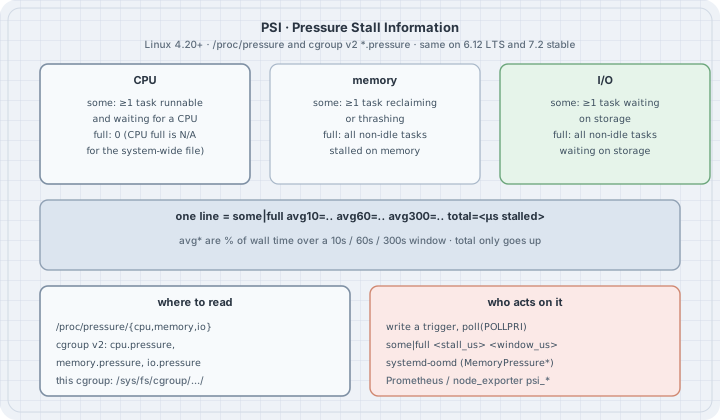
Thesis: load average and %CPU tell you that the machine is busy. They do not tell you that work is waiting. A host at 70 % CPU can be fine; a host whose tasks spend 20 % of wall time stalled on memory is not, even if CPU looks idle. Pressure Stall Information (PSI) measures the share of time that tasks are stalled on CPU, memory or I/O. It is exported for the whole system under /proc/pressure/ and for every cgroup v2 under cpu.pressure, memory.pressure and io.pressure. systemd-oomd, autoscalers and node exporters all read it. If you can read one pressure file and say what some versus full means, you can tell a saturated resource from a busy one before the OOM killer or a timeout does.
Typical operator jobs:
- Decide whether a latency spike is CPU contention, reclaim, or disk wait.
- Compare pressure inside one cgroup with the host (noisy neighbour vs whole-machine).
- Arm a userspace trigger that wakes on
poll()when pressure crosses a threshold. - Read the numbers
systemd-oomdand Prometheus already scrape.
uname -r
ls /proc/pressure/
head -n2 /proc/pressure/cpu /proc/pressure/memory /proc/pressure/io
6.12.94+
cpu
io
memory
==> /proc/pressure/cpu <==
some avg10=0.00 avg60=0.07 avg300=0.14 total=92264483
full avg10=0.00 avg60=0.00 avg300=0.00 total=0
==> /proc/pressure/memory <==
some avg10=0.00 avg60=0.00 avg300=0.00 total=27581617
full avg10=0.00 avg60=0.00 avg300=0.00 total=27295372
==> /proc/pressure/io <==
some avg10=0.00 avg60=0.01 avg300=0.01 total=41292135
full avg10=0.00 avg60=0.00 avg300=0.01 total=39967137All output below comes from a Debian 13 host, kernel 6.12, as an unprivileged user (uid=1000) inside the /agent cgroup. PSI has been on by default since Linux 4.20 (CONFIG_PSI=y). Linux 7.2 (current stable) keeps the same interface.
Mental model
  resource contended?
           │
           ▼
  for every non-idle task in the domain (system or one cgroup)
     is it stalled waiting for that resource right now?
           │
           ├─ at least one yes  →  add this sample to "some"
           └─ every one  yes  →  add this sample to "full"
           │
           ▼
  avg10 / avg60 / avg300 = % of wall time over that window
  total                  = cumulative stalled µs (monotonic)
Three facts:
somemeans someone is waiting. At least one runnable task could not make progress because of that resource. Latency for that task is already hurt.fullmeans everyone is waiting. All non-idle tasks in the domain are stalled on it. Forward progress for the domain has stopped. For CPU, system-widefullis not defined the same way (idle time exists; the system-wide CPU file’sfullline is zeros); cgroupcpu.pressuredoes reportfullwhen every task in that cgroup is waiting for CPU.avg*is a percentage;totalis a counter.avg10=18.05means “over the last ~10 s, tasks were under some-pressure about 18 % of the time.”totalonly rises. Derivatives oftotalare what monitors graph.
free and load average answer different questions. free’s available estimates reclaimable cache; PSI memory measures tasks actually stalled on reclaim or thrashing. Load average counts runnable+uninterruptible tasks; PSI cpu measures time spent waiting for a CPU. Use both.
Syntax
| File | Domain |
|---|---|
/proc/pressure/cpu, memory, io |
Whole system (all tasks visible in this PID namespace’s view of the host) |
cpu.pressure, memory.pressure, io.pressure under a cgroup v2 directory |
That cgroup’s tasks only |
cgroup.pressure |
0/1 kill-switch for pressure accounting in that cgroup (rare to touch) |
Line format (kernel docs):
some avg10=<pct> avg60=<pct> avg300=<pct> total=<µs>
full avg10=<pct> avg60=<pct> avg300=<pct> total=<µs>
Triggers (write to the same file, then poll for POLLPRI):
some|full <stall_us> <window_us>Meaning: wake me if, inside any window of window_us microseconds, the cumulative stall time for some or full reaches stall_us. Example: some 100000 1000000 = “100 ms of some-stall in any 1 s window.” Writing and polling need write permission on the pressure file (often root for /proc/pressure; cgroup ownership varies).
Safety
- Reading pressure files is always safe. Writing a trigger is safe but needs write access; a forgotten trigger stays armed until the writer closes the fd.
- Generating CPU or memory pressure on a shared host hurts neighbours. The CPU demo below uses processes inside this cgroup for a few seconds only. Do not leave a burn loop running.
- PSI is not an OOM killer.
systemd-oomdconsumes memory pressure (and swap) to decide when to kill; the kernel OOM killer still uses the badness score from thechoomchapter.
Examples with Explanations
1. Read the three system files as a table
# read_psi.py — parse /proc/pressure/{cpu,memory,io} into a table
import pathlib

def parse(path):
    out = {}
    for line in pathlib.Path(path).read_text().splitlines():
        kind, *fields = line.split()
        out[kind] = {k: float(v) if "." in v else int(v)
                     for k, v in (f.split("=", 1) for f in fields)}
    return out

print(f"{'file':22} {'some avg10':>10} {'avg60':>8} {'avg300':>8} {'total_us':>12}"
      f"  {'full avg10':>10} {'total_us':>12}")
for name in ("cpu", "memory", "io"):
    p = parse(f"/proc/pressure/{name}")
    s, f = p["some"], p["full"]
    print(f"/proc/pressure/{name:6} {s['avg10']:10.2f} {s['avg60']:8.2f} {s['avg300']:8.2f}"
          f" {s['total']:12}  {f['avg10']:10.2f} {f['total']:12}")
python3 read_psi.pyfile some avg10 avg60 avg300 total_us full avg10 total_us
/proc/pressure/cpu 0.00 0.07 0.14 92264483 0.00 0
/proc/pressure/memory 0.00 0.00 0.00 27581617 0.00 27295372
/proc/pressure/io 0.00 0.01 0.01 41292135 0.00 39967137An idle box: avg* near zero, total already in the tens of millions of microseconds from earlier life. System-wide CPU full.total stays 0. Memory and I/O do report full. Numbers here are a snapshot; yours will differ.
2. Make CPU some move (processes, not threads)
Python threads share the GIL, so a thread burn loop does not create real CPU contention. Processes do.
# cpu_pressure.py — burn N*cpus processes and watch this cgroup's cpu.pressure
import os, pathlib, time, multiprocessing as mp

def burn(seconds):
    end = time.perf_counter() + seconds
    x = 0
    while time.perf_counter() < end:
        x = (x * 3 + 1) & 0xFFFFFFFF

def psi(path):
    some = full = None
    for line in pathlib.Path(path).read_text().splitlines():
        kind, *fields = line.split()
        vals = {k: (float(v) if "." in v else int(v))
                for k, v in (f.split("=", 1) for f in fields)}
        if kind == "some":
            some = vals
        else:
            full = vals
    return some, full

cg = "/sys/fs/cgroup" + pathlib.Path("/proc/self/cgroup").read_text().strip().split(":")[-1]
path = f"{cg}/cpu.pressure"
ncpu = os.cpu_count() or 1
workers, sec = ncpu * 2, 4.0
print(f"cgroup {cg}, host CPUs {ncpu}, {workers} burn *processes* for {sec}s")
print(f"before  {pathlib.Path(path).read_text().splitlines()[0]}")
t0_some, _ = psi(path)
t0 = time.perf_counter()
procs = [mp.Process(target=burn, args=(sec,)) for _ in range(workers)]
for p in procs:
    p.start()
for i in range(4):
    time.sleep(sec / 4)
    print(f"  t+{(i + 1) * sec / 4:.1f}s  {pathlib.Path(path).read_text().splitlines()[0]}")
for p in procs:
    p.join()
some, _ = psi(path)
print(f"after   {pathlib.Path(path).read_text().splitlines()[0]}")
print(f"wall {time.perf_counter() - t0:.2f}s; some.total +{some['total'] - t0_some['total']} µs"
      f" ({(some['total'] - t0_some['total']) / 1e6:.2f}s)")
print(f"host    {pathlib.Path('/proc/pressure/cpu').read_text().splitlines()[0]}")
python3 cpu_pressure.pycgroup /sys/fs/cgroup/agent, host CPUs 8, 16 burn *processes* for 4.0s
before some avg10=0.18 avg60=0.06 avg300=0.08 total=86659330
t+1.0s some avg10=2.14 avg60=0.41 avg300=0.16 total=87526472
t+2.0s some avg10=2.14 avg60=0.41 avg300=0.16 total=88435842
t+3.0s some avg10=18.05 avg60=3.34 avg300=0.77 total=89352205
t+4.0s some avg10=18.05 avg60=3.34 avg300=0.77 total=90291051
after some avg10=18.05 avg60=3.34 avg300=0.77 total=90291051
wall 4.02s; some.total +3631721 µs (3.63s)
host some avg10=27.19 avg60=5.29 avg300=1.23 total=96002136Sixteen processes on eight CPUs: about half the wall time, someone in this cgroup is waiting for a CPU. some.total grew by 3.63 s of stall over 4.02 s of wall clock. avg10 climbed to 18 % (the 10 s window still holds quieter history). The host line is higher (27 %) because other cgroups were runnable too. Reading the cgroup file answers “is my service stalled?”; reading /proc/pressure answers “is the machine stalled?”
3. Triggers with poll() (not run here — write denied)
# conceptual — needs write permission on the pressure file
fd = open("/sys/fs/cgroup/…/cpu.pressure", "r+")
fd.write("some 100000 1000000")   # 100 ms of some-stall in any 1 s window
# poll(fd, POLLPRI) blocks until the condition holds; reading the fd acks it
On this box, open(…/agent/cpu.pressure, O_RDWR) returns EACCES for uid 1000, so the trigger was not armed. The interface and the some|full <stall_us> <window_us> grammar are from the kernel PSI documentation. Userspace that owns its cgroup (a systemd user service with Delegate=, a container runtime) can write the trigger and wait in one event loop next to its sockets.
4. What systemd-oomd does with memory pressure (docs)
systemd-oomd does not wait for the kernel OOM killer. It watches memory.pressure (and swap activity) on selected cgroups and kills a whole cgroup when pressure stays high. Unit knobs (see oomd.conf(5) and systemd.resource-control(5)):
| Knob | Role |
|---|---|
ManagedOOMMemoryPressure= / ManagedOOMMemoryPressureLimit= |
Enable monitoring; kill when avg10 (or the configured metric) exceeds the limit |
ManagedOOMPreference= |
avoid / omit to protect a unit |
DefaultMemoryPressureDurationSec= (oomd.conf) |
How long pressure must stay high |
No systemd is running on this box; the table is from the systemd manuals. The important design point: oomd acts on pressure, which appears while reclaim is still working, not on the allocation failure that trips the kernel OOM killer.
The trap
Trap: “high %CPU means high CPU pressure.” A single busy loop on an otherwise idle 8-CPU host shows ~12 % CPU and ~0 PSI some. PSI rises when tasks wait. Use it for latency, not for utilisation billing.
Trap: “threads will do for a CPU PSI demo.” Under CPython they will not (Example 2). Use processes, or a C/stress-ng burn.
Trap: “avg10 should jump the instant I start load.” It is an exponentially-weighted window of about ten seconds. Watch total for an immediate counter; watch avg10 for the smoothed signal monitors alert on.
Trap: “system-wide CPU full will tell me the machine is wedged.” The system-wide CPU file’s full line stays at 0. Use cgroup cpu.pressure’s full, or look at some plus runnable counts.
Trap: “PSI replaces the OOM killer.” It feeds policies that act earlier. The kernel OOM killer and oom_score_adj (see the choom chapter) still exist for the hard case.
Notes & Pitfalls
- Containers: the relevant file is usually the container’s own
*.pressure, not/proc/pressure. A quiet container on a hot host has low cgroup pressure and high host pressure. fullfor memory is the dangerous one: every task is stuck in reclaim or thrashing. That is the signal oomd is built around.- Pressure accounting can be disabled per cgroup with
cgroup.pressure=0(rarely what you want). - Off-CPU profiles (
offcputime,perf) explain why a task waited; PSI tells you how much waiting is happening for a whole domain, cheaply.
The boring rule
When latency is bad, read cpu.pressure, memory.pressure and io.pressure for the service’s cgroup and /proc/pressure for the host. some means someone waited; full means everyone did. Act on pressure before you act on OOM kills.
Try this
- Re-run
cpu_pressure.pywithworkers = ncpu(no oversubscribe). Doessome.totalstill grow? - On a host where you can write the cgroup pressure file, arm
some 50000 1000000, start the burn, and timepoll(POLLPRI). - Compare
/proc/pressure/memorywithmemory.pressureof a memory-limitedsystemd-run --user -p MemoryMax=512Mscope while allocating inside it. - Graph
rate(psi_cpu_some_stall_seconds_total[1m])(or your exporter’s equivalent) next to p99 latency for one service.
Verification
- Run unprivileged on this box: Debian 13, Linux 6.12.94+, Python 3.13.5, cgroup v2 (
0::/agent),uid=1000. Examples 1 and 2 are pasted from those runs. - Kernel interface checked against PSI — Pressure Stall Information and confirmed present on Linux 7.2 (current stable as of 2026-10-18, kernel.org).
- Not run: writing a PSI trigger (
EACCESon this cgroup’scpu.pressure; a further attempt to write/proc/pressurewas not pursued under the run rules),systemd-oomd(no systemd here), and a deliberate memory-pressure demo (4 GiB touch on a 16 GiB host with ~10 GiB available did not movememory.pressure; a truthful demo needs a tightMemoryMax=and was skipped rather than fabricated). These are described from the docs above. - No packages installed, no root, no
sudo.
Sources
- Kernel docs — PSI - Pressure Stall Information (interface,
some/full, triggers) - Kernel docs — Control Group v2: Pressure Stall Information
- systemd —
oomd.conf(5),systemd.resource-control(5)ManagedOOM* - Prometheus node_exporter — PSI collectors (
psi_cpu_*,psi_memory_*,psi_io_*) - kernel.org release list (versions checked 2026-10-18): https://www.kernel.org/