/proc Is the API: Rebuilding ps Columns from stat, status and smaps_rollup
/proc Is the API: Rebuilding ps Columns from stat, status and smaps_rollup
Learning goals
- Know which
/proc/PID/*file each familiarps/topcolumn comes from, and parse/proc/PID/statcorrectly, sincecommcan contain spaces and parentheses. - Compute
ps’s%CPUyourself, and understand why it is a lifetime average, not “right now”. - Tell RSS, PSS and VSZ apart, and know which
/procnumbers are fast-but-approximate and which are slow-but-exact. - Count mappings and open fds without any tool beyond
ls.
Version note: run on Linux 6.12 with Python 3 and procps ps, as an ordinary user, against a test process started for the lab. The output is pasted verbatim.
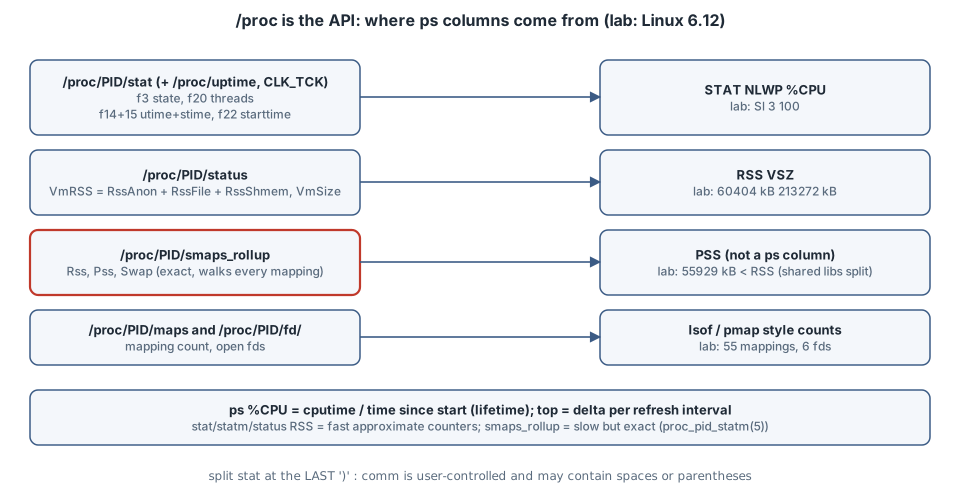
The files
| Column | Source | Notes |
|---|---|---|
STAT |
/proc/PID/stat field 3 |
state letter; ps adds l (multi-threaded) and others |
NLWP |
stat field 20 (num_threads), status Threads: |
threads = ls /proc/PID/task |
%CPU |
stat 14+15 (utime, stime, in clock ticks) and 22 (starttime) with /proc/uptime |
ticks ÷ sysconf(_SC_CLK_TCK) |
RSS |
status VmRSS (= RssAnon + RssFile + RssShmem), stat field 24 in pages |
fast counters (see below) |
VSZ |
status VmSize |
address space, not memory used |
| PSS | smaps_rollup Pss |
shared pages divided among their sharers |
| maps / fds | /proc/PID/maps lines, /proc/PID/fd/ entries |
Field numbers follow proc_pid_stat(5), which counts from 1. The only safe way to split stat is to cut at the last ), because comm is user-controlled.
Lab: a mini-ps
The test process allocates and touches 50 MiB, runs two spinning threads, and holds a file open:
import threading, time
blob = bytearray(50 * 1024 * 1024)          # 50 MiB, touched below
for i in range(0, len(blob), 4096): blob[i] = 1
def spin():
    t = time.time()
    while time.time() - t < 30: pass
for _ in range(2): threading.Thread(target=spin, daemon=True).start()
f = open('/etc/hostname'); time.sleep(30)
#!/usr/bin/env python3
"""Rebuild a few ps/top columns straight from /proc, then compare with ps."""
import os, sys, time
pid = int(sys.argv[1])
HZ = os.sysconf('SC_CLK_TCK')
PAGE = os.sysconf('SC_PAGE_SIZE')
def stat(pid):
raw = open(f'/proc/{pid}/stat').read()
comm = raw[raw.index('(') + 1:raw.rindex(')')] # comm may contain spaces
f = raw[raw.rindex(')') + 2:].split() # f[0] is field 3 (state)
return comm, f
comm, f = stat(pid)
state, ppid = f[0], int(f[1])
utime, stime = int(f[11]), int(f[12]) # fields 14, 15
nthreads, starttime = int(f[17]), int(f[19]) # fields 20, 22
rss_pages = int(f[21]) # field 24
uptime = float(open('/proc/uptime').read().split()[0])
age = uptime - starttime / HZ
status = dict(l.split(':', 1) for l in open(f'/proc/{pid}/status'))
rollup = {l.split(':')[0]: l.split()[1] for l in open(f'/proc/{pid}/smaps_rollup').readlines()[1:]}
fds = os.listdir(f'/proc/{pid}/fd')
maps = open(f'/proc/{pid}/maps').read().splitlines()
print(f"comm={comm} state={state} ppid={ppid} threads={nthreads}")
print(f"cpu: utime+stime={(utime+stime)/HZ:.2f}s over {age:.2f}s -> lifetime %CPU {(utime+stime)/HZ/age*100:.1f}")
print(f"rss: stat {rss_pages*PAGE//1024} kB | status VmRSS {status['VmRSS'].split()[0]} kB"
f" (anon {status['RssAnon'].split()[0]} + file {status['RssFile'].split()[0]} + shmem {status['RssShmem'].split()[0]})")
print(f"smaps_rollup: Rss {rollup['Rss']} kB, Pss {rollup['Pss']} kB, Swap {rollup['Swap']} kB")
print(f"vsz: status VmSize {status['VmSize'].split()[0]} kB, mappings {len(maps)}, open fds {len(fds)}")$ python3 busy.py &
$ python3 minips.py 1686991
comm=python3 state=S ppid=1686984 threads=3
cpu: utime+stime=3.01s over 3.01s -> lifetime %CPU 100.0
rss: stat 60220 kB | status VmRSS 60404 kB (anon 54464 + file 5940 + shmem 0)
smaps_rollup: Rss 60404 kB, Pss 55929 kB, Swap 0 kB
vsz: status VmSize 213272 kB, mappings 55, open fds 6
$ ps -o pid,stat,nlwp,%cpu,rss,vsz,comm -p 1686991
PID STAT NLWP %CPU RSS VSZ COMMAND
1686991 Sl 3 100 60404 213272 python3Reading the numbers
- Every column matches.
NLWP 3,RSS 60404,VSZ 213272and%CPU 100are exactly what the script derived.psis a formatter over these files. %CPUis a lifetime ratio. ps(1): “the CPU time used divided by the time the process has been running”. Two threads spin, but CPython’s GIL lets only one run Python bytecode at a time, so the process used 3.01 s of CPU in 3.01 s of life. A process that was busy an hour ago and is idle now still shows a high%CPUinps.topinstead shows the delta over its refresh interval.- Two RSS numbers, 184 kB apart.
statfield 24 said 60220 kB andVmRSSsaid 60404 kB. The two were read moments apart, and the per-process counters are a scalability optimisation. proc_pid_statm(5) says some values “are inaccurate because of a kernel-internal scalability optimization. If accurate values are required, use /proc/pid/smaps or /proc/pid/smaps_rollup instead, which are much slower”. - PSS < RSS. 55929 kB vs 60404 kB. The 5940 kB of file-backed RSS is mostly the Python binary and shared libraries, which other processes map too, so proc_pid_smaps(5)’s “proportional share” charges this process only part of it. For “how much RAM would I get back by killing these?”, add up PSS (or anonymous RSS), not RSS.
- VSZ is 3.5× RSS because of reserved but untouched address space (thread stacks, allocator arenas). It is not memory pressure.
Practical rules
- For scripts, read
/procdirectly rather than parsingpsoutput: it is stable, documented and cheap. - Use
statusorstatmfor quick RSS, andsmaps_rollupwhen the number must be exact or you need PSS or Swap.smaps_rollupwalks every mapping, so do not poll it at high frequency on huge processes. - For “CPU right now”, sample
utime + stimetwice and divide by the interval, which is whattopdoes.
Try this
- Run the script against PID 1 or another user’s process. Which files can you read, and which return
EACCES? (proc(5) describes the ptrace access-mode checks.) - Start the test process, wait 60 s after the spinners stop, and compare
ps -o %cpuwith twostatsamples one second apart. - Start two copies of
busy.pyand watch thePssof each fall whileRssstays the same.
Sources
- proc_pid_stat(5): https://man7.org/linux/man-pages/man5/proc_pid_stat.5.html
- proc_pid_status(5): https://man7.org/linux/man-pages/man5/proc_pid_status.5.html
- proc_pid_statm(5): https://man7.org/linux/man-pages/man5/proc_pid_statm.5.html
- proc_pid_smaps(5): https://man7.org/linux/man-pages/man5/proc_pid_smaps.5.html
- ps(1),
%cpu: https://man7.org/linux/man-pages/man1/ps.1.html - Linux kernel documentation, The /proc Filesystem (including
smaps_rollup): https://docs.kernel.org/filesystems/proc.html