Bind mounts and mount propagation: shared, slave, private, unbindable
Bind mounts and mount propagation: shared, slave, private, unbindable
Overview
Thesis: a bind mount makes the same directory tree visible at a second place. Propagation decides what happens later: when something is mounted or unmounted under one of those places, does the other place see it? Every mount has one propagation type, and the type answers that question. Containers, systemd PrivateTmp=, Kubernetes volume mounts (mountPropagation:), chroot build setups and “my USB stick appeared inside the container” all depend on it.
| Type | Events from peers/master arrive here | Events here go out | /proc/self/mountinfo tag |
findmnt -o PROPAGATION |
|---|---|---|---|---|
| shared | yes (from peers) | yes (to peers and slaves) | shared:N |
shared |
| slave | yes (from its master) | no | master:N |
private,slave |
| shared + slave | yes | yes, to its own peers | shared:M master:N |
shared,slave |
| private | no | no | (none) | private |
| unbindable | no | no, and it cannot be bind-mounted | unbindable |
private,unbindable |
N is the peer group ID. Mounts with the same shared:N are peers. A mount with master:N receives from peer group N.
Mental model
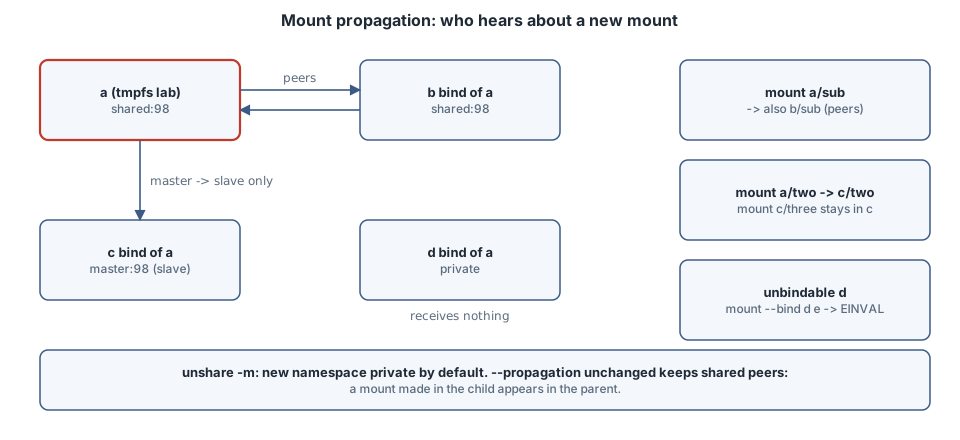
        shared:98               master:98
   a  <==========>  b      a  ----------->  c        d (private)    d (unbindable)
   mount a/sub  -> b/sub   mount a/two  -> c/two     a/four: not    mount --bind d e
                           mount c/three -/-> a      seen in d      -> EINVAL
Three rules:
- Propagation belongs to the mount, not the directory.
mount --make-*changes the mount at that path;--make-r*changes it and every mount below. - A bind mount copies the propagation of the source. Bind a shared mount and the new mount joins the same peer group; that is why
bsawa/sub. - A new mount namespace starts as a copy. Shared mounts stay peers across namespaces, so a mount made inside a “container” can show up on the host unless someone makes the tree private or slave first.
Syntax
mount --bind  OLD NEW            # one mount, no submounts
mount --rbind OLD NEW            # the mount and everything mounted below it
mount -o bind,ro OLD NEW         # read-only view of one mount
mount -o rbind,ro=recursive OLD NEW   # read-only for the whole tree (mount_setattr, Linux >= 5.12)
mount --make-shared   PATH       # also: --make-slave, --make-private, --make-unbindable
mount --make-rshared  PATH       # recursive variants: --make-rslave, --make-rprivate, --make-runbindable
findmnt -o TARGET,SOURCE,PROPAGATION [-R PATH]
grep PATH /proc/self/mountinfo   # field 7+: shared:N master:N propagate_from:N unbindable
unshare -m [--propagation private|slave|shared|unchanged] CMD   # default: private
Safety
- Every example below runs inside
unshare -rm: a new user namespace (you are “root” there with no real privilege) plus a new mount namespace. Nothing touches the host’s mount table, and everything disappears when the shell exits. - On a real host,
--make-rprivate /or--make-rshared /changes behaviour for every service. Do it only inside a namespace you created. umount -l(lazy) on a shared mount propagates the unmount to every peer and slave.
Examples with Explanations
All examples come from one script run as unshare -rm bash lab.sh in /tmp/proplab. First, where we start:
$ findmnt -no PROPAGATION /
private
unshare makes the whole tree private by default (see Notes for what a normal systemd host looks like).
2. Slave: receive, never send
$ mount --bind a c
$ mount --make-slave c
$ mkdir -p a/two c/three
$ mount -t tmpfs two a/two
$ mount -t tmpfs three c/three
$ grep -E "proplab/(a|c)(/two|/three)? " /proc/self/mountinfo
260 242 0:38 / /tmp/proplab/a rw,relatime shared:98 - tmpfs lab rw,uid=1000,gid=1000
264 242 0:38 / /tmp/proplab/c rw,relatime master:98 - tmpfs lab rw,uid=1000,gid=1000
265 260 0:45 / /tmp/proplab/a/two rw,relatime shared:126 - tmpfs two rw,uid=1000,gid=1000
267 264 0:45 / /tmp/proplab/c/two rw,relatime master:126 - tmpfs two rw,uid=1000,gid=1000
271 264 0:48 / /tmp/proplab/c/three rw,relatime - tmpfs three rw,uid=1000,gid=1000
$ findmnt -no TARGET,SOURCE,PROPAGATION -R c
/tmp/proplab/c         lab   private,slave
├─/tmp/proplab/c/two   two   private,slave
└─/tmp/proplab/c/three three private
$ findmnt -no TARGET -R a
/tmp/proplab/a
├─/tmp/proplab/a/sub
└─/tmp/proplab/a/two
c started as another peer of 98 (rule 2), and --make-slave turned shared:98 into master:98. Now a/two arrives as c/two (also a slave, of the new group 126), but c/three stays local: it has no tag, and a’s tree has no three. This is the type you want for “a container should see new host mounts, but its own mounts must not leak out”. c has no sub because --bind copies one mount, not the ones below it (example 5).
3. Private: a frozen copy
$ mount --bind a d
$ mount --make-private d
$ mkdir -p a/four && mount -t tmpfs four a/four
$ findmnt -no TARGET,PROPAGATION -R d
/tmp/proplab/d private
d was bound from a and made private. The later a/four never shows up in d.
4. Unbindable: no copies at all
$ mount --make-unbindable d
$ mount --bind d e; echo exit=$?
mount: /tmp/proplab/e: wrong fs type, bad option, bad superblock on /tmp/proplab/d, missing codepage or helper program, or other error.
       dmesg(1) may have more information after failed mount system call.
exit=32
The kernel refuses with EINVAL, which util-linux turns into its generic “wrong fs type, bad option…” message. Unbindable mounts exist to stop the exponential mount explosion you get when a tree is recursively bound into a directory inside itself.
5. --bind vs --rbind
$ mount --bind a e
$ mount --rbind a f
$ findmnt -no TARGET -R e | wc -l; findmnt -no TARGET -R f | wc -l
1
4
By now a has three submounts (sub, two, four). --bind copied only a itself; --rbind copied all four. For a chroot (/dev, /proc, /sys with their submounts) you almost always want --rbind, followed by --make-rslave so that unmounting the chroot does not unmount the host’s /dev/pts.
6. Read-only binds are not recursive by default
A tmpfs r with a submount r/in, bound read-only two ways (ro.sh, also inside unshare -rm):
$ mount -o rbind,ro r s; findmnt -no TARGET,OPTIONS -R s | cut -d, -f1
/tmp/proplab/s      ro
└─/tmp/proplab/s/in rw
$ mount -o rbind,ro=recursive r t; findmnt -no TARGET,OPTIONS -R t | cut -d, -f1
/tmp/proplab/t      ro
└─/tmp/proplab/t/in ro
Plain ro with rbind made only the top mount read-only, and s/in is still writable. ro=recursive (util-linux with the new mount API, using mount_setattr(2) with AT_RECURSIVE) covers the whole tree. If you hand a container a “read-only” host tree, check with findmnt -o TARGET,OPTIONS -R.
Notes and pitfalls
- systemd makes
/shared. On a normal systemd host, PID 1 runs the equivalent ofmount --make-rshared /at boot, sofindmnt -no PROPAGATION /printsshared. The kernel default for new mounts is private. The machine these examples ran on is itself a container, so its/isprivate. findmntwording. Slaves print asprivate,slave, meaning “slave, and not shared”;/proc/self/mountinfois the unambiguous source.- Kubernetes exposes this as
mountPropagation: None | HostToContainer | Bidirectional, which map to private, rslave and rshared.Bidirectionalneeds a privileged container for the leak reason above. - Docker has
--mount type=bind,...,bind-propagation=rslave(defaultrprivate). PrivateTmp=andProtectSystem=in systemd units are built from a new mount namespace with slave propagation plus bind mounts.- Bind-mounting a file works too (
mount --bind file1 file2), but editors that save by rename replace the directory entry, and the bind keeps showing the old inode. - Recursive read-only needs
ro=recursive(example 6). It relies onmount_setattr(2)withAT_RECURSIVE, which arrived in Linux 5.12.
The boring rule
After creating a mount namespace, make it rslave (or rprivate) before mounting anything. Use --rbind plus --make-rslave for chroots. Read /proc/self/mountinfo when findmnt’s wording is unclear.
Try this
- In
unshare -rm, makeashared, bind it tob, thenumount a/sub. Doesb/subdisappear? - Build a shared+slave mount: bind a slave
ctohand runmount --make-shared cfirst. What tags does/proc/self/mountinfoshow forcandh? - Run
mount --rbind /tmp/proplab /tmp/proplab/atwice, then count mounts withfindmnt -R /tmp/proplab | wc -l. Repeat after--make-unbindable. - On a systemd machine, compare
findmnt -no PROPAGATION /on the host and insidesystemd-run -p PrivateTmp=yes --pty findmnt -no PROPAGATION /tmp.
Verification
lab.sh,lab6.shandro.shwere run insideunshare -rm(util-linux 2.41.5) on Linux 6.12, without root or sudo. All listings are genuine and unedited. Peer group numbers (98, 126) and mount IDs change between runs.- The systemd, Docker and Kubernetes behaviour in the Notes comes from their documentation (Sources). It was not run here, because the test machine has no systemd.
Sources
- Kernel docs, Shared Subtrees: https://docs.kernel.org/filesystems/sharedsubtree.html
- mount_namespaces(7): https://man7.org/linux/man-pages/man7/mount_namespaces.7.html
- mount(8), bind mounts and propagation flags: https://man7.org/linux/man-pages/man8/mount.8.html
- proc_pid_mountinfo(5): https://man7.org/linux/man-pages/man5/proc_pid_mountinfo.5.html
- unshare(1): https://man7.org/linux/man-pages/man1/unshare.1.html
- mount_setattr(2): https://man7.org/linux/man-pages/man2/mount_setattr.2.html
- Kubernetes, volumes, mount propagation: https://kubernetes.io/docs/concepts/storage/volumes/#mount-propagation
- Docker, bind mounts, configure bind propagation: https://docs.docker.com/engine/storage/bind-mounts/