Day 1 — Toolchain & mental model
Day 1 — Toolchain & mental model
Stage I · ~3h (theory-heavy)
Goal: Build a correct model of how Go finds code, compiles it, and places artifacts—then prove it with a module you can inspect.
Today is intentionally more theory than feature checklist. The labs exist to verify the model, not to invent domain logic.
Why this day exists
Most “I know Go” failures in week one are not syntax—they are toolchain misconceptions:
- Treating
go runas the same thing as shipping a binary
- Believing projects must live under
GOPATH
- Confusing module path, import path, and directory path
- Not knowing which
gobinary is onPATHwhen multiple installs exist
If the model is solid, Days 2–10 are friction, not confusion.
Theory 1 — Four artifacts (and how they nest)
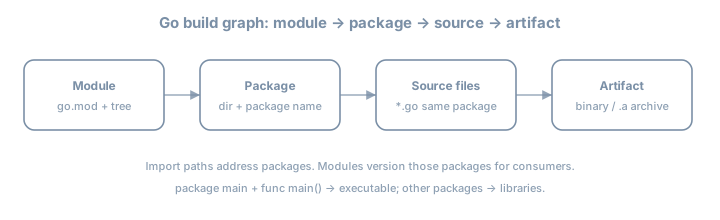
| Artifact | Definition | Example |
|---|---|---|
| Module | Versioned unit of distribution; root has go.mod |
example.com/day01 |
| Package | Compilation unit: one directory, one package clause |
package main or package config |
| Source file | One .go file belonging to that package |
main.go, banner.go |
| Artifact | Compiler output: executable or library archive | ./day01, pkg.a |
Rule that saves hours
- Directories group files into packages.
packagename is what other Go code uses inside the language (with import path).
- Module path in
go.modis the prefix for import paths of packages in that module.
Example — layout
day01/
  go.mod          # module example.com/day01
  main.go         # package main
  banner.go       # package main  (same package!)
  internal/
    greeter/
      greeter.go  # package greeter
                  # import "example.com/day01/internal/greeter"
Example — wrong mental model
# Myth: "each .go file is its own package"
main.go     package main
banner.go   package banner   # FAIL if both are entry for same binary
Both files of an executable’s root usually share package main. Split packages only when you introduce subdirectories intentionally.
Worked micro-example: one package, two files
// main.go
package main

import "fmt"

func main() {
    fmt.Println(greeting)
}
// banner.go
package main
const greeting = "hello from day 01"Same package → greeting is visible without import. That is package scope, not “global to the universe.”
Theory 2 — GOPATH era vs modules era
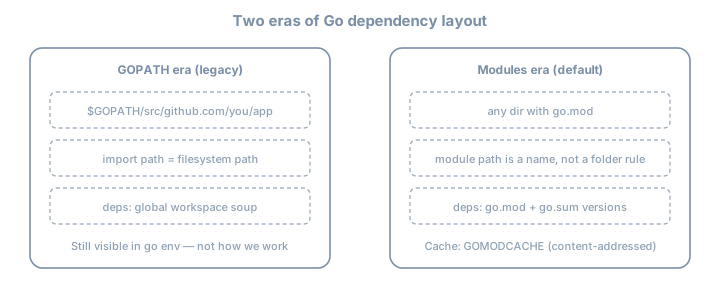
GOPATH era (you will still see it)
Historically:
- All code under
$GOPATH/src/...
- Import path ≈ filesystem path under
src
- Dependencies were a shared workspace problem
go env GOPATH still prints a path. go install still drops binaries under $GOPATH/bin (or GOBIN). That does not mean your project must live there.
Modules era (default for this volume)
| Property | Behavior |
|---|---|
| Location | Any directory with go.mod |
| Identity | module line is a name (often a URL-like path) |
| Dependencies | Versions in go.mod; checksums in go.sum |
| Cache | Downloaded modules in GOMODCACHE |
Example go.mod
module example.com/day01

go 1.26
Example import of an external module (later days; shown for theory)
import "golang.org/x/mod/semver"
// resolved via go.mod require + GOMODCACHE copy
Semantic import versioning (preview, not mastery today)
Major versions ≥ v2 often appear in import paths (.../v2). You do not need the full design today—only: import paths and versions are coupled by policy, not by guesswork.
Theory 3 — What “installing Go” actually installs
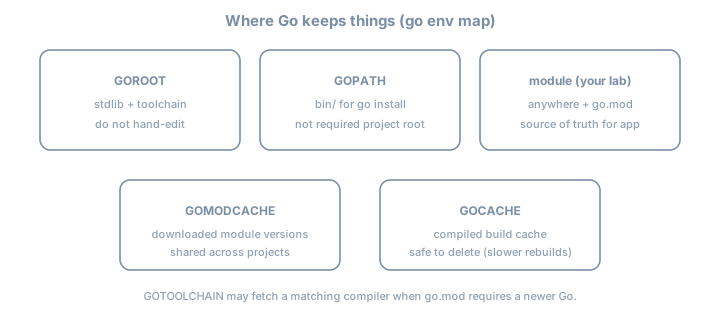
| Variable | Theory | Practice |
|---|---|---|
GOROOT |
Toolchain + standard library | Treat as read-only |
GOPATH |
Workspace for installed tools + legacy | Often ~/go |
GOMODCACHE |
Content cache of downloaded modules | Shared across projects |
GOCACHE |
Build cache of compiled packages | Delete ⇒ slower rebuilds, not wrongness |
GOTOOLCHAIN |
Policy for auto-fetching toolchains | Prefer local 1.26.x for this volume |
GO111MODULE |
Historical switch | Modern Go: modules on by default |
Multiple Go installs (classic footgun)
which -a go
type go
go version
ls "$(go env GOROOT)"
Example failure story: IDE uses toolchain A; terminal uses toolchain B → “works in editor, fails in CI.” Always ask go env GOROOT in the same shell you build with.
GOTOOLCHAIN theory (Go 1.21+)
If go.mod says go 1.26 and your installed toolchain is older, Go may download a matching toolchain depending on GOTOOLCHAIN (auto / local / version pin). That is deliberate design for reproducible module requirements—not malware.
For learning: install 1.26.x yourself so notes match your binary.
Theory 4 — go run vs go build vs go install
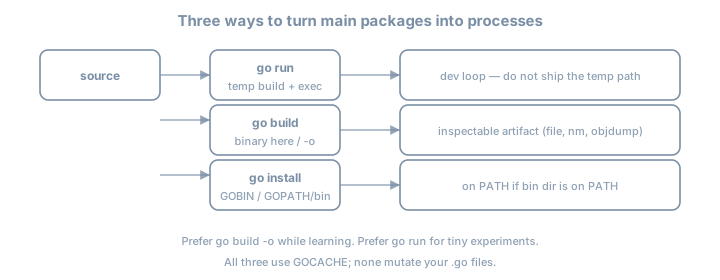
| Command | Produces | Leaves behind | Best for |
|---|---|---|---|
go run . |
Temporary binary + execute | Usually nothing durable | Experiments |
go build -o name . |
Named binary in cwd (or path) | File you can ship/inspect | Learning + release candidates |
go install . |
Binary in GOBIN/GOPATH/bin |
On PATH if configured | Installing CLIs you use often |
Compilation is not “interpreting”
Go is compiled. go run still compiles; it just hides the artifact lifecycle.
Example: same source, three outcomes
go run .                 # print output; no stable ./binary
go build -o day01 .      # ./day01 exists
go install .             # $GOPATH/bin or GOBIN
Inspecting a real artifact (theory → evidence)
file ./day01
go tool nm ./day01 | head
# go tool objdump -s main.main ./day01 | head -40
You are proving the machine code exists. Later profiling (Stage VII) builds on this comfort.
Theory 5 — Packages, visibility, and main
Exported vs unexported (preview that matters immediately)
| Name | Visibility |
|---|---|
Hello |
Exported (capital letter) — other packages can refer |
hello |
Unexported — same package only |
Inside package main split across files, lowercase is fine. When you create package greeter, capitals become the API.
The main contract
An executable package:
- Must be named
package main
- Must define
func main()with no parameters and no return values
- Should live in a directory you intentionally build as a command
Counter-example (will not link as you expect):
package main

func Main() {} // wrong name — not an entry point
Theory 6 — Build cache and reproducibility (honest)
- GOCACHE speeds rebuilds; it is not a substitute for modules.
- Reproducible builds (bit-for-bit) need more than
go builddefaults (flags, paths, cgo, OS). Do not claim bit-identity yet.
- Module sums (
go.sum) protect dependency integrity for module downloads—not your own uncommitted source.
Lab 1 — Install and interrogate the toolchain
Install
Install Go 1.26.x from https://go.dev/dl/ (or a package manager that tracks 1.26 closely).
go version
# expect: go1.26.x
Map the environment (write answers)
go env GOROOT GOPATH GOMODCACHE GOCACHE GOTOOLCHAIN GO111MODULE
go env | sort | head -40
Fill:
| Question | Your answer |
|---|---|
| Where is the stdlib? | GOROOT → … |
Where will go install put binaries? |
… |
| Where do module downloads land? | … |
Lab 2 — First module with multi-file package
mkdir -p ~/lab/90daysofx/go/day01
cd ~/lab/90daysofx/go/day01
go mod init example.com/day01
Create main.go and banner.go as in Theory 1. Then:
go run .
go build -o day01 .
./day01
file ./day01
Deliberate failures (read the errors)
- Change
banner.gotopackage other→ rebuild.
- Rename
main→Main→ rebuild.
- Introduce
var x = 1 + "2"→ rebuild.
Paste errors into your journal. Compiler messages are part of the language UX.
Lab 3 — Prove install path theory
go install .
ls "$(go env GOPATH)/bin"
# or: ls "$(go env GOBIN)" if set
Compare binary names from go build -o vs go install. Note surprises.
Common misconceptions (theory checklist)
| Myth | Reality |
|---|---|
“Go is interpreted because of go run” |
Always compiled |
| “Project must be under GOPATH” | Modules: any directory |
“go.mod is optional in 2026” |
Required for real work |
| “Deleting the binary uninstalls the module” | Source remains; install bin is separate |
“One .go file = one package” |
Package = directory (+ package clause) |
Checkpoint
go versionis 1.26.x
- Can draw module → package → file → binary from memory
- Can explain GOPATH vs modules without notes
- Produced
./day01viago buildand ran it
- Caused and fixed at least two compile errors
- Documented
GOROOT/GOMODCACHE/GOCACHE
Commit
git init  # if needed
git add go.mod main.go banner.go
git commit -m "day01: toolchain mental model + hello module"
Tomorrow
Day 2 — Variables, types, constants, conversions (theory of zero values, typed vs untyped constants, explicit conversions) + units CLI lab.