Day 57 — Disko for real
Day 57 — Disko for real
Stage VI · ~4h (lab-heavy, destructive-capable)
Goal: Describe disks declaratively with Disko, install or reinstall a lab host from that description, and wire Disko into your flake so storage stops being tribal knowledge.
Disko can wipe disks. Use a disposable VM, spare drive, or cloud instance. Never experiment on a disk with irreplaceable data.
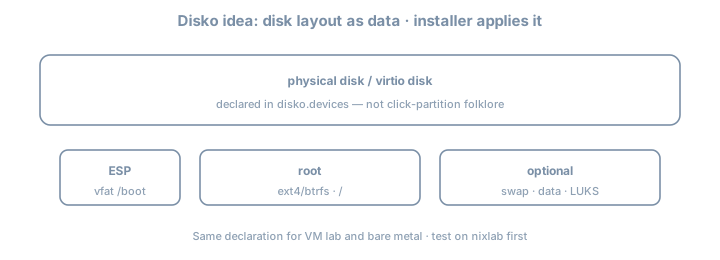
Why this day exists
Stage II may have used the installer GUI or a one-shot hardware-configuration.nix. Fleet habits require repeatable storage: partitions, LVM, btrfs/zfs layouts, LUKS—as code. Disko is the 2026 default answer in many NixOS fleets.
Theory 1 — What Disko is
Disko turns a Nix attrset into:
- Partitioning / formatting scripts
- Mount configuration compatible with NixOS
- Optionally integrated into
nixos-rebuild/ installer flows
disko.devices = { … }
        │
        ├─► disko script (destroy/create/mount)
        └─► fileSystems / boot / swap NixOS options
Theory 2 — Minimal GPT + ext4 root (UEFI)
# modules/disko-lab.nix
{
  disko.devices = {
    disk = {
      main = {
        type = "disk";
        device = "/dev/vda"; # CHANGE per machine: nvme0n1, sda, …
        content = {
          type = "gpt";
          partitions = {
            ESP = {
              size = "512M";
              type = "EF00";
              content = {
                type = "filesystem";
                format = "vfat";
                mountpoint = "/boot";
                mountOptions = [ "umask=0077" ];
              };
            };
            root = {
              size = "100%";
              content = {
                type = "filesystem";
                format = "ext4";
                mountpoint = "/";
              };
            };
          };
        };
      };
    };
  };
}| Field | Notes |
|---|---|
device |
Host-specific; inject via host module |
type = "gpt" |
UEFI-friendly |
ESP EF00 |
EFI system partition type |
mountpoint |
Becomes NixOS fileSystems |
Theory 3 — Flake integration
# flake.nix fragment
{
  inputs.disko.url = "github:nix-community/disko";
  inputs.disko.inputs.nixpkgs.follows = "nixpkgs";

  outputs = { self, nixpkgs, disko, ... }: {
    nixosConfigurations.lab = nixpkgs.lib.nixosSystem {
      system = "x86_64-linux";
      modules = [
        disko.nixosModules.disko
        ./hosts/lab/disko.nix
        ./hosts/lab/configuration.nix
      ];
    };
  };
}
# From installer ISO or rescue, after networking + clone:
sudo nix --extra-experimental-features "nix-command flakes" run github:nix-community/disko -- \
--mode disown \
--flake .#lab
# modes/flags evolve—check current Disko CLI help; common modes: destroy, format, mount, disownThen install:
sudo nixos-install --flake .#labOr use documented disko-install flows when available in your Disko version.
Theory 4 — LUKS sketch (common homelab)
root = {
  size = "100%";
  content = {
    type = "luks";
    name = "crypted";
    settings.allowDiscards = true;
    content = {
      type = "filesystem";
      format = "ext4";
      mountpoint = "/";
    };
  };
};
Password vs TPM unlock: passphrase for today’s lab; TPM path appears Day 68.
Theory 5 — btrfs subvolumes (impermanence-ready)
content = {
  type = "btrfs";
  subvolumes = {
    "@" = { mountpoint = "/"; };
    "@home" = { mountpoint = "/home"; };
    "@nix" = { mountpoint = "/nix"; };
    "@persist" = { mountpoint = "/persist"; };
  };
};
Day 58 (impermanence) loves @persist + wipe @ on boot. You can create the layout today even if you skip impermanence.
Theory 6 — Host-specific devices without copy-paste hell
# hosts/lab/disko.nix
{ lib, ... }:
{
  disko.devices.disk.main.device = lib.mkDefault "/dev/vda";
}
# hosts/metal/disko.nix
{
imports = [ ../../modules/disko-btrfs-template.nix ];
disko.devices.disk.main.device = "/dev/nvme0n1";
}Never commit a fleet-wide wrong device path.
Worked example — VM lab checklist
1. Create empty qcow2 / virt disk
2. Boot NixOS 26.05 installer ISO
3. Git clone flake (or nix copy)
4. Identify disk: lsblk
5. Set device in disko config
6. Run disko (destructive)
7. nixos-install --flake .#lab
8. Reboot; verify findmnt / lsblk
lsblk -f
findmnt /
cat /etc/fstab # generated view; source of truth is NixLab — multi-step
Suggested workspace: ~/lab/90daysofx/02-nixos/day57 (flake fragments live in your main lab flake)
Step 1 — Snapshot safety
Confirm target disk is disposable. lsblk screenshot/paste into notes.
Step 2 — Add Disko input
Pin via flake; follows nixpkgs; update lock.
Step 3 — Write simplest UEFI layout
ext4 root + ESP. Parameterize device.
Step 4 — Dry evaluation
nix eval .#nixosConfigurations.lab.config.fileSystems --json | jq 'keys'
# ensure / and /boot appear as expected after disko module merge
Step 5 — Apply on VM
Run Disko + install or nixos-rebuild path if reinstalling an already-Disko host per docs.
Step 6 — Reinstall proof (core of “for real”)
Wipe once more (VM) and reinstall from same flake. Time it. Note pain points.
Step 7 — Optional LUKS or btrfs
Add one complexity only if Step 6 succeeded cleanly.
Step 8 — Document recovery
DISK.md: device names per host, LUKS key location, disko command that saved you.
Common gotchas
| Symptom / mistake | What to do |
|---|---|
| Wiped wrong disk | Device IDs; prefer /dev/disk/by-id/… when possible |
| No EFI boot | Missing ESP / wrong bootloader module |
| Device path differs after hardware change | by-id; update host module |
| Forgot disko module import | fileSystems empty/wrong |
| Swap forgotten | Add swap partition or zram intentionally |
| Cloud images | Device often /dev/vda or /dev/nvme0n1; check vendor docs |
Checkpoint
- Disko input wired in flake
- Declarative layout for lab host committed
- At least one real format/install or reinstall performed on disposable media
fileSystemsmatches intent after boot
DISK.mdrecovery notes written
Commit
git add .
git commit -m "day57: disko layout and reinstall proof"
Write three personal gotchas before continuing.
Tomorrow
Day 58 — Impermanence: persist deliberately or document why you skip.