Day 59 — deploy-rs
Day 59 — deploy-rs
Stage VI · ~4h (lab-heavy)
Goal: Deploy a flake-defined NixOS host to a remote machine with deploy-rs, understand activation profiles, and succeed at least once end-to-end over SSH. Target config: NixOS 26.05.
nixos-rebuild --target-host works; fleets still standardize on deploy tools for profiles, magic rollback, and multi-node later. deploy-rs is a common choice for small-to-medium flakes before (or beside) Colmena (Day 60).
Why this day exists
Pushing a closure and activating it without sitting on the machine is the core of fleet ops. Today installs the boring muscle memory: SSH auth, profile activation, proof file, second delta, and a safe failure story.
Theory 1 — Deploy pipeline
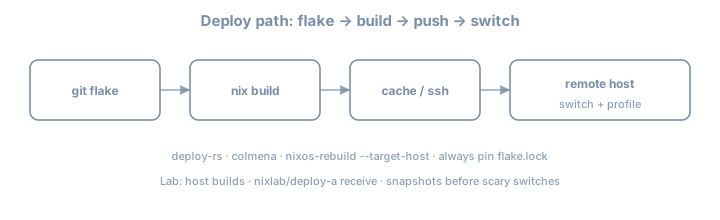
local eval (flake) → build (local/remote) → copy closure → activate → health check → keep/rollback| Step | Failure mode |
|---|---|
| Eval | Module errors |
| Build | Compile / missing cache |
| Copy | SSH/disk |
| Activate | Boot/switch scripts fail |
| Confirm | Custom checks fail → auto rollback (when configured) |
Understanding where it failed is half the job—read the stage in the log before rewriting modules blindly.
Theory 2 — Flake skeleton with deploy-rs
{
  description = "Day 59 deploy-rs lab";

  inputs = {
    nixpkgs.url = "github:NixOS/nixpkgs/nixos-26.05";
    deploy-rs.url = "github:serokell/deploy-rs";
    deploy-rs.inputs.nixpkgs.follows = "nixpkgs";
  };

  outputs = { self, nixpkgs, deploy-rs, ... }:
    let
      system = "x86_64-linux";
      pkgs = import nixpkgs { inherit system; };
    in {
      nixosConfigurations.lab-vm = nixpkgs.lib.nixosSystem {
        inherit system;
        modules = [ ./hosts/lab-vm/configuration.nix ];
      };

      deploy.nodes.lab-vm = {
        hostname = "lab-vm.example.internal"; # or IP
        profiles.system = {
          user = "root";
          path = deploy-rs.lib.${system}.activate.nixos
            self.nixosConfigurations.lab-vm;
        };
      };

      checks = builtins.mapAttrs
        (system: deployLib: deployLib.deployChecks self.deploy)
        deploy-rs.lib;
    };
}
nix run github:serokell/deploy-rs -- .#lab-vm
# or if deploy-rs is in the flake / shell:
deploy .#lab-vmExact CLI entrypoints: prefer deploy .#node after nix shell github:serokell/deploy-rs. Pin via flake input so CI and laptop match.
Theory 3 — SSH prerequisites
ssh root@lab-vm.example.internal nix --version
# or deploy user with passwordless sudo / root activation per your policy| Requirement | Notes |
|---|---|
| Nix on target | NixOS has it; confirm version band |
| Flakes enabled | On target as needed for activation |
| Disk space | Closures are large first time |
| Network to substituters | Or pre-pushed cache |
| Non-interactive auth | Keys, not passwords |
# target snippets
services.openssh.enable = true;
users.users.root.openssh.authorizedKeys.keys = [
  "ssh-ed25519 AAAA… deploy"
];
# Prefer dedicated deploy key; Day 36 hardening still applies
system.stateVersion = "26.05";
Theory 4 — Magic rollback / confirmation
deploy-rs can require confirmation that the new system is healthy; if SSH dies, it rolls back. Read current serokell docs for confirmTimeout / magic-rollback options for your version—enable something before testing firewall changes remotely.
deploy.nodes.lab-vm = {
  hostname = "192.0.2.50";
  # sshOpts = [ "-p" "22" ];
  profiles.system = {
    user = "root";
    path = deploy-rs.lib.x86_64-linux.activate.nixos
      self.nixosConfigurations.lab-vm;
    # magicRollback / confirmTimeout per current docs
  };
};
Always keep a console/VNC path on the first remote firewall experiment. Magic rollback is not a substitute for out-of-band access.
Theory 5 — Build locality
| Mode | Idea |
|---|---|
| Build local, copy | Laptop/CI builds; target only activates |
| Build on target | Sometimes via remote builder / deploy options |
| Build on remote builder + cache | Stage V machinery |
For lab: local build + copy is fine if architectures match. Cross-arch without a builder is pain—fix Day 54 first if needed.
Theory 6 — Profiles beyond system
deploy-rs supports multiple profiles per node (system is the common first). Later you might activate user/home profiles; today master one system profile end-to-end.
| Profile idea | Role |
|---|---|
system |
NixOS activation |
| Future custom | App-only activations (advanced) |
Do not invent multi-profile complexity until single profile is boring.
Worked example — trivial visible change
# hosts/lab-vm/configuration.nix
{ pkgs, ... }:
{
  networking.hostName = "lab-vm";
  environment.systemPackages = [ pkgs.hello pkgs.git ];
  environment.etc."day59".text = "deployed-by-deploy-rs\n";
  services.openssh.enable = true;
  system.stateVersion = "26.05";
}
deploy .#lab-vm
ssh lab-vm cat /etc/day59Second deploy: change the text; redeploy; confirm update. Two successful deploys beat one lucky shot.
Lab — multi-step
Suggested workspace: your fleet flake; notes in ~/lab/90daysofx/02-nixos/day59
Step 1 — Target ready
Disposable NixOS VM with SSH key auth. Snapshot the VM before first deploy.
Step 2 — Add deploy-rs input
follows nixpkgs; lock; commit.
Step 3 — Wire deploy.nodes
Match nixosConfigurations name; set hostname/IP. Prefer IP in lab DNS chaos.
Step 4 — First deploy
nix flake check   # includes deployChecks if wired
deploy .#lab-vm
# -s / skip-checks flags: know them; don’t live on skip forever
Capture full terminal output in notes.
Step 5 — Prove activation
ssh lab-vm cat /etc/day59
ssh lab-vm nixos-version
ssh lab-vm readlink /run/current-system
Step 6 — Second deploy delta
Change environment.etc text; redeploy; confirm update. Note wall time vs first deploy (cache effects).
Step 7 — Failure drill (safe)
Deploy a config that adds a harmless broken oneshot or bad package, observe failure handling; restore from snapshot if needed. Do not lock yourself out on purpose without console.
Step 8 — Compare one-liner
Once, run classic:
nixos-rebuild switch --flake .#lab-vm --target-host root@lab-vmWrite 5 lines: when you prefer deploy-rs vs rebuild.
Step 9 — Document RUNBOOK seed
# Deploy lab-vm
1. VPN/SSH path
2. deploy .#lab-vm
3. health: cat /etc/day59
Step 10 — Generation awareness after deploy
ssh lab-vm -- sudo nix-env -p /nix/var/nix/profiles/system --list-generations | tailNote generation number before/after deploy. This is Day 89 prep: you cannot rollback what you never listed.
Step 11 — Cache interaction
Deploy once with cold cache (or after GC on target), once with warm substitutes. Record wall times. Link Day 53: deploy without cache is a social incident for fleets.
Profile activation mental model
deploy-rs
  builds profile path P (NixOS system)
  copies closure of P to target
  activates P (switch-to-configuration)
optional confirm / magic rollback window| If this fails… | Look at |
|---|---|
| Eval on laptop | modules, flake inputs |
| Build | caches, builders, arch |
| Copy | SSH, disk, bandwidth |
| Activate | systemd, scripts, secrets paths |
| Confirm timeout | network cut by your own firewall |
Common gotchas
| Symptom / mistake | What to do |
|---|---|
| Arch mismatch | Build on same system or use remote builder |
| Permission denied | root keys / sudo deploy user |
| Out of disk on target | GC; grow disk |
| Hang on activation | Console; magic rollback timeouts |
deploy not found |
nix shell the tool |
| Hostname DNS | Use IP for lab |
| Checks fail locally | Fix deployChecks or understand impure needs |
follows forgotten |
Mixed nixpkgs between deploy-rs and host |
Checkpoint
- deploy-rs in flake
- Successful remote activation
- Visible file/package change verified over SSH
- Second delta deploy succeeded
- Comparison note vs
nixos-rebuild --target-host
Commit
git add .
git commit -m "day59: deploy-rs remote lab activation"
Write three personal gotchas before continuing.
Tomorrow
Day 60 — Colmena: multi-host tags and parallel deploy.