Day 34 — sops-nix
Day 34 — sops-nix
Stage IV · ~4h
Goal: Wire sops-nix end-to-end: encrypt a secret in-repo, decrypt at activation, consume it from a NixOS service or timed script—without plaintext secrets in the Nix store evaluation graph.
House primary: sops-nix. Day 35 compares agenix; do not run both as permanent dual systems unless you have a reason.
Use placeholder values and lab-only credentials. Never paste production tokens into examples or commits.
Why this day exists
Day 33 established the threat model. Today installs the default tooling for this volume:
| Property | sops-nix approach |
|---|---|
| At rest in git | Encrypted YAML/JSON/ENV (SOPS) |
| Encryption keys | Age and/or GPG; age recommended |
| On host | Decrypted at activation to a path like /run/secrets/... |
| Nix modules | Reference secret paths, not secret strings |
Theory 1 — Components
| Piece | Role |
|---|---|
| SOPS | Encrypts/decrypts structured files |
| age | Modern encryption tool; identities (private) + recipients (public) |
| sops-nix | NixOS/HM modules: decrypt during activation; systemd credentials integration patterns |
.sops.yaml |
Creation rules: which keys encrypt which files |
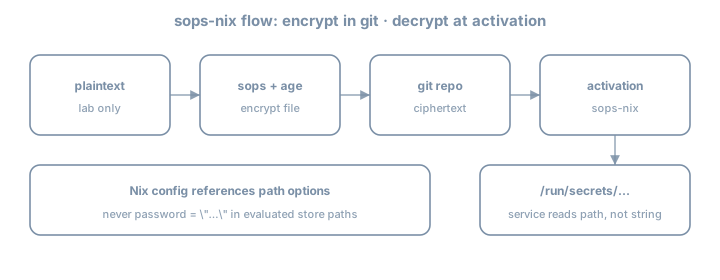
Flow
edit plaintext locally (editor via `sops file`)
    → encrypted file committed
    → nixos-rebuild
    → sops-nix activation decrypts with host/user age key
    → secret file on tmpfs/run with tight perms
    → service reads path
Theory 2 — Age keys (host-centric pattern)
Common NixOS pattern: host age key on the machine, public key in .sops.yaml creation rules.
Generate key (on the lab host; protect private key):
# install age if needed (temporary shell)
nix shell nixpkgs#age -c age-keygen -o "$HOME/.config/sops/age/keys.txt"
# private key file — NEVER commit
# public key printed as age1...
For unattended host decryption, sops-nix docs describe placing keys where the activation can read them (often /var/lib/sops-nix/key.txt or configured path)—follow current sops-nix README for 26.05-compatible setup. Private key stays on host disk with root-only permissions—not in git.
Also encrypt to your admin age key so you can decrypt on a workstation for editing. Creation rules can list multiple recipients.
Theory 3 — Flake input
inputs = {
  nixpkgs.url = "github:NixOS/nixpkgs/nixos-26.05";
  sops-nix.url = "github:Mic92/sops-nix";
  sops-nix.inputs.nixpkgs.follows = "nixpkgs";
  # home-manager ...
};
Import module:
modules = [
  ./hosts/lab
  inputs.sops-nix.nixosModules.sops
];
Theory 4 — Minimal NixOS sops config
# modules/common/sops.nix
{ config, ... }:
{
  sops.defaultSopsFile = ../../secrets/lab.yaml;
  # sops.age.keyFile = "/var/lib/sops-nix/key.txt"; # per upstream guidance
  sops.age.sshKeyPaths = [ ]; # or use ssh host key conversion patterns if you choose that method

  sops.secrets."lab/demo_token" = {
    # owner / group / mode as needed
    mode = "0400";
    # restartUnits = [ "some-service.service" ];
  };
}
Consume path:
# example: a oneshot that proves the secret path exists
systemd.services.sops-demo-check = {
  wantedBy = [ "multi-user.target" ];
  after = [ "etc.service" ]; # adjust ordering as needed
  serviceConfig = {
    Type = "oneshot";
    RemainAfterExit = true;
    ExecStart = "/bin/sh -c 'test -f /run/secrets/lab/demo_token && echo ok > /var/lib/sops-demo-ok'";
  };
};
Exact secret path layout depends on sops-nix version and naming—inspect after activation:
sudo ls -la /run/secretsNever do builtins.readFile config.sops.secrets."lab/demo_token".path into another world-readable derivation if that re-embeds content. Prefer systemd LoadCredential, EnvironmentFile pointing at the secret path, or scripts that read at runtime.
Theory 5 — Creating encrypted files
.sops.yaml example shape:
keys:
  - &admin age1AAAAAAAAAAAAAAAAAAAAAAAAAAAAAAAAAAAAAAAAAAAAAAA
  - &host age1BBBBBBBBBBBBBBBBBBBBBBBBBBBBBBBBBBBBBBBBBBBBBB
creation_rules:
  - path_regex: secrets/.*\.yaml$
    key_groups:
      - age:
          - *admin
          - *host
Edit:
nix shell nixpkgs#sops nixpkgs#age -c sops secrets/lab.yamlExample structure before encryption (editor buffer only):
lab:
  demo_token: PLACEHOLDER_LAB_TOKEN_ROTATE_ME
After save, file on disk is encrypted ciphertext suitable for git.
Theory 6 — HM secrets (awareness)
sops-nix also integrates with Home Manager for user secrets. Today prefer system secret for clarity; user secrets can wait until you need them.
Theory 7 — Bootstrapping chicken-and-egg
First host key setup is the awkward part:
- Generate age key on host
- Put public key in
.sops.yaml
- Encrypt secrets to that recipient
- Place private key where sops-nix expects
- Rebuild
Document your bootstrap in docs/secrets.md. Losing the age private key without other recipients = cannot decrypt—keep admin recipient + backups of keys (offline).
Worked example — Secret for a custom script service
{ config, pkgs, ... }:
{
  sops.secrets."lab/demo_token" = {
    mode = "0400";
    owner = "root";
  };

  systemd.services.lab-token-touch = {
    description = "Demonstrate runtime read of sops secret path";
    wantedBy = [ "multi-user.target" ];
    serviceConfig = {
      Type = "oneshot";
      RemainAfterExit = true;
      ExecStart = pkgs.writeShellScript "lab-token-touch" ''
        set -euo pipefail
        # path attribute is the runtime location
        token_path="${config.sops.secrets."lab/demo_token".path}"
        test -r "$token_path"
        # Do NOT echo the token to logs
        wc -c < "$token_path" > /var/lib/lab-token-bytes
      '';
    };
  };
}
Note: writeShellScript embeds the path string, not the secret content—good.
Lab 1 — Add input and module
# edit flake inputs; nix flake update sops-nix
# import sops-nix.nixosModules.sops
nix flake metadata
Lab 2 — Age keys and .sops.yaml
- Generate admin age identity (laptop)
- Generate or configure host identity per sops-nix docs
- Write
.sops.yamlwith both public keys
- Confirm private keys are gitignored
keys.txt
*.agekey
/var/lib/sops-nix/  # if ever copied into repo by mistake — should never be
Lab 3 — First encrypted secret file
mkdir -p secrets
# create encrypted secrets/lab.yaml via sops
git add secrets/lab.yaml .sops.yaml
# ensure plaintext never staged
Lab 4 — Declare sops.secrets and rebuild
sudo nixos-rebuild switch --flake .#lab
sudo ls -la /run/secrets
sudo wc -c /run/secrets/...   # do not cat into scrollback you paste publicly
Lab 5 — Runtime consumer
Add the oneshot that reads path without logging secret contents. Prove /var/lib/lab-token-bytes or similar.
Lab 6 — Failure drill
- Break key access (rename key file temporarily)
- Rebuild or restart activation path
- Observe failure mode
- Restore key
Journal: how the host fails closed.
Lab 7 — Docs
docs/secrets.md:
- Key locations
- How to add a secret
- How to add a recipient
- Rotation sketch
Common gotchas
| Symptom / mistake | What to do |
|---|---|
| Cannot decrypt on host | Host public key not in creation rules / wrong private key path |
| Cannot edit on laptop | Admin age key missing from recipients |
| Secret path empty | Activation order; sops config; check journal |
| Plaintext committed | Rotate; purge if needed; fix |
readFile secret into store |
Use runtime path only |
Logged secret via echo $TOKEN |
Never log secrets |
| GPG-only complexity | Prefer age for new labs |
Checkpoint
- sops-nix input pinned with follows
.sops.yamlwith host + admin recipients
- Encrypted secret file in git
- Private keys not in git
sops.secretsdeclared; appears under/run/secrets
- Service/script consumes path only
- Bootstrap docs written
Commit
git add .
git commit -m "day34: sops-nix end-to-end lab secret"
Write three personal gotchas before continuing.
Tomorrow
Day 35 — agenix comparison: implement the same secret once with agenix, then pick a house default (sops-nix for this book).