Lab 0 — Overview: roles before Day 1
Lab 0 — Overview: roles before Day 1
Before Day 1. Do not skip this if you will follow the full journey on real hardware. The curriculum assumes you can break and rebuild machines without fear. That only works if lab roles are clear.
Why a lab host exists
NixOS learning fails when:
- The only machine is your daily driver and every
nixos-rebuildis scary
- Disk fills because
/nix/storeand VM images share a tiny root
- Nested “VM inside VM inside laptop on battery” becomes the whole evening
A single spare machine (your case: HP Elitebook 2570p · 16 GB RAM) is enough for the entire path—if you treat it as a lab server, not a casual browser laptop.
Philosophy: host is not an appliance
Homelab hypervisors like Proxmox are excellent—and often GUI-first. You can automate them (CLI, API, Terraform, Ansible), but day-to-day debugging still tempts one-off imperative fixes that never return to git. That drift is annoying for humans and messy if an agent runs dozens of shell “fixes” that leave the machine unreproducible.
This curriculum optimizes for a different contract, in the spirit of operators who moved Proxmox → NixOS + Incus (see Bas Nijholt, I’ve gone full Nix):
| Idea | What it means for Lab 0 |
|---|---|
| Git is the source of truth | Host networking quirks, hypervisor packages, firewall ports live in the flake—not only in shell history |
| Host is fully yours | NixOS-as-host is not a locked appliance: you may run tools on metal, but journey breakage stays in guests |
| CLI-first ops | Prefer virsh / incus / nixos-rebuild over click-only workflows so every step is copy-pasteable |
| Simulate before bare metal | Prove a config in a VM that mirrors the host role before you reinstall the Elitebook |
| Hardware fixes are modules | NIC offload bugs, firmware flags, microcode → commented Nix + systemd, not “I ran ethtool once in 2019” |
Proxmox remains fine software. For this guide we default to NixOS on metal so one language describes host + guests.
Three roles (do not collapse them)
| Role | What it is | Mutability |
|---|---|---|
| Lab host (hypervisor) | Metal OS: KVM/libvirt and/or Incus, storage, networking, maybe Podman | Stable; rare rebuilds; fully declarative |
| Journey guest(s) | NixOS VMs (or Incus VMs) you rebuild, break, roll back (Days 11+) | Disposable |
| Dev environment | Where you edit flakes, run nix CLI, commit git |
Stable tools; can be host or a dedicated VM |
Chapters in this section
| Chapter | Purpose |
|---|---|
| Lab 0A — Journey single-server | One metal box: libvirt and/or Incus, containers, storage, simulate-before-metal |
| Lab 0B — NixOS dev machine | Editor, flakes, SSH, caches, drift discipline |
| Lab 0C — Elitebook 2570p profile | Concrete RAM/CPU/disk/BIOS plan for your spare HP |
| Lab 0D — Ops cheatsheet | Daily commands |
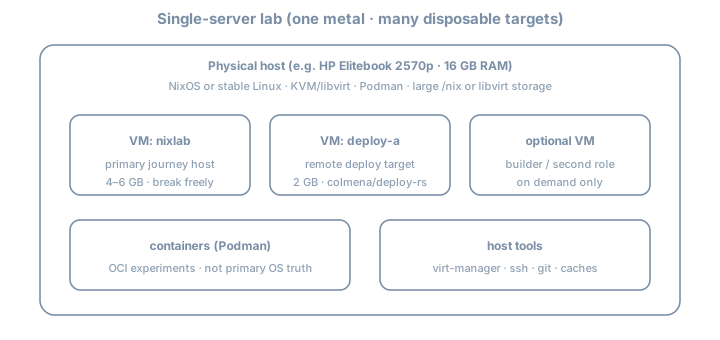
You can run 0A and 0B on the same laptop (recommended for 16 GB): host = stable NixOS with hypervisor; guests = journey; host also has Nix + editor for flakes.
Recommended topology for this curriculum
Elitebook 2570p (16 GB)
├── Host OS (NixOS 26.05 preferred)     ← fully yours; flake-managed
│   ├── Hypervisor (pick one primary)
│   │   ├── libvirt/KVM  (default for this guide)
│   │   └── and/or Incus (CLI-first VMs + system containers; optional)
│   │       ├── nixlab     4–6 GB   ← primary journey machine
│   │       ├── deploy-a   2 GB     ← deploy-rs / Colmena target
│   │       └── (optional builder)  on demand
│   ├── Podman (rootless)             ← OCI days
│   ├── ~/src/nix-config              ← git = source of truth
│   └── optional: Attic/Cachix
└── Do NOT: run k3s multi-node + desktop + 3 heavy VMs all day
Decision: host OS
| Host choice | Pros | Cons |
|---|---|---|
| NixOS host | One mental model; host reclaimable via generations; great for Lab 0B | Early days need care not to smash host |
| Debian/Ubuntu host | Familiar if you are not ready | Two worlds (apt host + NixOS guests); more drift risk |
Expert default: NixOS as host with strong separation—host flake boring and pinned; guests are the playground.
Hypervisor choice (libvirt vs Incus)
| Stack | Strength | Use when |
|---|---|---|
| libvirt + virt-manager | Familiar, great snapshots, virt-install simple | Default for this curriculum on 16 GB |
| Incus (LXD community fork) | CLI-first VMs + system containers; strong for pets + automation | After host is solid, if you want one CLI surface |
| Both | Possible but heavy | Avoid on Elitebook unless you know why |
Lab 0A documents libvirt fully and Incus as an optional path (aligned with Proxmox→NixOS+Incus style migrations).
What “ready for Day 1” means
- Spare machine boots reliably; disk has free space (see Lab 0C)
- Virtualization enabled in BIOS; at least one NixOS VM can boot
- You can SSH into the VM from the host (or use console)
- You know which disk/VM you are allowed to wipe
- Dev tools path chosen (Lab 0B): editor +
nix+ git on host or dev VM
- Host (and guest) config lives in git, not only live state
Time budget
| Task | Estimate |
|---|---|
| BIOS + disk + host install | 2–4 h |
| KVM/Incus + first guest | 1–2 h |
| Dev tooling (Lab 0B) | 1–2 h |
| Elitebook tuning (Lab 0C) | 30–60 min |
Do this once before Day 1; revisit when Stage II and Stage VI need second VMs.
Further reading
- I’ve gone full Nix: Proxmox to NixOS + Incus — Bas Nijholt (why declarative host + Incus; simulate-before-metal; hardware quirks in git)